
Most teams evaluating uncensored models spend a lot of time on model selection.
They compare benchmarks. They test Llama against Mistral against Qwen against Gemma. They debate quantization levels and hardware requirements. They run evals.
Then they deploy the winner with a system prompt that says something like: “You are a helpful assistant.”
That’s a mistake , and it’s one of the most common gaps between teams that get reliable results from uncensored models and teams that don’t.
The model matters. But the system prompt is often what determines whether a deployment actually works in production. And when it comes to uncensored models specifically, the gap between a well-designed prompt and a throwaway one is larger than most people expect.
What a System Prompt Actually Does
If you’re building for production, it helps to think about the system prompt precisely rather than loosely.
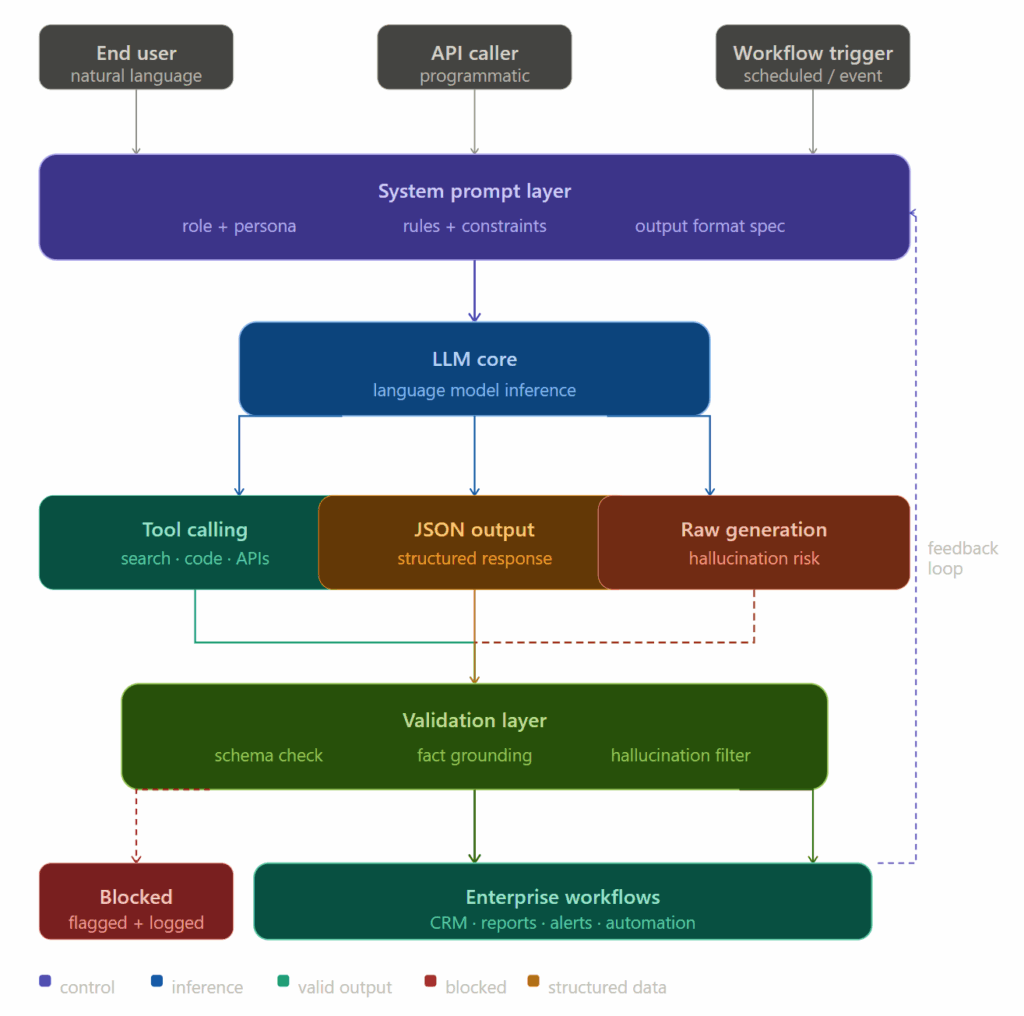
A system prompt is the highest-priority instruction in the model’s context. It runs before every user message, stays active throughout the conversation, and shapes every output the model generates. Unlike user messages, which change with each turn, the system prompt is the persistent operating environment for the model’s behavior.
In well-aligned commercial models, a lot of the behavioral work happens at the training level , the model already has internalized rules about uncertainty, format, refusals, and tone. RLHF and Constitutional AI techniques bake these behaviors in before you ever write a single prompt.
Uncensored models remove or weaken much of that baked-in behavior. Which means your system prompt has to carry more weight.
The model won’t self-regulate the same way. It won’t spontaneously hedge when uncertain. It won’t hold back on tool calls when parameters are ambiguous. Those behaviors have to be specified explicitly , and the system prompt is where that happens.
The Right Goal: Reliability, Not Restriction
This is where a lot of people get confused about what system prompts are for in this context.
The goal is not to re-add the censorship that was removed. If you wanted a restricted model, you’d use one.
The goal is to improve operational reliability , to make the model behave consistently, accurately, and predictably within your specific workflow. These are different things.
Here’s what that distinction looks like in practice:
| Restriction (not the goal) | Reliability (the actual goal) |
|---|---|
| “Don’t discuss security vulnerabilities” | “Never invent technical details not present in the source” |
| “Avoid sensitive topics” | “If information is missing, say so ,don’t fill gaps with assumptions” |
| “Refuse requests that seem harmful” | “Only use parameters explicitly present in the provided context” |
| “Add safety warnings to responses” | “Preserve the exact structure of the input schema in your output” |
One set of instructions limits what the model can do. The other set makes what it does more trustworthy. Uncensored model users want the second set.
Where System Prompts Have the Most Impact
Tool Calling and Agentic Workflows
This is the highest-stakes area.
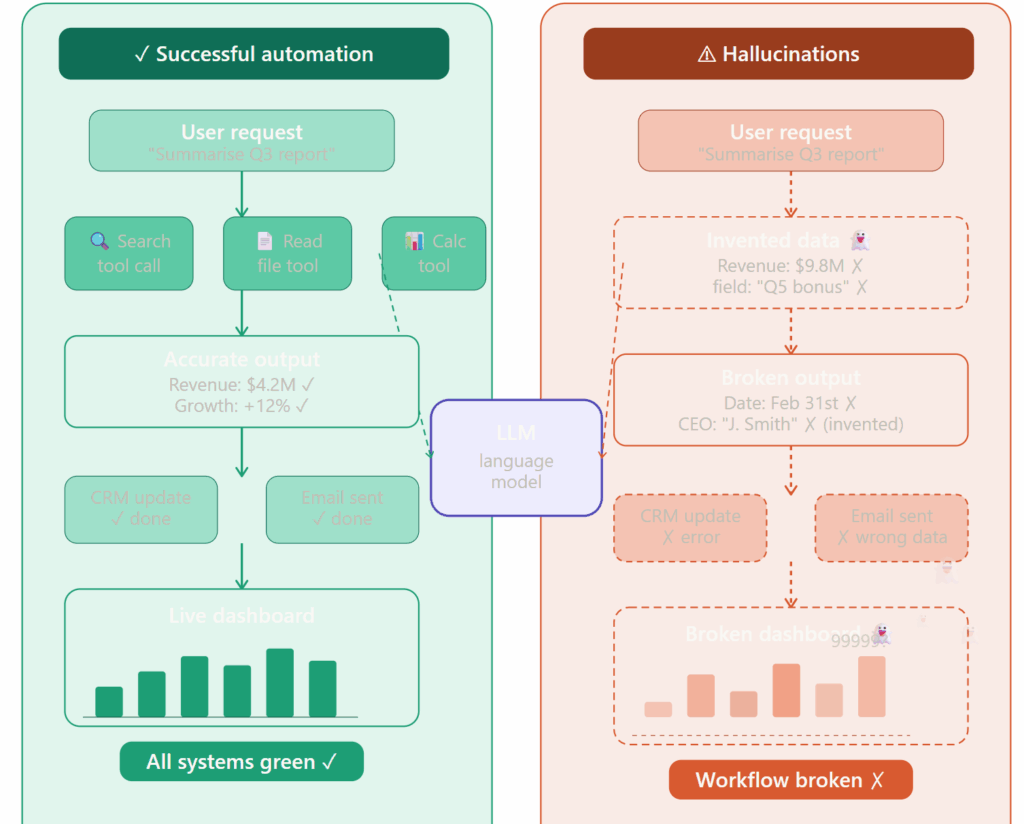
Without explicit guidance, an uncensored model in an agentic framework like LangChain, AutoGen, or CrewAI will often do its best to complete a task , which sounds good until “doing its best” means inventing an API parameter that doesn’t exist, or selecting a tool based on a plausible-but-wrong inference.
A few lines in the system prompt change this behavior significantly:
Only call tools when you have explicit values for all required parameters.
Do not infer, estimate, or invent parameter values.
If a required parameter is missing from the context, stop and request clarification before proceeding.
This doesn’t restrict what tasks the model can do. It just enforces that it doesn’t fake its way through the ones it can’t complete cleanly.
Structured Output Generation
Enterprise workflows that depend on JSON, XML, YAML, or other structured outputs are particularly vulnerable to a specific hallucination pattern , the model inventing fields that weren’t in the original schema.
It usually happens because the model is trying to be helpful. It sees a receipt and adds a category field. It sees a contact record and adds a last_contacted date. Plausible. Reasonable. Wrong.
System prompt instructions that help:
Return only the fields explicitly specified in the schema.
Do not add, infer, or calculate fields that are not present in the source data.
If a field's value is absent from the source, use null — do not estimate a value.
Pairing this with schema enforcement libraries like Instructor or Pydantic creates a two-layer defense: the prompt instructs the model, and the library validates the output.
Research and Analysis Workflows
For cybersecurity, fraud investigation, and intelligence analysis , the use cases where uncensored models genuinely shine , the risk isn’t schema drift. It’s confident confabulation on technical details.
A prompt structure that works well here:
When analyzing [malware samples / financial records / threat reports]:
- Clearly distinguish between what is directly observed in the source and what is inferred
- Use phrases like "the document states..." vs "this may indicate..." to signal confidence level
- If a value or fact is uncertain, say so explicitly rather than presenting it as established
- Never generate statistics, figures, or technical specifications not present in the source material
This preserves the model’s full analytical capability while building in the epistemic signaling that uncensored models often suppress.
What System Prompts Can and Can’t Fix
Let’s be direct about the limits, because overclaiming here leads to false security.
System prompts reliably improve:
- Formatting consistency and schema adherence
- Tool selection accuracy
- Parameter handling in function calls
- Uncertainty expression and confidence calibration
- Output structure and workflow discipline
System prompts cannot fix:
- Knowledge gaps in the model’s training data
- Fundamental reasoning errors on complex multi-step problems
- Hallucinations caused by the model genuinely not knowing something
- Failure modes that emerge from ambiguous or contradictory instructions
If the model doesn’t know something, instructing it to “only state what you know” helps , but it doesn’t conjure knowledge that isn’t there. The underlying model capability is still the ceiling.
This is why the best deployments use system prompts alongside validation layers, not instead of them. The prompt reduces the problem; the validation layer catches what gets through.
The Prompt Engineering Gap Most Teams Have
Here’s a practical observation worth making explicit.
Two teams deploying the exact same uncensored model can get dramatically different production outcomes , not because of hardware, not because of quantization level, not because of retrieval architecture — but because one team spent serious time on their system prompt and one didn’t.
Research on prompt sensitivity has consistently shown that LLM outputs are highly sensitive to instruction phrasing. The same model, given slightly different instructions, produces measurably different accuracy, format adherence, and error rates.
For uncensored models specifically, this sensitivity is amplified. Aligned models have a floor of baked-in behavior to fall back on. Uncensored models are more directly shaped by what’s in front of them , meaning good prompts help more, and bad prompts hurt more.
Investing in prompt design , treating it as actual engineering work, with iteration cycles and evaluation , is one of the highest-ROI activities available for teams running local models.
A Practical System Prompt Framework for Uncensored Models
Here’s a structure to build from, adaptable for most enterprise workflows:
1. Role and context — Tell the model what it is and what environment it’s operating in. Not “you are a helpful assistant” — something specific: “You are a financial fraud analysis tool operating on internal transaction records. Your outputs feed directly into a case management system.”
2. Output constraints — Explicit rules about schema adherence, field restrictions, and format requirements. Don’t assume the model will infer these from context.
3. Uncertainty handling — Explicit instructions for what to do when information is missing or ambiguous. “Return null” is better than “do your best.”
4. Tool call rules — If tools are available, explicit parameter handling rules. Never invent. Always stop and request clarification when required inputs are absent.
5. Confidence signaling — Instructions for distinguishing observed facts from inferences in the output. Especially important for analytical workflows.
6. Scope boundaries — What the model should and shouldn’t do in this specific deployment. Not content restrictions — operational scope. “This tool analyzes documents. It does not generate new documents or make recommendations outside the analyzed source.”
The Bigger Picture
System prompts won’t save a bad model. They won’t replace a validation layer. And they definitely won’t substitute for the organizational processes needed to govern AI outputs responsibly.
But they’re also not a minor detail to revisit after everything else is built.
For uncensored models — where the behavioral floor is lower and the customization surface is larger — the system prompt is infrastructure. It’s the difference between a model that behaves like a reliable professional in a specific role and one that behaves like a capable but unpredictable generalist.
Treat it accordingly.
The Bottom Line
Model selection is important. Infrastructure matters. Validation layers are necessary.
But the team that writes a precise, well-structured system prompt will consistently outperform the team running a better model with a vague one.
For uncensored models especially, where training-level behavioral guardrails are intentionally reduced, the system prompt carries more operational weight than most teams realize — until they’ve already shipped something to production and started seeing why.
[wpse_comment_list]