
Enterprise AI projects tend to over-index on raw analytical speed or unstructured vector search. But the actual operations of a business rarely live in flat files or high-throughput analytical engines. They live in transactional consistency: account balances, system states, order fulfillment status, relational customer profiles. If an autonomous AI agent can’t read and reason about that structured, stateful data, it stays disconnected from how the business actually runs.
Connecting a language model to a core relational database introduces real friction. The usual approaches, custom hardcoded API layers or unconstrained raw SQL execution loops, risk performance degradation, security breaches, or context exhaustion. To ground AI agents securely in the transactional engine most enterprises already run on, Ypipe natively integrates the PostgreSQL MCP Server.
This article breaks down the architecture of that integration, the structural translation layer managed through DBHub, and the configuration choices needed to expose multi-table relational context to language models without giving up data sovereignty or performance.
Table of Contents
- What Is PostgreSQL?
- Why Enterprises Use It
- The Problems It Solves
- Architecture Overview
- What Is the PostgreSQL MCP Server?
- Why AI Needs This MCP
- Why Ypipe Includes It
- Installing the PostgreSQL MCP Server in Ypipe
- Configuration Explained
- Enterprise Use Cases
- Performance
- Security
- Best Practices
- Common Mistakes
- Why This Integration Matters
- Frequently Asked Questions
- Related Articles
What Is PostgreSQL?
PostgreSQL is an advanced, open-source object-relational database known for strict adherence to ACID principles, strong reliability, and a highly extensible architecture. Unlike specialized analytical engines such as Apache Druid or ClickHouse, PostgreSQL is built for Online Transactional Processing (OLTP). It handles concurrent read-write workloads across complex, normalized schemas using Multi-Version Concurrency Control (MVCC), which keeps transactions isolated and safe even under heavy concurrent load.
In most enterprise architectures, PostgreSQL is the single source of truth for transactional applications, which makes its schema definitions, relational constraints, and table rows some of the most valuable context an AI agent can get access to.
Why Enterprises Use It
Enterprises build their structural backbone on PostgreSQL because of its maturity, predictable performance, and freedom from licensing lock-in. A few technical reasons it stands out for AI integrations specifically:
- Rich data types. Native support for
JSONB, arrays, geometric data, and key-value structures lets agents query hybrid structured and unstructured data in the same request. - A deep extension ecosystem. Procedural languages and flexible indexing models mean PostgreSQL adapts to workload requirements that shift over years, not just months.
- Strong security and compliance. Fine-grained access controls, row-level security (RLS), and comprehensive encryption options make it a solid fit for strict regulatory environments.
The Problems It Solves
Connecting autonomous AI agents directly to a production PostgreSQL database raises two classic engineering problems, both of which this MCP integration is built to address.
The Dynamic Schema Exploration Challenge
An agent working under a reasoning-and-acting loop can’t query a database it knows nothing about: what tables exist, how they join, what data types to expect. Hardcoding schema details into a system prompt causes serious context pollution, eating into the model’s token budget before it runs a single query. The PostgreSQL MCP Server solves this with runtime discovery tools, letting the model look up schema structure on demand instead of carrying it around at all times.
The SQL Guardrail Deficit
Giving a language model raw, unmediated access to a database through a plain connection string is dangerous. A single hallucination, or a targeted prompt injection attack, can trigger something as destructive as a cascading DROP TABLE. MCP acts as a deterministic layer in front of the database, keeping query compilation, execution boundaries, and result streaming inside a protocol-compliant contract rather than open-ended raw access.
Architecture Overview
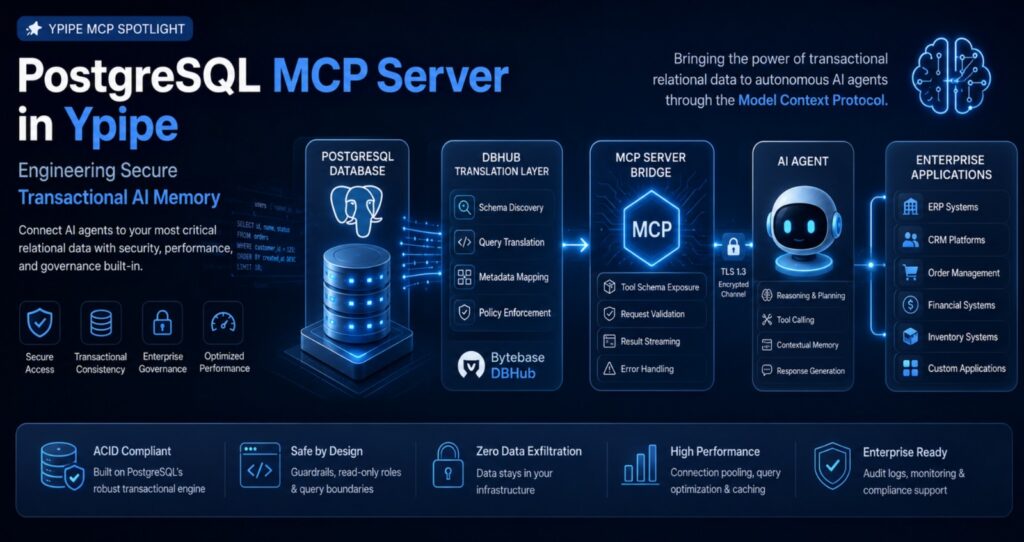
The PostgreSQL integration inside Ypipe separates application logic, protocol parsing, and low-level driver execution into distinct, decoupled components.
Ypipe Core Client (vector search decides when to inject the tool schema)
      ↓
MCP Server Bridge (query_database, inspect_table_schema, via JSON-RPC)
      ↓
DBHub Translation Layer (structured database abstraction)
      ↓
pg Driver (connection pooling, binary-to-JSON serialization)
      ↓
PostgreSQL Instance (TLS connection, MVCC isolation, row streaming)
- The Ypipe Core Client orchestrates the agent workflow, managing user input and using local vector search to decide when the PostgreSQL tool schema should be injected into the model’s execution context.
- The MCP Server Bridge is a protocol-compliant process running locally or in an isolated runtime container. It exposes standardized tools, such as
query_databaseandinspect_table_schema, over JSON-RPC via stdio or HTTP. - The DBHub Translation Layer uses components derived from Bytebase’s DBHub project to handle database abstraction, standardizing query telemetry and output parsing.
- The Client Driver, the native
pgpackage, talks directly to the target database node: socket connections, connection pooling, and binary-to-JSON serialization. - The PostgreSQL Instance receives the query over an encrypted TLS connection, parses the execution plan, isolates the transaction through MVCC, and streams row data back to the driver.
What Is the PostgreSQL MCP Server?
The PostgreSQL MCP Server is an open-source, standardized tool contract that exposes a PostgreSQL cluster’s native capabilities to any model speaking MCP. Rather than acting as a thin wrapper around a connection string, it follows the same principle covered in Why Most MCP Servers Are Built Wrong: good MCP design means high-intent, use-case driven tools, not a one-to-one mirror of the underlying API.
The server doesn’t just execute raw query strings, it provides structural context. It packages functions to list tables, describe column types, and run safe queries bounded by runtime overrides like forced row limits and execution timeouts, translating relational structure into JSON schemas the model can work with directly.
Why AI Needs This MCP
To move past simple chat and into real workflows, automated billing audits, CRM record enrichment, multi-tenant system diagnostics, an AI agent needs a predictable relational anchor.
Without MCP, developers end up writing custom middleware for every table an agent needs to touch. Standardizing on the PostgreSQL MCP Server gives the model a clean semantic boundary instead: it can reason through “inspect the schema of the orders table, determine the primary keys, compile a parameterized query, return the filtered transaction logs” as one dynamic sequence, without a human writing that logic by hand each time.
Why Ypipe Includes It
Ypipe treats data access as a core design primitive rather than a generic, one-size-fits-all layer. Alongside the SQLite MCP Server for local application state and other analytical connectors, an enterprise platform is incomplete without a proper OLTP data connector, which is what PostgreSQL provides.
By embedding the PostgreSQL blueprint natively, Ypipe lets platform engineers deploy secure, sovereign AI runtimes that talk directly to internal databases. No transactional connection strings or query outputs ever have to leave your own infrastructure to reach an external provider.
Installing the PostgreSQL MCP Server in Ypipe
Platform engineers provision the connection through the Ypipe control plane.
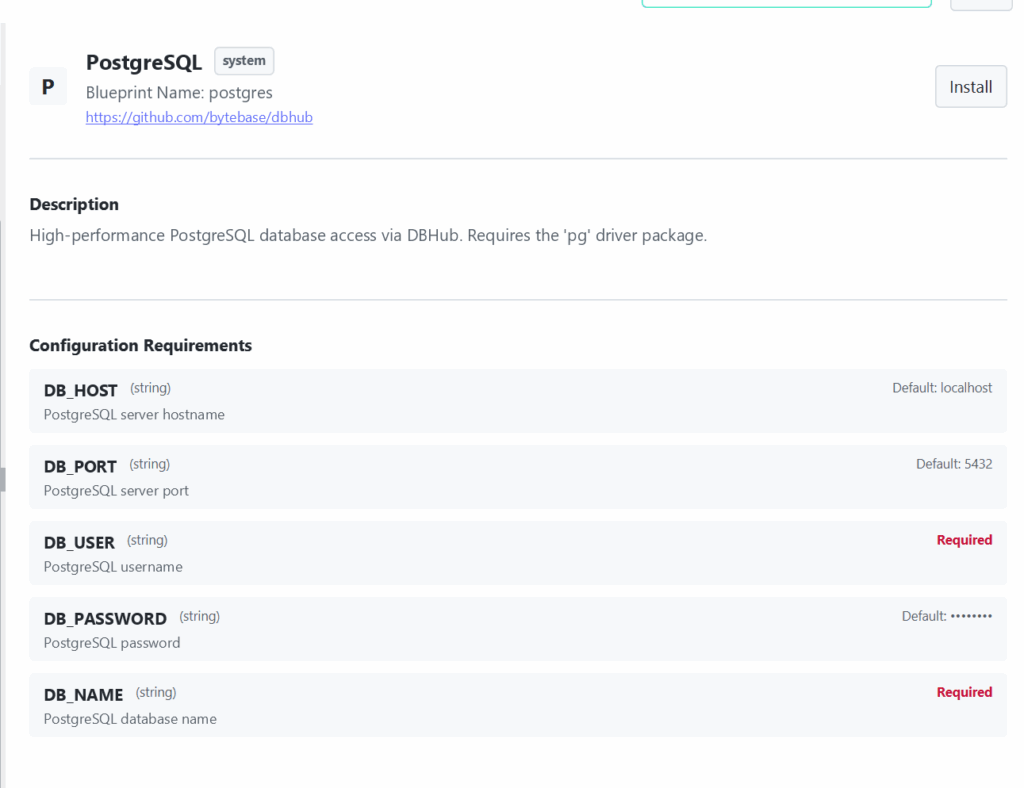
Step 1: Click “Install Community MCP Servers.”
Step 2: Choose the postgres blueprint, sourced from the community repository at github.com/bytebase/dbhub.
Step 3: Ypipe instantiates an isolated node environment and automatically resolves dependencies, including validating the pg driver package inside the execution sandbox.
Step 4: Use the configuration panel to bind your database targets securely.
Configuration Explained
Connecting a reasoning model to a core relational system takes a clear understanding of network boundaries and authorization scope. Here is the full breakdown.
| Variable | Type | Default / Requirement | Engineering Notes |
|---|---|---|---|
DB_HOST | String | localhost | The network address where the target PostgreSQL cluster listens. In production, this should never point straight at an isolated database node. Point it at a highly available connection pooler endpoint (like a PgBouncer instance) or an internal load balancer DNS, for example pg-pool.internal.net. |
DB_PORT | String | 5432 | The TCP port matching your database service. Connection poolers running in transaction mode often expose an alternate port, such as 6432, which should be declared here so the agent’s short-lived queries don’t exhaust backend process limits. |
DB_USER | String | Required | The database role the MCP server assumes when running queries. Enforce least privilege strictly here: never use the postgres superuser. Provision a dedicated service role, such as ypipe_agent_role, restricted via GRANT semantics to read-only access on explicit schemas. |
DB_PASSWORD | String | Hidden | The authentication secret for that role. Ypipe holds this credential in memory inside the sandbox container only, it is never exposed to the model, which prevents credential leakage during multi-step reasoning chains. |
DB_NAME | String | Required | The target database name. Locking the MCP instance to a single database prevents the model from roaming across unrelated catalogs, which keeps schema noise down and query planning efficient. |
Both DB_USER and DB_NAME are marked required with no loose default, which is a deliberate choice: it stops anyone from spinning up an open-ended, insecure database tool by accident. The blueprint also states plainly that it requires the pg driver package, so operators know exactly which layer is executing underneath the DBHub abstraction.
Enterprise Use Cases
Autonomous ERP lifecycle management. A financial agent can monitor an internal PostgreSQL ledger table, cross-reference incoming order entries against inventory levels, and flag accounting discrepancies automatically, without a human writing the query.
Intelligent customer support context. Helpdesk agents running on local models can use the MCP server to pull relational user history, account status, and recent purchase context straight from production tables, in real time, during a live support conversation.
Automated database telemetry analysis. SRE agents can query system catalogs like pg_stat_activity or pg_stat_statements to spot long-running lock contention or unindexed queries, then generate natural language optimization suggestions for the database team.
Performance
Running relational queries through an AI interaction loop means dealing with the mismatch between database throughput and model processing speed. The main bottleneck is small-model optimization: flood the context window of an agile open-source model with thousands of raw rows, and you get latency spikes or degraded reasoning almost immediately.
Ypipe mitigates this with tool overrides that automatically inject safety limits into the SQL execution path, appending explicit LIMIT clauses to agent-generated queries. PostgreSQL’s indexing (B-tree, Hash, GIN) means that with proper filtering conditions, row retrieval happens in sub-millisecond windows, and results are serialized into compact JSON before they ever reach the model, keeping pipeline latency low.
Security
Enterprise AI needs a zero-trust approach to data access, and exposing a core RDBMS like PostgreSQL calls for several active layers of protection.
Transport encryption. All communication between the Ypipe MCP bridge and the PostgreSQL host should run over strictly enforced TLS/SSL, preventing packet sniffing on the internal network.
Schema isolation through permissions. The service account should be limited to read access through standard SQL roles:
ALTER DEFAULT PRIVILEGES IN SCHEMA public GRANT SELECT ON TABLES TO ypipe_role;
This hard constraint blocks the model from attempting any data modification, no matter how it is prompted.
Context pollution firewalls. By controlling tool discoverability through local vector search, Ypipe keeps the database tool inactive unless a user’s request genuinely calls for relational data, which shields the model from unrelated telemetry noise. For a broader look at what happens when this kind of control is missing, see The Hidden Data Leakage Risk of MCP Servers.
Best Practices
Use connection pooling. Point DB_HOST at a PgBouncer layer configured for transaction pooling. AI agents tend to fire off short, rapid bursts of queries, and a pooler prevents backend process starvation that direct connections can cause under that pattern.
Enforce strict statement timeouts. Set a hard timeout on the role assigned to the agent:
ALTER ROLE ypipe_role SET statement_timeout = '5000';
That guarantees any accidental unindexed nested loop join across a multi-million row table gets killed automatically after five seconds, instead of quietly consuming production resources.
Use database views instead of raw tables. Build views tailored to a given agent’s domain. This hides column complexity and keeps sensitive fields, encrypted passwords or PII structures, completely out of the model’s view.
Common Mistakes
Using the superuser account. Configuring the integration with the postgres master role defeats every architectural safeguard at once, giving the model complete structural control over the entire catalog.
Leaving target columns unindexed. If an agent queries an unindexed text field during exploration, PostgreSQL falls back to a full table scan, which degrades performance for every other workload running concurrently.
Ignoring oversized text fields. PostgreSQL stores large text values in TOAST tables. A query that touches a column holding big unstructured blobs can pull megabytes of text straight into the application tier, overflowing the model’s context window almost instantly.
Why This Integration Matters
Bringing the PostgreSQL MCP Server natively into Ypipe changes what “grounded” means for enterprise AI. It moves models out of isolation and anchors them in the transactional memory engine the business actually runs on. Through protocol-compliant abstractions over the DBHub translation layer, organizations can deploy capable, local AI agents that talk to production databases and deliver real-time insight without compromising transactional safety or throughput.
Frequently Asked Questions
Does the PostgreSQL MCP Server support write operations? Yes, as long as the DB_USER role has been explicitly granted INSERT, UPDATE, or DELETE permissions on the target schema. For standard analytics and RAG use cases, a strictly read-only role is still the recommended default.
How does this server reduce SQL injection risk? The MCP server enforces a structured tool boundary. The model never executes arbitrary shell commands; inputs map into parameterized tool schemas handled by the DBHub execution engine, and non-compliant queries can be blocked before they ever reach the database socket.
Can this integration work with Amazon RDS or another managed PostgreSQL service? Yes. DB_HOST accepts any reachable network endpoint, including AWS RDS, GCP Cloud SQL, or Azure Database for PostgreSQL, as long as the Ypipe runner’s network paths are whitelisted to reach it.
What happens if an agent runs a query that would return millions of rows? Ypipe’s built-in tool overrides enforce safety limits, such as automatically appending LIMIT 100, so oversized tabular payloads never reach the model’s context window.
Why does this blueprint need a separate pg driver package? It relies on the open-source pg client library to handle low-level connection handshakes, connection pooling, and binary type parsing at the system level.
Can an agent query multiple databases in the same PostgreSQL instance at once? No. Each MCP configuration locks to a single database through DB_NAME. If an agent needs access to more than one independent database, you provision a separate MCP server configuration for each one.
Does the server support schemas outside the default public namespace? Yes. An agent can target any schema, for example SELECT * FROM analytics.users, as long as the configured DB_USER role has usage permission on that namespace.
Is PgBouncer required to run the PostgreSQL MCP server? No. The server can connect directly to the instance on port 5432. For deployments with meaningful agent concurrency, though, a transaction-mode connection pooler like PgBouncer is strongly recommended.
How does the agent discover the database layout dynamically? The server queries standard system tables, such as information_schema.tables and information_schema.columns, and surfaces that structure to the model as discovery hints, rather than requiring the schema to be hardcoded anywhere.
Does this integration support querying JSONB columns? Yes. PostgreSQL parses JSONB natively, and the pg driver maps the results into JSON structures that pass back over the protocol stream without any translation loss.
Can I disable the database tool entirely when it isn’t needed? Yes. Ypipe’s local vector search evaluates each prompt and only surfaces the database tool when the request actually calls for relational lookups, which keeps unrelated context out of the model entirely.
What happens if a query gets stuck in a lock during execution? A strict statement_timeout at the database level means any query caught in lock contention or an inefficient plan is terminated automatically, returning a clean timeout error to the agent instead of hanging indefinitely.
Is this integration compatible with air-gapped or fully local deployments? Yes. The entire execution path, the MCP bridge and the DBHub translation layer, runs inside your own infrastructure, which keeps data sovereignty intact for air-gapped environments.
Can the agent call stored procedures or custom functions? Yes, provided the database role has been granted EXECUTE permission on those specific functions or procedures.
How do I audit exactly what queries the agent has run? Ypipe logs every MCP tool invocation. Pairing that with PostgreSQL’s own logging, such as setting log_statement = 'all' on the agent’s service role, gives you a complete, auditable record of every SQL call inside your existing SIEM setup.
Related Articles
Continue exploring the Ypipe MCP Spotlight series:
- Why Most MCP Servers Are Built Wrong (And How to Fix It)
- The Hidden Data Leakage Risk of MCP Servers: What Happens When Your Database Talks to a Cloud LLM?
- Nextcloud MCP Server in Ypipe
- Browser MCP Server in Ypipe
- Filesystem MCP Server in Ypipe
- SQLite MCP Server in Ypipe
- ClickHouse MCP Server in Ypipe
- MariaDB MCP Server in Ypipe
- Apache Druid MCP Server in Ypipe
- What Are MCP Servers?
Together, these articles map out how to connect, secure, and design MCP integrations across the enterprise AI data stack.