
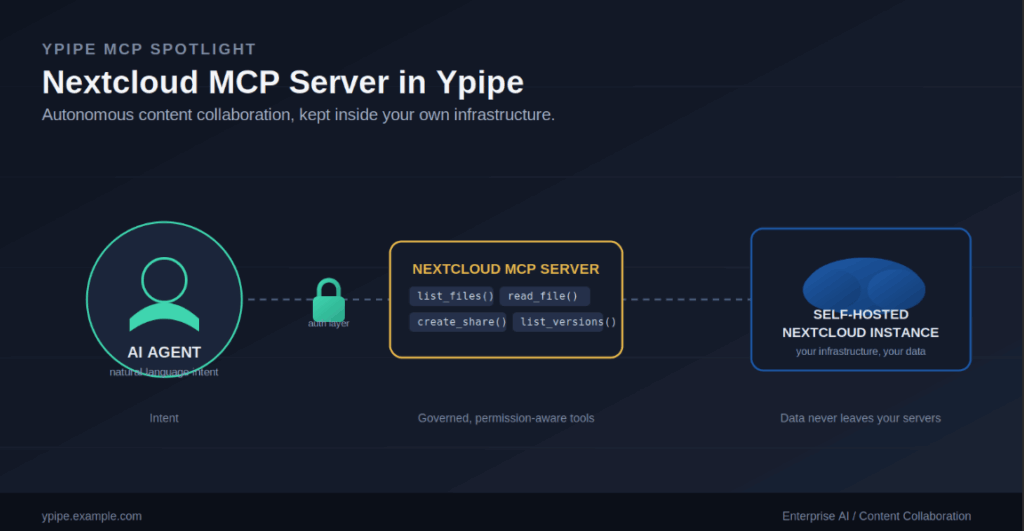
Document and content collaboration platforms are the lifeblood of enterprise productivity, but they usually operate as sealed off silos, invisible to the AI agents meant to organize, analyze, or act on the data inside them. Enterprises that care about keeping control of their own infrastructure are increasingly turning to self-hosted, sovereign platforms like Nextcloud to close that gap.
To let AI agents operate natively inside these secure environments, Ypipe integrates a dedicated Nextcloud MCP Server. This guide walks through the architecture of that integration, the security model around agentic file access, and the engineering reasoning behind exposing Nextcloud’s content collaboration features to AI through the Model Context Protocol (MCP).
Table of Contents
- What Is the Nextcloud MCP Server?
- Why Enterprises Use It
- The Problems It Solves
- Architecture Overview
- Why AI Agents Need This
- Why Ypipe Includes It
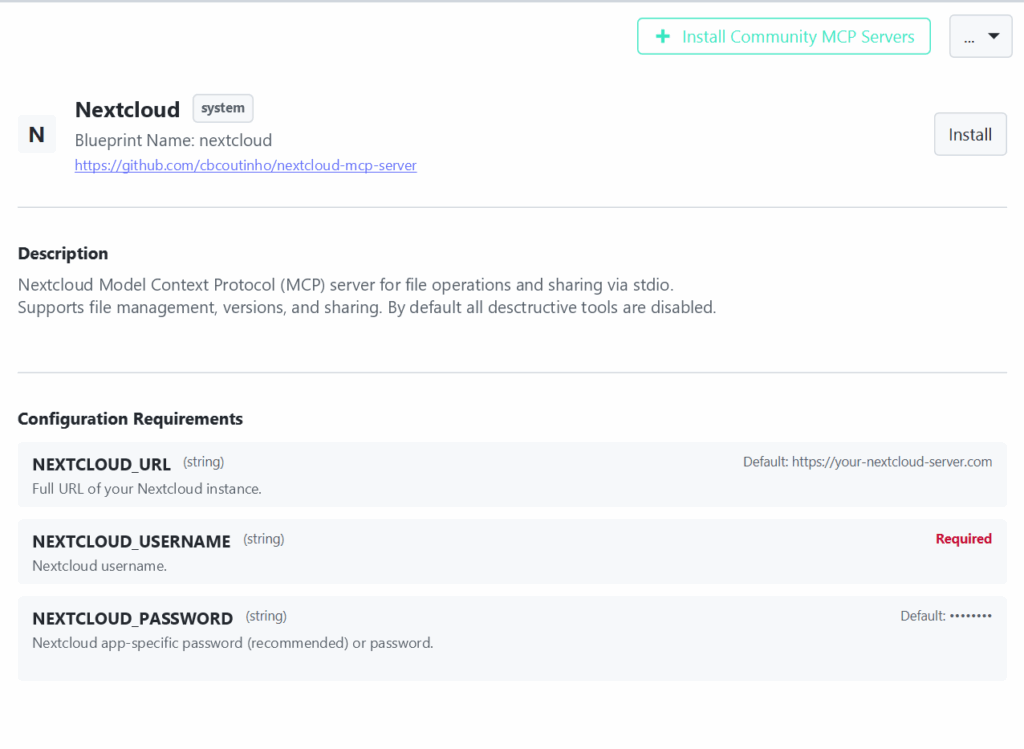
- Installing the Nextcloud MCP Server in Ypipe
- Configuration Explained
- Enterprise Use Cases
- Performance
- Security
- Best Practices
- Common Mistakes
- Why This Integration Matters
- Frequently Asked Questions
- Related Articles
What Is the Nextcloud MCP Server?
Nextcloud is an industry-leading, self-hosted content collaboration platform that provides secure, scalable file storage, sharing, and communication. It is built for organizations that prioritize data sovereignty, letting them keep full control of their content instead of handing it to a third-party SaaS provider.
The Nextcloud MCP Server acts as the bridge between that environment and Ypipe. It uses the Model Context Protocol to translate an AI agent’s natural language intent into authenticated, actionable requests against a Nextcloud instance. It provides a standardized interface for file management, versioning, and sharing, so agents can collaborate on content safely, predictably, and strictly within the limits your security policies define.
Why Enterprises Use It
Enterprises reach for Nextcloud because of its uncompromising focus on control and security. Pairing it with Ypipe through MCP unlocks a few strategic advantages:
- Data sovereignty. Sensitive enterprise content stays entirely within your own infrastructure, which is a hard requirement in many regulated industries.
- Secure collaboration. Exposing Nextcloud to AI agents lets organizations automate collaborative workflows, such as organizing file structures or managing sharing permissions, without loosening security.
- A customizable ecosystem. Nextcloud’s extensible architecture allows deep integration with existing enterprise identity management and security stacks.
The Problems It Solves
Before MCP became the standard way to connect platforms like this, giving AI access to collaborative storage usually meant building brittle, custom API connectors by hand. That approach created two recurring engineering headaches.
The Security and Access Control Problem
Giving an AI agent broad, unconstrained access to a collaborative storage platform is a serious security liability. Without a protocol-standardized, fine-grained access model, an agent could accidentally expose sensitive files or make changes nobody intended. The Nextcloud MCP Server addresses this by abstracting access into specific, permission-aware tools rather than one broad connection.
The Siloed Data Problem
Collaboration platforms hold a huge amount of unstructured data that would be genuinely useful for AI-driven work, but it typically stays locked away from the tools that could use it. The Nextcloud MCP Server closes that gap, letting agents ingest, organize, and work with that content securely.
Architecture Overview
The Nextcloud MCP integration in Ypipe is built around three layers, each with a narrow, well-defined job.
AI Agent
  ↓
Ypipe MCP Interface (list_files, read_file, create_share, ...)
  ↓
Authentication Layer (secure credential negotiation)
  ↓
Execution Engine (calls Nextcloud's standard APIs)
  ↓
Nextcloud Instance
- The MCP interface. Ypipe presents AI agents with a set of discovery-based tools for interacting with Nextcloud, such as
list_files,read_file, andcreate_share. - The authentication layer. The MCP server handles secure negotiation with your Nextcloud instance using the credentials you provide.
- The execution engine. Tools run against the Nextcloud instance through its standard APIs, with every file-based operation routed through Ypipe’s secure protocol layer.
The Nextcloud MCP Server itself functions as a specialized, protocol-compliant proxy. Its job is to turn abstract AI intent into concrete, authenticated requests, and to make sure every interaction is governed by MCP, logged for audit purposes, and predictable enough to trust in production.
Why AI Agents Need This
Autonomous agents are increasingly asked to handle real document and content workflows, not just read files. To be genuinely useful, they need more than read-only access; they need to participate in the collaborative lifecycle itself, which means managing versions, generating shares, and organizing information the way a person would. The Nextcloud MCP Server provides exactly those capabilities, but through a governed, agent-accessible interface rather than open-ended access.
Why Ypipe Includes It
Ypipe is meant to be the orchestration layer that sits underneath enterprise AI, not just one integration among many. Treating Nextcloud as a first-class MCP service means Ypipe agents can move across the full breadth of the enterprise stack, from relational databases to collaborative content platforms, inside one unified, policy-governed environment instead of a patchwork of one-off connectors.
Installing the Nextcloud MCP Server in Ypipe
Deployment is designed to be quick for platform engineers.
Step 1: Open the Ypipe integrations panel.
Step 2: Select “Install Community MCP Servers.”
Step 3: Choose the nextcloud blueprint.
Step 4: Follow the configuration flow to provision secure connectivity to your Nextcloud environment.
Once configuration is complete, the Nextcloud MCP Server becomes available to any agent or workflow inside Ypipe.
Configuration Explained
Secure connectivity is the foundation of this integration. Here is the full configuration breakdown.
| Variable | Type | Default / Requirement | Notes |
|---|---|---|---|
NEXTCLOUD_URL | String | https://your-nextcloud-server.com | The full URL of your self-hosted Nextcloud instance. Make sure this endpoint is reachable from wherever the Ypipe agent runs. |
NEXTCLOUD_USERNAME | String | Required | The username for the agent’s account. Provision a dedicated service account rather than reusing a personal login, and scope it strictly to the folders and operations the agent actually needs. |
NEXTCLOUD_PASSWORD | String | Required | The password, ideally an app-specific password rather than the account’s primary credential. App-specific passwords isolate the agent’s access and can be revoked independently without touching the user’s main login. |
The requirement for a dedicated username, paired with the recommendation for an app-specific password, reflects Ypipe’s broader security-first design philosophy: agentic access should always be scoped, revocable, and separate from any human’s own credentials.
Enterprise Use Cases
Autonomous content organization. Agents can periodically scan collaborative storage, identify unorganized files, and relocate or archive legacy content based on organizational policy.
Automated sharing workflows. Agents can generate secure, temporary shares for documents, which simplifies collaborating with external partners or vendors without manual back-and-forth.
Content-aware RAG pipelines. Agents can ingest content directly from Nextcloud to keep retrieval systems current, so AI-driven answers are grounded in the latest collaborative data rather than a stale snapshot.
Performance
Performance in an AI-to-content-collaboration workflow mostly comes down to minimizing network round-trips and handling payloads efficiently. Ypipe manages this in two ways:
- Tool scoping. Specific, high-intent tools let agents complete complex operations in a single API call instead of chaining several generic ones together.
- Protocol efficiency. Leaning on MCP itself keeps overhead low, so file management tasks run with minimal added latency.
Security
Security is the central design constraint when exposing any collaborative storage platform to an AI agent.
- Service accounts. Always use a dedicated, least-privilege service account for agentic access rather than a personal or admin account.
- Destructive operations disabled by default. Out of the box, the Nextcloud MCP Server ships with destructive tools disabled, keeping agentic actions limited to safe, policy-compliant operations.
- Audit trails. Ypipe logs every agentic interaction with Nextcloud, giving security teams full visibility into what agents actually did.
Best Practices
Use least-privilege access. Grant the service account used by the MCP server only the specific paths and operations it genuinely needs, nothing broader.
Always use app-specific passwords. This isolates the agent’s access from any human user’s credentials and makes revocation straightforward if something needs to be cut off quickly.
Govern sharing with policy, not defaults. Make sure an AI agent’s ability to generate shares is bound by organizational policy, so sensitive collaborative content can’t be exposed by accident.
Common Mistakes
Using an account with broad permissions. Reusing a personal account with wide-ranging access for an agent is one of the more common and more serious mistakes teams make with this integration.
Leaving destructive tools enabled without checking. Failing to verify that destructive tools are disabled (or intentionally re-enabling them without a clear reason) exposes content to actions nobody meant to authorize.
Running an unsecured or outdated Nextcloud instance. Agentic access is only as safe as the underlying Nextcloud deployment. An unpatched or poorly secured instance puts the whole integration at risk, independent of anything Ypipe does on top of it.
Why This Integration Matters
The Nextcloud MCP integration is a meaningful step toward real autonomous collaboration. By providing a secure, governed bridge between AI agents and content collaboration tools, Ypipe lets organizations use AI to organize, manage, and act on their collaborative content, all while keeping the data sovereignty that modern enterprises increasingly treat as non-negotiable.
Frequently Asked Questions
Can I restrict what files the agent can access? Yes. Access is governed entirely by the permissions of the service account used by the MCP server, so scoping that account controls exactly what the agent can reach.
Are destructive tools enabled by default? No. All destructive tools are disabled by default to protect your content, and enabling them is a deliberate, separate decision.
How are credentials stored? Ypipe manages configuration secrets securely and does not expose them in plaintext.
Can I connect to multiple Nextcloud instances? Yes. You can install multiple instances of the Nextcloud MCP server, each pointed at a different Nextcloud environment.
Is this MCP server audit-logged? Yes. Ypipe tracks every agentic interaction with Nextcloud, giving your security team a complete audit trail.
Why use an app-specific password instead of the main account password? It isolates the agent’s access from a user’s primary credentials and can be revoked on its own without affecting anything else tied to that account.
How is data sovereignty maintained? Because the integration runs against your self-hosted Nextcloud instance, content never leaves your own infrastructure, which supports data residency and compliance requirements.
Can the agent manage file versions? Yes, the MCP server includes tools for working with file version history.
Is the Nextcloud MCP server secure by design? Yes. It follows least-privilege principles and ships with destructive operations disabled by default, both core parts of its security model.
How do I troubleshoot connection issues? Ypipe surfaces logs and error details that help diagnose configuration problems or network connectivity issues between Ypipe and your Nextcloud instance.
Does this support file sharing? Yes, the server includes tools for generating and managing shares, all governed by your organization’s sharing policies.
Why is a dedicated service account recommended over a personal one? It creates a clean separation of duties and gives you granular control over exactly what the agent can do, independent of any individual’s own account permissions.
Can the agent read any file type? The agent can interact with any file that its service account has permission to access, regardless of file type.
Is the Nextcloud MCP server open source? The blueprint for the Nextcloud MCP server is open source. Check the Ypipe GitHub repository for details.
How does this compare to other MCP server integrations in Ypipe? The Nextcloud MCP Server is purpose-built for collaborative content management, filling a role that database or filesystem MCP servers do not cover: autonomous, governed document workflows