
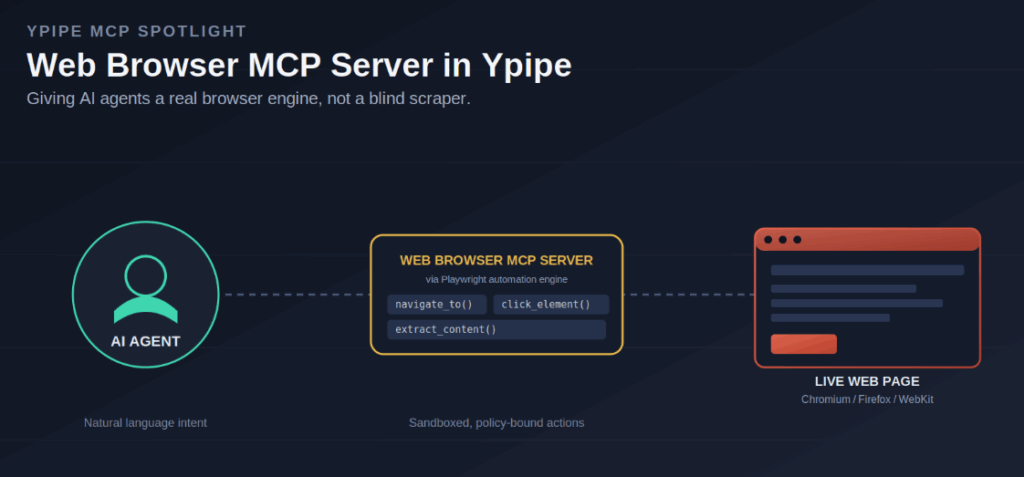
The modern web is built for human interaction: dynamic content, JavaScript-rendered interfaces, and interactive elements meant to be navigated by eyes and a cursor. That human-first design creates a real barrier for autonomous AI agents. Traditional scrapers can parse static HTML well enough, but they struggle badly with the interactive, state-heavy nature of today’s web applications.
For an AI agent to genuinely operate in that environment, it needs more than a request-response pipeline. It needs an actual browser engine. That’s why Ypipe integrates a Web Browser MCP Server, built on the industry-standard Playwright automation engine.
This article covers the engineering reasoning behind using headless browsers as an agent’s sensory organs, the challenges of managing browser state and security in an enterprise setting, and how Ypipe exposes all of it through the Model Context Protocol (MCP).
Table of Contents
- What Is the Web Browser MCP Server?
- Why Enterprises Use It
- The Problems It Solves
- Architecture Overview
- Why AI Needs This MCP
- Why Ypipe Includes It
- Installing the Web Browser MCP Server in Ypipe
- Enterprise Use Cases
- Performance
- Security
- Best Practices
- Common Mistakes
- Why This Integration Matters
- Frequently Asked Questions
- Related Articles
What Is the Web Browser MCP Server?
The Web Browser MCP Server is a specialized interface bridging a language model and the Playwright automation framework. Playwright is a mature browser automation library capable of driving Chromium, Firefox, and WebKit, and handling complex actions like page navigation, element interaction, and dynamic content rendering.
The MCP server translates an agent’s high-level intent, something like “navigate to this page and extract the price”, into the low-level, executable browser actions that actually accomplish it. It spawns a headless browser process, runs the necessary operations, and returns structured information, sometimes even visual context, back to the AI.
Why Enterprises Use It
Enterprises adopt AI-driven browser automation to modernize workflows that used to require a person at a keyboard.
- Dynamic web scraping. Modern web apps are heavily rendered by JavaScript, which makes plain GET requests insufficient. A browser-based MCP server renders content the same way a real user’s browser would, so the agent can pull data out of complex, highly dynamic interfaces.
- Automated testing and validation. Agents can navigate enterprise web portals on their own, validate business logic, and run regression tests against UI components.
- Operational RPA. Agents can interact with legacy, browser-based ERP systems that never got a proper API, effectively automating workflows across systems that were never designed to talk to each other.
The Problems It Solves
Trying to connect AI to the modern web through traditional scraping tools runs into two major engineering bottlenecks.
The Interaction Gap
Traditional scrapers are essentially blind. They can’t click buttons, navigate modals, or wait for a JavaScript event to finish resolving. The Web Browser MCP Server solves this with a full, interactive browser engine, so the agent can see and interact with a page the way a person actually would.
The State and Auth Challenge
Plenty of enterprise sites sit behind complex authentication flows, session cookies, and bot detection. A full browser engine manages sessions, cookies, and headers natively, which lets an agent persist an authenticated session and handle intricate login requirements without extra tooling bolted on the side.
Architecture Overview
The architecture is built to manage the high overhead of running real browser processes, securely and predictably.
AI Agent
  ↓
MCP Interface (navigate_to, click_element, extract_content)
  ↓
Server Bridge (translates requests into Playwright calls, manages lifecycle)
  ↓
Playwright Automation Engine (Chromium / Firefox / WebKit)
  ↓
Target Website
- The MCP interface. Ypipe exposes tools that map directly to browser functionality, such as
navigate_to,click_element, andextract_content. - The automation engine. Playwright does the actual work: managing the browser instance, rendering pages, executing JavaScript, and handling DOM interaction.
- The server bridge. The MCP server translates standardized agent requests into Playwright API calls and manages the browser’s lifecycle, spawning, running, and destroying instances to keep both security and resource usage under control.
The result is a deterministic wrapper around browser automation. It doesn’t just relay commands, it maintains state, handles waits, and keeps interactions inside a predictable timeframe, so the agent can build reliable multi-step navigation sequences without managing browser orchestration itself.
Why AI Needs This MCP
An agent working in the modern digital workspace needs to navigate the web as capably as it reasons about text. Being able to pull real-time, context-rich data straight from a browser-rendered application is what lets an agent take meaningful, real-world action instead of operating purely on static, previously indexed information.
Why Ypipe Includes It
Ypipe is meant to be the orchestration layer underneath enterprise AI, not a single-purpose tool. Treating browser automation as a first-class MCP service means Ypipe agents can complete tasks end to end, bridging internal data with the broader internet instead of stopping at the edge of what an API happens to expose.
Installing the Web Browser MCP Server in Ypipe
Deployment is straightforward for platform engineers.
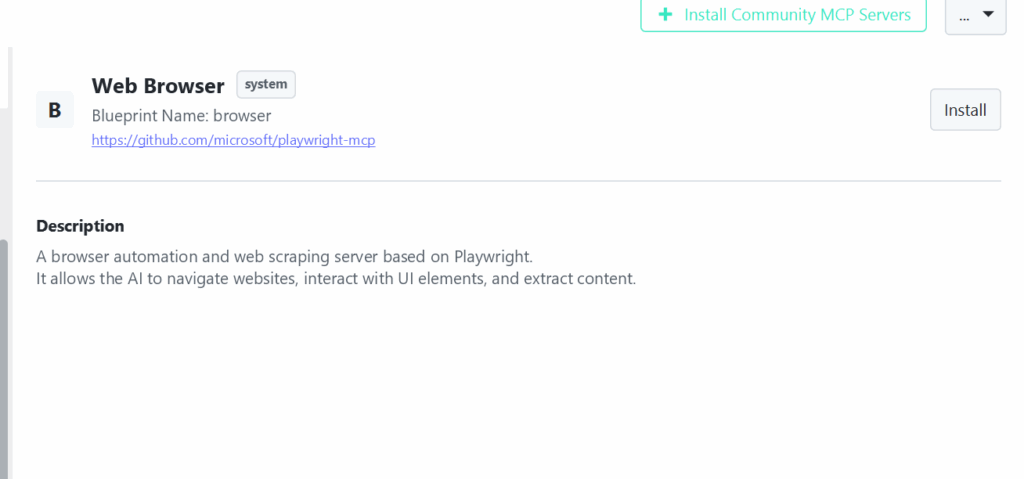
Step 1: Open Community MCP Servers inside Ypipe.
Step 2: Select the browser blueprint.
Step 3: Ypipe provisions the runtime environment with the dependencies needed for headless browser automation.
Once configuration completes, browser tools become available to any agent or workflow in Ypipe.
Enterprise Use Cases
Automated market intelligence. Agents monitor competitor pricing and news portals in real time, navigating complex UI layouts to pull out actionable insight without a person doing the browsing manually.
Legacy system integration. Agents automate data entry into browser-based enterprise systems that were never given a public API, bridging older infrastructure into modern automated workflows.
Automated compliance verification. Agents run ongoing checks across internal or external portals to confirm that content stays aligned with organizational branding and compliance requirements.
Performance
Running headless browsers is genuinely resource-intensive, so performance management matters here more than in most MCP integrations.
Process lifecycle management. The MCP server manages browser instances carefully, reusing them where it can and destroying them promptly to free up system resources rather than letting them accumulate.
Targeted interaction. Agents are guided, through system prompts, toward specific, targeted interactions rather than brute-force exploration, which cuts down on time spent rendering and interacting with pages that don’t matter for the task at hand.
Security
Browser automation needs strict containment, since it’s the one MCP integration that reaches directly out onto the open web.
Sandboxing. Browser instances run in isolated, sandboxed environments so malicious web content has no path to the host system.
Policy enforcement. Ypipe restricts which domains an agent is allowed to navigate to, enforcing site-specific policy to protect the integrity of the enterprise network.
Session management. Browser sessions are ephemeral by default, so no sensitive authentication state persists longer than the task actually requires.
For a broader look at how uncontrolled context and data flow show up across MCP integrations generally, see The Hidden Data Leakage Risk of MCP Servers.
Best Practices
Prefer targeted interactions. Train agents to use precise selectors, ID or class, for page interaction instead of brittle coordinate-based clicking that breaks the moment a layout shifts.
Build in real wait strategies. Implement proper wait-for-element conditions in agentic workflows so dynamic content loading gets handled reliably instead of racing the page.
Use dedicated authentication policies. Run browser-based automation through dedicated, restricted service accounts, which limits the blast radius if a session is ever compromised.
Common Mistakes
Relying on brittle locators. Fragile DOM selectors that change with every frontend deploy will make agentic workflows unstable in ways that are hard to debug.
Spawning too many browser instances. Running too many simultaneous browser processes overwhelms host system resources fast, especially under concurrent agent load.
Skipping the sandbox. Neglecting to sandbox automated browser sessions exposes the host environment to whatever the target website throws at it, intentionally or not.
Why This Integration Matters
The Web Browser MCP Server lets AI agents operate in the web’s native environment instead of a simplified, static approximation of it. By bridging reasoning with actual interactive rendering, Ypipe enables a category of automation that is genuinely web-aware while still respecting enterprise security and performance constraints.
Frequently Asked Questions
Why use a headless browser instead of simple scraping? Headless browsers render dynamic content, execute JavaScript, and manage session state, all of which are essential for interacting with modern web applications the way a real user would.
Is this secure enough for enterprise use? Yes. It is designed with enterprise security in mind, including sandboxed execution and ephemeral session management by default.
Can it handle authenticated sessions? Yes. It manages cookies and session state natively, so agents can persist authenticated access across a workflow.
How are browser resources managed? The MCP server carefully manages browser process lifecycles, reusing instances where possible and destroying them promptly to prevent host resource exhaustion.
Can I use it for automated testing? Yes, it works well for agentic UI testing and component validation, especially for interfaces that change frequently.
Does this comply with enterprise governance standards? Yes, it operates within a secure, policy-governed environment, including domain restrictions and sandboxing.
How do I prevent malicious interactions? Through sandboxed browser instances and strict, enforced navigation policies that limit which domains an agent can reach.
Which browsers does it support? Playwright supports Chromium, Firefox, and WebKit, so the MCP server inherits all three.
How are agent interactions controlled? Interaction is governed by the tool-based mappings the MCP server exposes, such as navigate_to and click_element, rather than open-ended browser control.
Can this be used in air-gapped environments? Not generally. Because it needs live access to the web, it’s a poor fit for fully air-gapped systems, unlike database or filesystem MCP servers that can run entirely offline.
How is this different from manual or script-based scraping? It provides a genuine browser engine rather than raw HTTP request and response handling, which means it can render JavaScript, click through modals, and wait for dynamic content the way a scraper never could.
Why Playwright specifically? Playwright is a mature, high-performance, cross-browser automation engine with strong support for the modern, JavaScript-heavy web.
How are browser interactions logged? Ypipe provides comprehensive logging for every agentic browser interaction, supporting the same audit trail expectations as its other MCP integrations.
Is the MCP server open source? Yes. Check the Ypipe GitHub repository for the blueprint and implementation details.
How much does this affect agent performance overall? Browser automation requires meaningfully more system resources than most other MCP tools, which makes careful lifecycle management important for keeping agent performance predictable.