
Go beyond chat boxes with YPipe SmartPipes—the visual multi-model AI workflow engine that chains local Whisper speech-to-text, vision OCR, image synthesis, and compact LLMs on your own hardware.
Designed for IT-affine business users in controlling, finance, operations, and healthcare, SmartPipes lets you declare a typed Input Contract once and automatically exposes your pipeline as a Human Web Form, a production REST API Webhook (cURL), and a reusable Model Context Protocol (MCP) tool—persisted as a clean Kubernetes-style .ypipe YAML manifest.

Table of Contents
- Key Takeaways
- Moving Beyond Chat Boxes with Multi-Model Local Pipelines
- One-Click Blueprint Catalog: Live Voice Transcription & Receipt JSON Scanning
- Write the Input Contract Once: Expose as Web Form, REST Webhook & MCP Tool
- Sequential SpEL Chaining, KnowledgePipes RAG Sinks & GitOps .ypipe YAML Manifests
- How One SmartPipe Input Contract Exposes Three Production Interfaces Automatically
- Step-by-Step Walkthrough Inside YPipe
- Frequently Asked Questions
- Related Articles & Video Series
Key Takeaways
- 1-Click Multimodal Blueprint Catalog: Install ready-made workflows for Receipt & Invoice JSON Scanning, Live Voice & Meeting Transcription, Audio Summarization, Marketing Visual Generation, and German Voice Translation.
- Live On-Device Whisper & Vision OCR Demos: Capture microphone audio for zero-latency local transcription and extract vendor, tax, and line-item JSON from financial receipts without cloud data leaks.
- Write Input Contract Once, Expose Everywhere: Every SmartPipe automatically generates a department Web Form, an async/sync REST API Webhook with ready-to-copy cURL snippets, and an MCP Tool.
- Sequential SpEL Chaining & RAG Sinks: Pass outputs across Whisper, Vision, Manifold Engine LLMs, File Writers, and KnowledgePipes RAG Sinks using Spring Expression Language (${prior.output}).
- Declarative .ypipe K8s-Style YAML Manifests: Prototype visually on desktop or web, commit to Git, and deploy headlessly on-premise with IT and DevOps.
Moving Beyond Chat Boxes with Multi-Model Local Pipelines
While conversational chat interfaces are useful for ad-hoc questions, repeatable enterprise workloads in controlling, accounting, healthcare, and operations require deterministic, multi-step pipelines. YPipe SmartPipes lets IT-affine business users visually chain specialized local models—including Whisper speech recognition, vision OCR, image generation, and compact language models governed by the ypipe Manifold Engine—without writing glue code or transmitting sensitive documents to cloud APIs.
Just as our MCP integrations for Gmail, LibreOffice, and Playwright Web Browsers standardize external tool actions, SmartPipes standardizes how multiple local AI models and tools collaborate in a single auditable pipeline.

One-Click Blueprint Catalog: Live Voice Transcription & Receipt JSON Scanning
To make teams productive immediately, the SmartPipes Blueprint Catalog ships with ready-to-run templates: the Marketing and Product Visual Generator, Uploaded Audio Recording Minutes and Summarizer, Receipt and Invoice JSON Scanner, Live Voice and Meeting Audio Transcription, and the Audio Language Recognition, German Translator, and Voice Synthesizer pipeline.
In our live demonstration, we capture microphone audio directly in the browser for zero-latency on-device Whisper transcription, and drop a photographed restaurant receipt into the Receipt Scanner to extract schema-validated vendor, tax, and line-item JSON 100% locally.
Write the Input Contract Once: Expose as Web Form, REST Webhook & MCP Tool
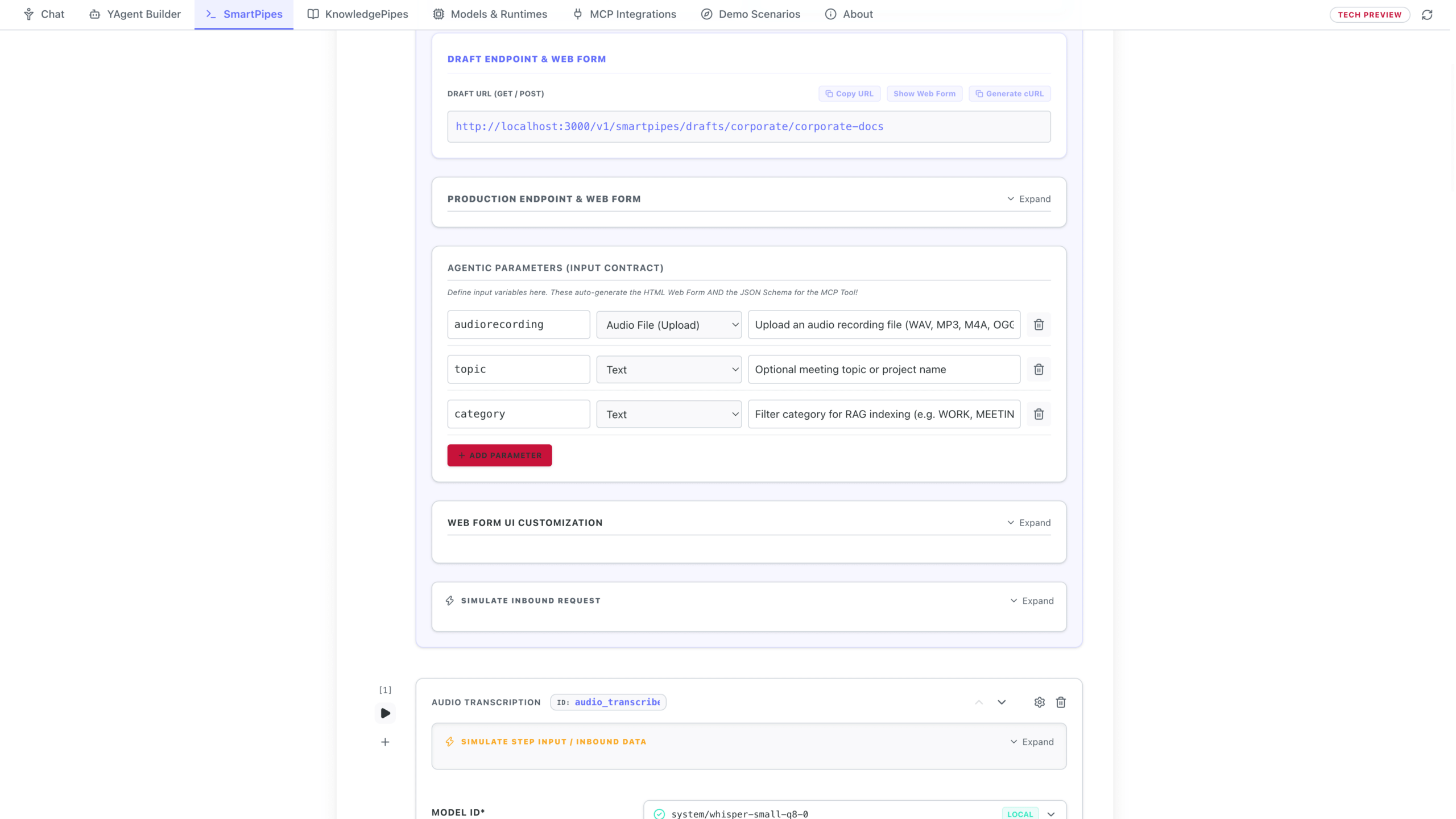
Inside the visual SmartPipe editor, every workflow begins with a typed Input Contract (`text`, `audio`, `image`, or structured parameters). Declaring that contract once automatically generates three production interfaces simultaneously:
1) A clean Human Web Form with microphone, camera, and file-drop controls for department staff; 2) A synchronous or asynchronous REST API Webhook (`/api/smartpipes/execute/…`) with ready-to-copy cURL snippets for ERP/CRM integration; and 3) A native Model Context Protocol (MCP) Tool that YPipe Chat and autonomous YAgents can invoke on demand.
Sequential SpEL Chaining, KnowledgePipes RAG Sinks & GitOps .ypipe YAML Manifests
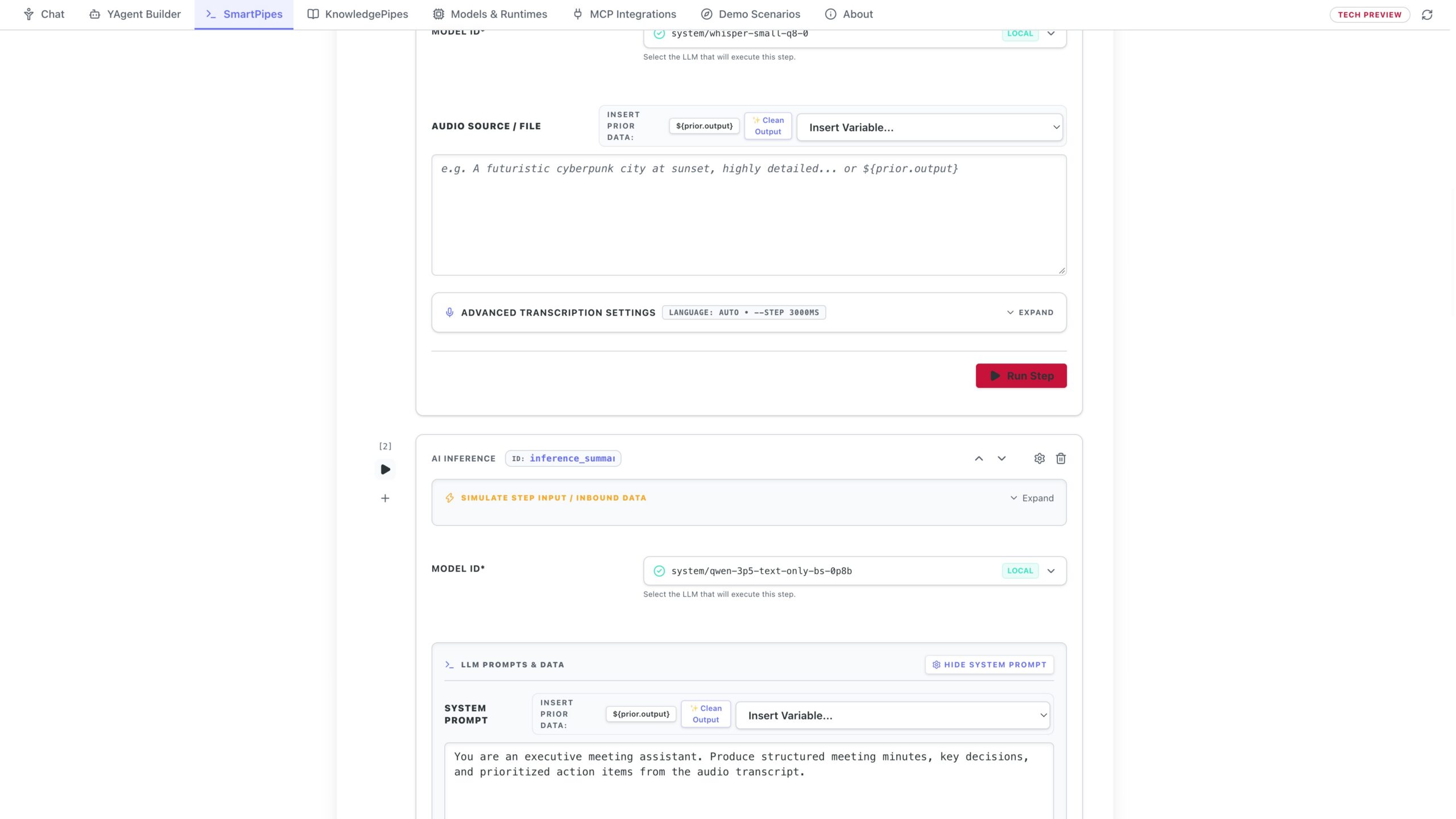
Execution steps pass intermediate outputs forward using Spring Expression Language (SpEL) expressions such as ${prior.output}. At the end of a pipeline, a KnowledgePipe RAG Sink can automatically chunk, embed, and index the structured output into a KnowledgePipes vector store—turning every processed receipt or voice note into searchable institutional memory.
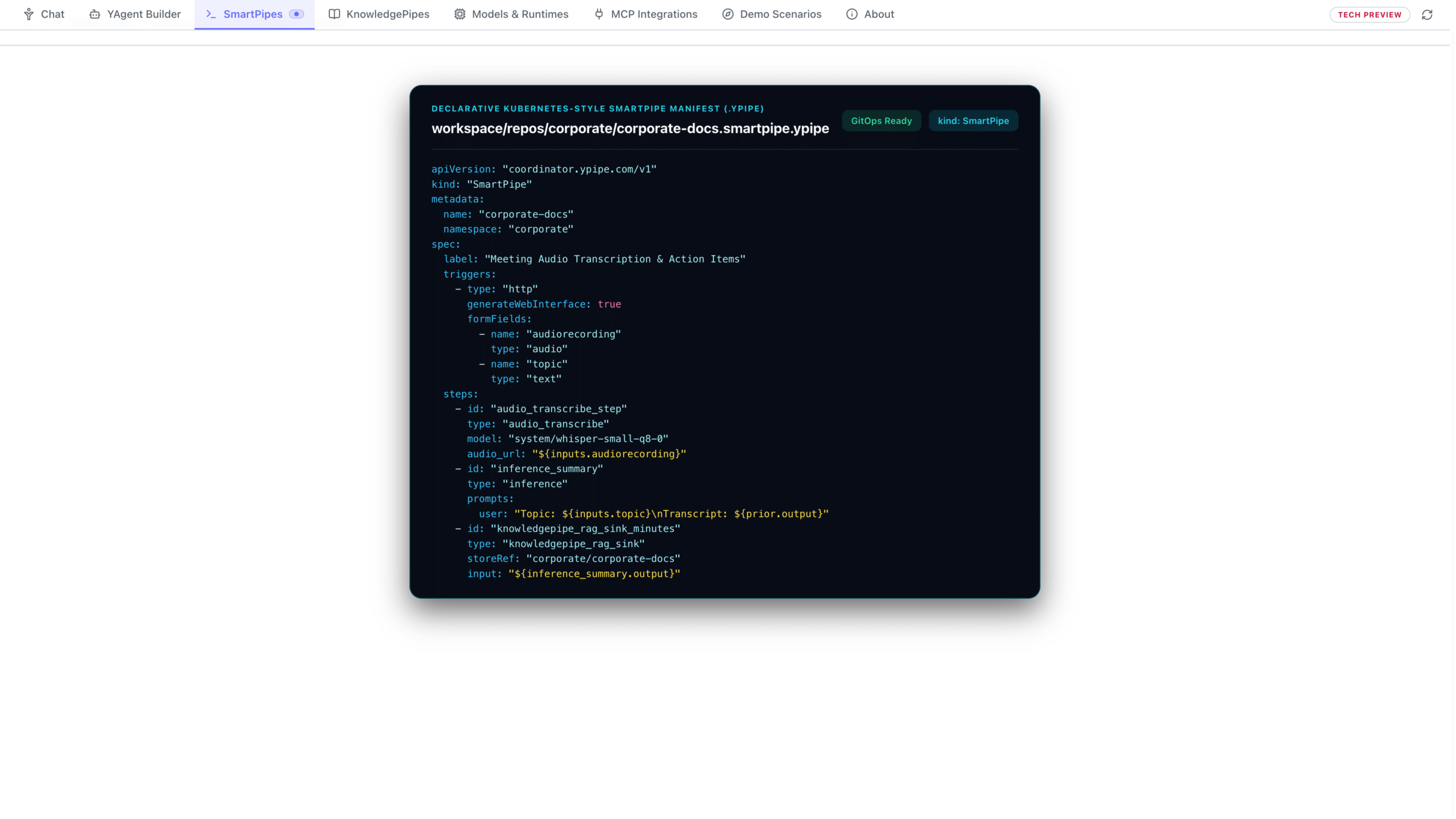
Under the hood, every SmartPipe is saved as a declarative Kubernetes-style .ypipe YAML manifest (`kind: SmartPipe`) with a complete local execution history and audit trail.
How One SmartPipe Input Contract Exposes Three Production Interfaces Automatically
| Generated Interface | Target Consumer | Key Capabilities in YPipe |
|---|---|---|
| Interactive Human Web Form | Department staff in Finance, HR, Clinics & Operations | Built-in microphone recording, drag-and-drop file upload, typed fields & live result rendering |
| REST API Webhook (Sync & Async) | IT / DevOps, ERP systems, CI/CD & internal microservices | Auto-generated HTTP endpoint with ready-to-copy cURL commands and JSON schema validation |
| Native MCP Tool Exposure | YPipe Chat, YAgents & Manifold Engine orchestrators | Zero-code registration as a callable MCP tool with typed arguments and description |
| KnowledgePipe RAG Sink | KnowledgePipes Vector & Hybrid Stores | Automatically maps SpEL output fields into vector chunks and metadata attributes |
Step-by-Step Walkthrough Inside YPipe
Step 1: SmartPipes Overview — Multi-Model Local AI Workflows
Real enterprise value goes far beyond a single chat box. Welcome to SmartPipes, the visual multi-model workflow engine inside Y-Pipe, The Sovereign Local-First AI Platform. SmartPipes empowers IT-affine business users in controlling, operations, and healthcare to chain specialized local models—combining Whisper speech recognition, vision OCR, image generation, and compact language models governed by the Y-Pipe Manifold Engine. Whether you are digitizing receipts into validated JSON, turning recorded meetings into structured minutes, or piping workflow outputs directly into KnowledgePipes local vector stores—which we cover in depth in our dedicated KnowledgePipes video—every step runs 100 percent on your own hardware.
Step 2: Exploring the SmartPipes Blueprint Catalog
To get productive in seconds, the SmartPipes Blueprint Catalog ships with ready-to-run templates that you can install into your workspace with one click. As we scroll through the catalog, you will find blueprints built for real department workloads: the Marketing and Product Visual Generator for local image synthesis and scene analysis; the Uploaded Audio Recording Minutes and Summarizer for automated meeting documentation; the Receipt and Invoice JSON Scanner for finance and controlling; Live Voice and Meeting Audio Transcription; and the multi-stage Audio Language Recognition, German Translator, and Voice Synthesizer pipeline.
Step 3: Installing & Running Live Voice Transcription and Receipt JSON Scanner
Let’s install and run two of these blueprints live. First, we install Live Voice and Meeting Audio Transcription, open the launcher, and capture audio directly from the microphone—transcribing speech locally on-device with zero cloud latency. Next, we install the Receipt and Invoice JSON Scanner and launch its web interface. When a controlling analyst drops in a receipt scan, Y-Pipe’s local vision model extracts vendor details, tax amounts, and line items into clean, schema-validated JSON without a single byte leaving the machine.
Step 4: Inside the Visual Editor — HTTP & Agentic Triggers and Input Contracts
Inside the visual SmartPipe editor, declaring your typed Input Contract once—across text, audio, or images—automatically exposes a human Web Form, a production REST webhook, and a reusable Model Context Protocol tool simultaneously.
Step 5: Chaining Multimodal Steps, Manifold Inference & Sinks
Below the trigger, numbered steps chain Whisper transcription, Manifold Engine language models, and KnowledgePipes RAG or File Sinks using Spring Expression Language variables like prior-dot-output—all added with one click from the bottom palette.
Step 6: Web Form, cURL Webhook & Declarative .ypipe Manifests
Every completed SmartPipe immediately provides an interactive web form for business users alongside a pre-filled curl command so developers can trigger the exact same pipeline from any backend service. Under the hood, the entire workflow persists as a clean Kubernetes-style dot-ypipe YAML manifest for Git and headless deployment. In our upcoming videos, we will showcase complete end-to-end industry scenarios—download Y-Pipe today at Y-Pipe dot com.
Frequently Asked Questions
What is a SmartPipe in YPipe? A SmartPipe is a visual, multi-step AI workflow that chains local speech-to-text (Whisper), vision OCR, image generation, LLMs, and MCP tools into a deterministic pipeline.
How does a SmartPipe differ from a standard chat prompt? A chat prompt relies on a single model turn, whereas a SmartPipe executes a repeatable sequence of specialized models and tools with typed inputs, SpEL variable passing (${prior.output}), and structured output sinks.
Can non-programmers create a REST API webhook with SmartPipes? Yes. Defining the Input Contract in the visual editor automatically creates both a human Web Form and a REST API webhook complete with copy-paste cURL commands.
Does the Receipt and Invoice JSON Scanner send images to the cloud? No. Vision OCR and structured JSON extraction run 100% locally on your workstation or on-premise server.
How do SmartPipes connect to KnowledgePipes RAG? By adding a KnowledgePipe RAG Sink at the end of a SmartPipe, the workflow’s output is automatically chunked, embedded, and written into your target KnowledgePipe Store.
Can an AI agent call a SmartPipe as a tool? Yes. Every SmartPipe can be toggled to expose itself as a native Model Context Protocol (MCP) tool.
How are SmartPipes versioned and deployed by DevOps? Every SmartPipe is stored as a declarative Kubernetes-style .ypipe YAML manifest that can be committed to Git and deployed headlessly.
Does SmartPipes keep an audit log of executions? Yes. The Execution History tab records every run’s inputs, step-by-step intermediate outputs, latency, and status locally.
Related Articles & YPipe Video Series
YPipe by iunera is The Sovereign Local-First AI Platform—running 100% locally on workstations or on-premise on your enterprise and clinic servers with full GDPR, HIPAA, and EU AI Act sovereignty. Explore our related engineering studies on Kraken and the full video series below:
Related Kraken Articles on YPipe & Local AI
- Gmail MCP Server on Ypipe: How Local AI Sends Real Email Without the Cloud
- LibreOffice MCP Server in Ypipe: Engineering Autonomous Document Automation
- Web Browser MCP Server in Ypipe: Engineering Agentic Web Interaction
- Filesystem MCP Server in Ypipe: Secure Local File Access for Enterprise AI
Explore All Episodes in the YPipe Video Series
- Episode 01: YPipe — The Sovereign Local-First AI Platform | Manifold Engine, MCP, SmartPipes & On-Premise RAG
- Episode 02: Re:Think Local AI — 800M Qwen 3.5 & YPipe Manifold Engine: Tool Calling & Reasoning on Laptops
- Episode 03 (This Article): YPipe SmartPipes — Visual Multi-Model AI Workflows (Whisper, Vision OCR, REST Webhooks & MCP Tools)
Official YPipe Resources
- Official YPipe Website: https://ypipe.com
- iunera Company Website: https://www.iunera.com
- GitHub Repository: https://github.com/iunera/ypipe
- Full YouTube Video Series Playlist: https://www.youtube.com/playlist?list=PLIB7VtTuXX3Y