
Every “AI sends your email” product on the market today runs through someone else’s cloud. You authorize an OAuth app, your messages pass through a third-party API, and the model doing the writing usually isn’t running on your hardware either. A Gmail MCP server breaks that chain. It lets a model running locally in Ypipe call a real send_email function, over a protocol built for exactly this, and deliver mail through Gmail’s own SMTP servers, with nothing routed through an intermediary.
This article is part one of a series documenting how we built and tested this integration end to end: what a Gmail MCP server actually is, why we chose the specific open source project we did, how the blueprint works inside Ypipe, and what it took to get it running cleanly. Later parts in the series cover something most vendors won’t tell you: how reliably each model size actually performs at this task, from a 9B model down to 800M parameters.
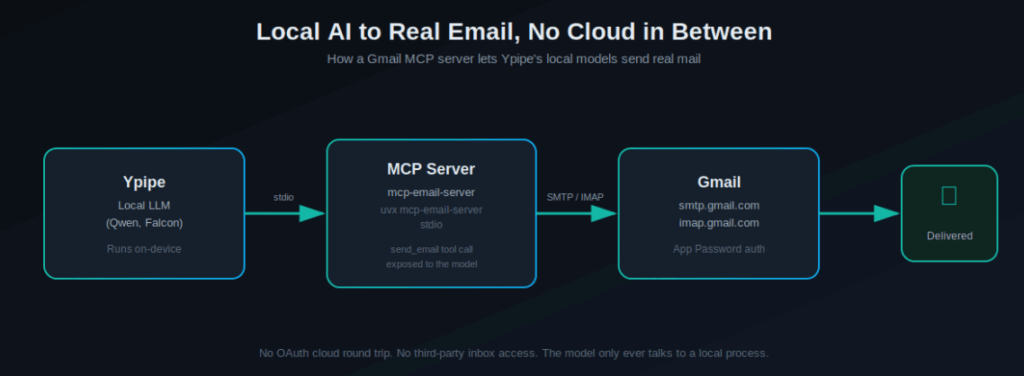
Table of Contents
- What a Gmail MCP Server Actually Does
- Why Run Email Automation Locally Instead of in the Cloud
- Choosing the Right MCP Email Server
- How Ypipe Connects to an MCP Server
- Setting Up the Gmail Blueprint Step by Step
- Testing the Full Pipeline
- What This Unlocks
- What’s Next in This Series
- FAQ
- Related Articles
What a Gmail MCP Server Actually Does
The Model Context Protocol (MCP) is a standard way for an LLM to call external tools without a developer hand-writing custom glue code for every integration. Anthropic introduced MCP as an open standard in November 2024, and it has since been adopted across the major model providers. A Gmail MCP server is simply an MCP-compliant program that exposes email actions, sending, reading, searching, moving messages, as callable tools. The model sees a tool named send_email with a defined parameter schema, and it can call it the same way it would call any other function.
The part that matters for a local-first platform like Ypipe is the transport. MCP supports stdio as a transport, meaning the server runs as a plain local subprocess and talks to the model host over standard input and output. No network port has to be opened, no webhook has to be registered, and no cloud relay sits in the middle. The entire conversation between the model, the tool, and Gmail’s mail servers happens on one machine plus a direct SMTP/IMAP connection.
Why Run Email Automation Locally Instead of in the Cloud
Most commercial “AI email assistant” tools require:
- OAuth2 authorization against your Google Workspace, handled by their servers
- Your email content passing through their infrastructure for the model to read it
- A subscription tied to their specific model, with no visibility into what it actually does with your data
Running the model and the email tool locally inverts all three. The credentials live in a config file on your machine. The model reasoning happens on your hardware. The only external network call is the one you’d make anyway, a direct SMTP connection to Gmail, using an App Password instead of a shared OAuth token.
This matters most in exactly the contexts where AI email automation is genuinely useful and genuinely risky at the same time, outreach at scale, enterprise workflows handling sensitive correspondence, and any regulated environment where a third-party data processor is a compliance question, not a convenience.
Choosing the Right MCP Email Server
Before picking a server to build on, we compared the actively maintained options in the open source MCP ecosystem.
| Project | Auth Method | Runtime | Gmail Support | Notes |
|---|---|---|---|---|
| mcp-email-server (wh1isper / ai-zerolab) | SMTP/IMAP with App Password, plus env-var config | Python, uvx | Full send and read | Most active release cadence, config UI included |
| Gmail-MCP-Server (GongRzhe) | OAuth2 against Gmail API | Node.js, npx | Native Gmail API, labels and threads | No generic SMTP fallback |
| email-mcp (codefuturist) | SMTP/IMAP, provider auto-detect | Node.js, npx | Full, plus Outlook and others | Newer project, smaller community |
| email-mcp-server (egyptianego17) | SMTP with per-call overrides | Python, uv | Full | Lightweight, less mature tooling around it |
We chose mcp-email-server, maintained by wh1isper, for three reasons that mattered more than raw star count. First, it supports pure environment-variable configuration, which is what makes a clean install form possible inside a platform like Ypipe, no manual TOML file, no editing a config on disk. Second, it ships an IMAP-only mode that can disable sending entirely for a given account, which matters for anyone building read-only research or monitoring agents on top of the same server. Third, its release history showed real, active maintenance rather than a project that had stalled after initial launch.
The trade-off is worth stating plainly: this server authenticates with a Gmail App Password over SMTP and IMAP, not OAuth2 against the Gmail API. That’s simpler to set up and doesn’t require registering a Google Cloud project, but some Workspace administrators disable App Passwords by policy. If your organization requires OAuth2, GongRzhe’s server is the alternative, at the cost of losing the generic SMTP/IMAP flexibility.
Both the reference server and the launch pattern used throughout this series depend on uv/uvx, the Python package and tool runner from Astral, which is what makes a single-line uvx mcp-email-server@latest stdio command possible without a manual virtual environment.
How Ypipe Connects to an MCP Server
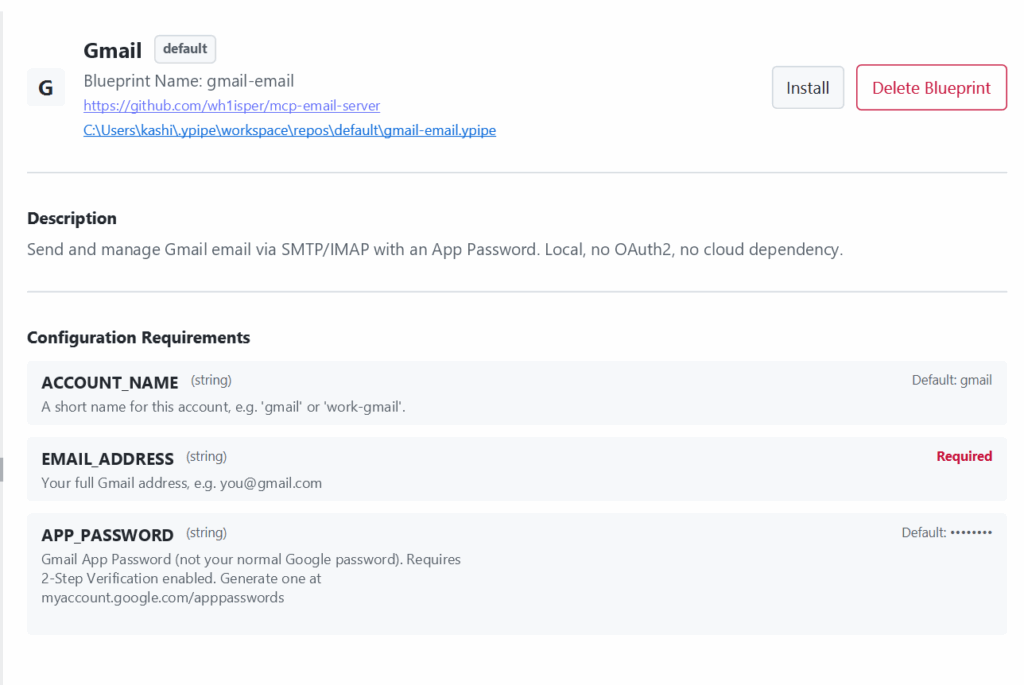
Ypipe registers external tools through a blueprint, a YAML document describing how to launch the server and what configuration it needs from the user. The two fields that matter most are mcpConfig, which defines the actual launch command, and configurationSchema, which defines the form Ypipe renders when someone installs the blueprint.
spec:
  configurationSchema:
    EMAIL_ADDRESS:
      type: "string"
      required: true
    APP_PASSWORD:
      type: "string"
      required: true
      sensitive: true
  mcpConfig:
    type: "stdio"
    command: "uvx"
    args:
      - "mcp-email-server@latest"
      - "stdio"
    env:
      MCP_EMAIL_SERVER_EMAIL_ADDRESS: "${EMAIL_ADDRESS}"
      MCP_EMAIL_SERVER_PASSWORD: "${APP_PASSWORD}"
The ${VARIABLE} syntax is the important part. Whatever the user types into the generated form gets substituted into the launch environment at install time. The user never sees or edits an environment variable directly, and the server never needs a config file written to disk by hand.
One detail worth flagging for anyone editing a blueprint’s YAML directly rather than through a UI: keep every argument in the args list as a single, complete token. A multi-word string passed as one argument can get silently split on whitespace by some editors, turning a working command into a broken one. Using uvx package-name stdio instead of a longer inline script avoids the problem entirely, since every argument is naturally a single word.
Setting Up the Gmail Blueprint Step by Step
- Generate a Gmail App Password. This requires 2-Step Verification to be enabled on the account first, then a password can be created at Google’s App Passwords page.
- In Ypipe, open Couplings, then Install Community MCP Servers.
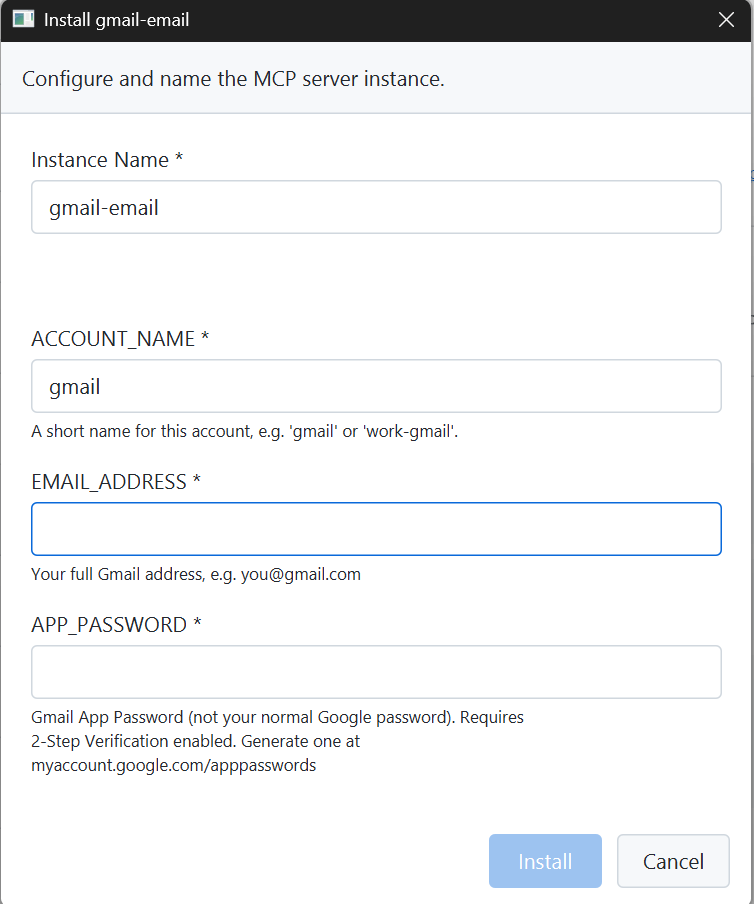
- Provide the blueprint YAML, which defines a three-field install form: account name, email address, and App Password.
- Click Install. Ypipe launches
uvx mcp-email-server@latest stdiowith the submitted values injected as environment variables. - Confirm the integration shows all expected tools enabled, including
send_email,list_available_accounts, andlist_emails_metadata.
The result is a form with exactly three fields, nothing about SMTP hosts, ports, or TLS settings is exposed, because those are fixed for Gmail and hardcoded into the blueprint itself.
| Field | Required | Description |
|---|---|---|
| Account Name | Yes | Internal label, e.g. work-gmail |
| Email Address | Yes | The full Gmail address |
| App Password | Yes | The 16-character password from Google, not the account’s normal password |
Testing the Full Pipeline
Verification has to go past what the chat interface reports. During testing, one model produced a fully plausible-looking “email sent successfully” confirmation, complete with the correct recipient and subject, without any underlying tool call having executed. The only way that surfaced was checking the actual inbox and finding nothing had arrived.
The reliable test sequence:
- Ask the model directly: what email tools do you have access to. Confirm
send_emailis listed. - Send a real test message to a second inbox you control.
- Open that second inbox and confirm the message physically arrived, correct sender, subject, and body.
- Only then trust the tool for anything beyond a single test message.
What This Unlocks
With the pipeline proven, the practical use cases are straightforward:
- AI-generated outreach, drafted and sent without the content passing through a third-party inference API
- Enterprise workflows where a local agent drafts routine correspondence for human review before sending
- Regulated environments, healthcare administration among them, where a cloud data processor is a compliance liability the organization would rather not take on
- Sovereign AI deployments where the requirement is simply that no external vendor has access to the model, the data, or the mail flow
None of this replaces basic operational safeguards. Sender and recipient allowlists, rate limiting, and a human approval step before anything autonomous goes out are still the responsibility of whatever sits on top of the MCP server, not something the protocol provides by default.
What’s Next in This Series
The blueprint working is only half the story. The other half is which models can actually be trusted to call send_email correctly, with the right parameters, on the first try, every time. That turned out to be far less consistent than the marketing around “large context windows” and “advanced reasoning” .
FAQ
What is a Gmail MCP server? It’s a Model Context Protocol server that exposes Gmail actions, sending, reading, and searching email, as callable tools an AI model can invoke directly, instead of requiring custom integration code for each platform.
Does this use OAuth2 to connect to Gmail? No. The server we used, mcp-email-server, authenticates via SMTP and IMAP using a Gmail App Password. OAuth2-based alternatives exist but don’t support the same generic SMTP/IMAP flexibility.
What is a Gmail App Password and how do I get one? It’s a 16-character password Google generates specifically for an app that doesn’t support modern OAuth2 sign-in. It requires 2-Step Verification to be enabled first, and is created at myaccount.google.com/apppasswords.
Can I use this with an email provider other than Gmail? Yes. The underlying server supports any standard SMTP/IMAP provider, including Outlook and ProtonMail Bridge. Gmail is used first in this series because its SMTP and IMAP hosts and ports are fixed, simplifying the setup.
Does Ypipe store my email password? The password is passed as an environment variable to the local MCP server process at launch. It is not transmitted anywhere outside the local machine and the direct connection to Gmail’s servers.
What transport does the MCP server use? Stdio, meaning the server runs as a local subprocess communicating over standard input and output. No network port is opened for the integration itself.
Is this safe for sending real business email autonomously? Not without additional guardrails. This setup proves the technical pipeline works. Production use needs sender and recipient allowlists, audit logging, and typically a human approval step before anything is sent without review.
Why not just use the Gmail API directly? The Gmail API requires OAuth2 and a registered Google Cloud project, which is more setup overhead for a local, single-user testing scenario. SMTP and IMAP with an App Password get the same result faster, at the cost of a less modern auth model.
What happens if the AI model gets the parameters wrong? The MCP server will typically reject a malformed call, and Ypipe has a built-in recovery step that asks the model to retry. Smaller models are considerably more prone to this failure mode, covered in detail in part 4 of this series.
Can this send HTML emails and attachments? Yes. The send_email tool accepts an html boolean flag and a list of file paths for attachments, alongside the standard recipients, subject, and body fields.
How do I know the blueprint’s YAML is configured correctly? Check that the args list under mcpConfig contains clean, single-word entries. A multi-word string as one argument is the most common cause of a broken configuration in blueprint editors.
Does every AI model size work equally well with this setup? No. Testing across model sizes showed a clear reliability drop below roughly 4 billion parameters, with smaller models struggling specifically to construct a correctly formatted tool call rather than to identify which tool to use. This is covered in depth later in the series.
[wpse_comment_list]