
1. Introduction
In the enterprise, text generation is only half the battle. Large Language Models (LLMs) are exceptionally good at drafting contracts, generating financial summaries, and creating slide decks in plain text or markdown. However, modern business operates on standard document formats: DOCX, XLSX, PPTX, and PDF.
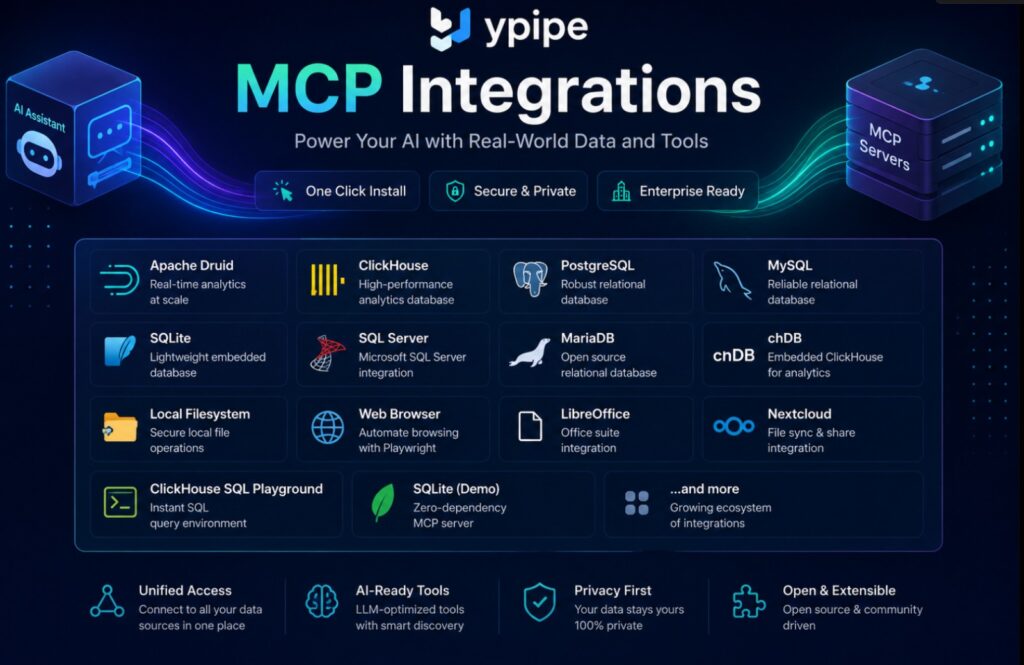
When an AI agent needs to read a heavily formatted vendor contract, extract a specific table from a massive Excel workbook, or convert a generated report into a client-ready PDF, text-based reasoning hits a wall. Relying on lightweight Python libraries like python-docx or openpyxl often leads to corrupted formatting, lost macros, and incomplete rendering.
To manipulate enterprise documents with true fidelity, the AI needs access to a full-fledged office suite rendering engine. This is why we integrated the LibreOffice MCP Server into the Ypipe ecosystem.
This article dissects the engineering philosophy behind using LibreOffice as a headless backend for AI agents, the complexities of the Universal Network Objects (UNO) API, and how Ypipe exposes this massive capability via the Model Context Protocol (MCP) for secure, local document automation.
2. What is the LibreOffice MCP Server?
LibreOffice is a powerful, open-source office suite that includes Writer (word processing), Calc (spreadsheets), Impress (presentations), and Draw (vector graphics). Crucially for engineers, it can run in “headless” mode—without a Graphical User Interface (GUI)—acting as a background server that manipulates documents programmatically.
The LibreOffice MCP Server is a standardized interface that bridges an LLM and the LibreOffice headless process. It translates the AI’s natural language intents into discrete, executable tools capable of reading, writing, modifying, and converting complex document formats securely on the local filesystem.
3. Why Enterprises Use It
Why use LibreOffice when cloud APIs like Microsoft Graph (Office 365) or Google Workspace exist? The answer lies in data sovereignty, cost, and execution speed.
- Data Sovereignty and Privacy: Enterprises routinely process highly sensitive documents (legal contracts, M&A financials, patient records). Sending these documents over the internet to a third-party API for parsing or conversion violates strict compliance frameworks (GDPR, HIPAA). LibreOffice runs locally.
- Zero API Rate Limits: Cloud document APIs are notorious for aggressive rate limiting and high costs at scale. A local LibreOffice instance can batch-convert 10,000 DOCX files to PDF bounded only by the host machine’s CPU.
- Full-Fidelity Rendering: Unlike reverse-engineered Python libraries, LibreOffice is a native renderer. It understands pagination, complex stylesheets, embedded OLE objects, and legacy formats (like old .doc or .xls files) flawlessly.
4. Problems It Solves
Integrating AI with legacy enterprise workflows introduces the “Format Barrier.”
The Extraction Problem
If you ask an LLM to “summarize the Q3 financials,” and those financials are locked in a 50-tab XLSX file with pivot tables and macros, standard Retrieval-Augmented Generation (RAG) pipelines fail. The LibreOffice MCP allows the agent to specifically target sheets, evaluate cell formulas, and extract structured data without destroying the file.
The Generation Problem
When an AI generates a legal contract, outputting markdown is insufficient for a legal department. The AI must inject its generated text into an existing, heavily branded, and legally formatted DOCX template. The MCP server allows the LLM to perform localized text replacement and style mapping programmatically.
5. Architecture Overview
The architecture of this integration relies on abstracting a notoriously complex internal API.
- The Core Engine: LibreOffice exposes an API called UNO (Universal Network Objects). UNO is incredibly powerful but famously hostile to developers, requiring complex language bindings (typically Java or C++) and a steep learning curve.
- The Headless Process: The software is invoked via a command-line flag (e.g.,
soffice --headless --accept="socket,host=localhost,port=2002;urp;"), binding it to a local port. - The MCP Bridge: The Ypipe LibreOffice MCP Server acts as a translation layer. It connects to the UNO socket, abstracts the esoteric UNO commands, and exposes simple JSON-RPC tools to the LLM (e.g.,
convert_to_pdf,read_spreadsheet_range).
6. What is the MCP Server?
The LibreOffice MCP Server is the deterministic tool wrapper. Instead of an LLM trying to write a fragile Python script using the uno module, the MCP server provides a schema of available actions.
When the AI agent decides it needs to read a presentation, it calls the MCP tool, passing the file path. The MCP server handles the lifecycle: spawning the headless LibreOffice instance, loading the PPTX into memory, extracting the slide text, shutting down the instance to free memory, and returning the text to the LLM.
7. Why AI Needs This MCP
Autonomous AI agents are increasingly used for Robotic Process Automation (RPA). Traditional RPA relies on brittle screen-scraping or rigid coordinate-based clicking.
By giving an AI the LibreOffice MCP, you move from “dumb” RPA to “semantic” RPA. The AI doesn’t need to know where the “Save As PDF” button is on the screen. It fundamentally understands the tool convert_document(source="contract.docx", format="pdf") and can execute it flawlessly, regardless of OS or screen resolution.
8. Why Ypipe Includes It
Ypipe is designed to be the ultimate orchestration layer for Enterprise AI, strongly adhering to the Package by Feature vs Package by Layer philosophy.
Document manipulation is a distinct feature. While the Filesystem MCP Server in Ypipe allows the AI to see that a file exists, it cannot parse binary document formats. We included the LibreOffice MCP to ensure that Ypipe agents have a complete, end-to-end local toolchain. When combined with the Nextcloud MCP Server in Ypipe for file synchronization, the AI gains a massive, autonomous back-office capability.
9. Installation in Ypipe
Platform Engineers deploy this integration by navigating to the Community MCP Servers in Ypipe and selecting the libreoffice blueprint (sourced from https://github.com/iunera/mcp-libre).
Because LibreOffice is a heavy desktop application, the Ypipe environment must ensure the underlying OS has the core LibreOffice binaries installed. In containerized deployments, this typically means ensuring the Dockerfile for the Ypipe runner includes the libreoffice-headless packages.
10. Configuration Explained
The configuration surface for the LibreOffice MCP is intentionally narrow, focusing entirely on process execution.
LIBREOFFICE_PATH
- Type: String
- Requirement: Required (per the UI validation).
- What it does: This defines the absolute path to the core LibreOffice executable (usually
sofficeorsoffice.exe). - Engineering Context: Why is this explicitly required rather than relying entirely on the system’s
$PATHvariable? In enterprise environments, relying on environment variables for critical executable paths is an anti-pattern. Container environments, restricted user shells, or multi-tenant servers often have stripped or modified `$PATH` variables. By explicitly defining the path (e.g.,/usr/bin/libreofficeorC:\Program Files\LibreOffice\program\soffice.exe), Ypipe ensures deterministic execution. It guarantees the MCP server targets the exact, approved, and security-patched version of LibreOffice installed by the SysAdmins, avoiding accidental invocation of legacy or conflicting software versions.
11. Screenshot Walkthrough
Let’s examine the configuration interface within Ypipe.
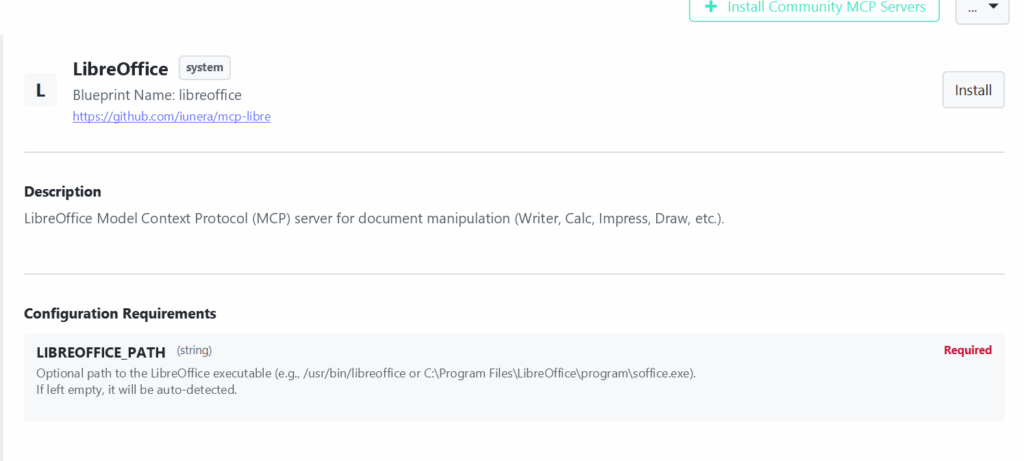
Notice the deliberate design choice regarding the LIBREOFFICE_PATH field. The helper text mentions, “Optional path… If left empty, it will be auto-detected.” However, the red Required badge is enforced by the Ypipe configuration schema.
This is a classic “defense in depth” UI pattern in platform engineering. While the underlying Python/Node code of the MCP server likely has fallback logic to search common system directories if a path isn’t provided, the Ypipe blueprint engine forces the administrator to make an explicit, documented choice during provisioning to prevent configuration drift.
12. Enterprise Use Cases
The integration of LibreOffice unlocks high-value automation workflows:
- Bulk Document Sanitization: An AI compliance agent scans a network drive using the Filesystem MCP, opens every DOCX and ODT file using the LibreOffice MCP, searches for Personally Identifiable Information (PII) using a local LLM, redacts the text, and exports sanitized PDFs.
- Automated Invoice Processing: An agent receives legacy
.xlsfiles, uses LibreOffice Calc to extract structured line items, and pipes that data into the PostgreSQL MCP Server in Ypipe for accounting. - Dynamic Proposal Generation: Sales agents can take an RFP (Request for Proposal), ask the LLM to generate custom responses, and use the LibreOffice MCP to inject those responses directly into a branded PPTX template.
13. Performance
Unlike querying a database, rendering a document is CPU and RAM intensive.
Spawning a new soffice --headless process for every single file operation creates severe latency (often 2-4 seconds just for the application to boot). Advanced deployments of the LibreOffice MCP handle this via Process Pooling. The server keeps a persistent headless instance of LibreOffice running in the background, listening on the UNO socket. When the LLM requests a conversion, the MCP server passes the instruction to the warm instance, reducing operation times from seconds to milliseconds.
14. Security
Running a complex rendering engine that parses external files introduces significant security considerations.
- Macro Execution Risks: LibreOffice supports powerful macros (Basic, Python). Malicious documents can exploit this. The MCP Server explicitly disables macro execution when booting the headless instance to prevent Remote Code Execution (RCE).
- Filesystem Traversal: The AI agent should only be able to manipulate documents within a designated, sandboxed directory. This is managed by coordinating the LibreOffice MCP with a strictly scoped Filesystem MCP.
- Data Sovereignty: Because no data is sent to external APIs (like Adobe or Microsoft), the security boundary remains entirely within your VPC, perfectly supporting a zero-trust architecture.
(For more on securing local agent environments, read: The Hidden Privacy Risk of MCP Servers).
15. Best Practices
To maximize stability when building AI document workflows:
- Standardize Formats: Instruct your LLM to standardize on OpenDocument formats (ODT, ODS) or standard OOXML (DOCX, XLSX) during its reasoning loops to ensure maximum compatibility with the LibreOffice rendering engine.
- Handle Async Operations: Large document conversions (e.g., a 500-page PDF generation) take time. Ensure the AI agent is prompted to expect a slight delay, rather than assuming the tool failed and aggressively retrying.
- Memory Limits: LibreOffice can consume significant RAM when opening massive spreadsheets. Monitor your container memory limits closely if the agent is processing large datasets.
16. Common Mistakes
- Incorrect Path Mapping: In Docker/Kubernetes deployments, providing a Windows path (
C:\...) to a Linux container, or failing to volume-mount the LibreOffice binary into the container space. - Assuming OCR Capabilities: LibreOffice is a document renderer, not an Optical Character Recognition (OCR) engine. It cannot extract text from an image embedded inside a PDF.
- GUI Interlock: Accidentally running the MCP server on a local machine where a human user currently has LibreOffice open. This can cause file-locking conflicts if they are sharing the same user profile directory.
17. Why This Integration Matters
By bringing the LibreOffice MCP Server into Ypipe, we bridge the gap between digital reasoning and analog business processes. AI is no longer trapped in the chat box; it has a set of digital hands capable of formatting, compiling, and finalizing the actual artifacts that drive enterprise operations, doing so with total privacy and zero API costs.
18. Related MCP Servers
Explore how the LibreOffice integration interacts with other systems in the Ypipe ecosystem:
- Filesystem MCP Server in Ypipe (Crucial for locating the documents LibreOffice will manipulate)
- Browser MCP Server in Ypipe
- SQLite MCP Server in Ypipe
- PostgreSQL MCP Server in Ypipe
- ClickHouse MCP Server in Ypipe
- MariaDB MCP Server in Ypipe
- SQL Server MCP Server in Ypipe
- Nextcloud MCP Server in Ypipe (For syncing the modified documents to the broader team)
- Apache Druid MCP Server in Ypipe
- What are MCP Servers?
19. Frequently Asked Questions
1. Why use LibreOffice instead of Microsoft Word API?
LibreOffice runs entirely locally, requiring no internet connection, no API keys, and incurring no per-document conversion costs. It ensures complete data privacy for sensitive enterprise files.
2. Can the AI edit existing DOCX files without destroying the formatting?
Yes. Because LibreOffice is a native renderer, it can perform localized text replacements or data injections without flattening or breaking the underlying XML formatting of a DOCX file.
3. Why is the LIBREOFFICE_PATH required in Ypipe?
Explicit path configuration prevents execution errors in enterprise and containerized environments where relying on the system `$PATH` variable is insecure or unpredictable.
4. Does the server support PDF conversion?
Yes. PDF conversion via headless LibreOffice is one of the most reliable and heavily utilized features of this MCP server.
5. Can the AI run Excel macros (.xlsm)?
For security reasons, macro execution is typically disabled by default when running LibreOffice in headless mode via MCP to prevent malicious code execution by the AI.
6. Is LibreOffice required to be installed on the host machine?
Yes. The MCP server is a bridge; the actual LibreOffice software must be installed on the machine or container running the Ypipe agent.
7. How does this differ from the Filesystem MCP?
The Filesystem MCP can move, copy, and read plain text files. It cannot parse the proprietary binary or complex XML structures of DOCX/XLSX. LibreOffice MCP handles the actual document rendering and parsing.
8. Can the AI extract data from a specific cell in Calc?
Yes. The MCP provides tools to target specific sheets, rows, and cells within a spreadsheet, returning structured data to the LLM.
9. Is it slow to boot up LibreOffice for every file?
It can be. Optimized deployments keep a background LibreOffice process running (warmed up) and communicate with it via socket to ensure low latency.
10. Does this work on Windows and Linux?
Yes. LibreOffice is cross-platform, and the MCP server can orchestrate it regardless of the underlying OS, provided the LIBREOFFICE_PATH is correct.
11. Can the AI create presentations?
Yes. The AI can generate text and use the MCP tools to inject that text into an Impress (or PPTX) template.
12. What happens if a file is password-protected?
The MCP tool request will fail unless the LLM is explicitly programmed to pass the decryption password via the tool arguments.
13. How does this prevent prompt injection?
The MCP server strictly limits the API surface. An LLM cannot execute arbitrary shell commands; it can only invoke specific, predefined document functions exposed by the MCP.
14. Can it read PDFs?
LibreOffice Draw can open and parse vector-based PDFs (not scanned images), allowing the AI to extract text, though dedicated PDF parsing tools are sometimes faster for pure text extraction.
15. Is this integration free?
LibreOffice is free and open-source software. The community MCP server is also open-source. Check the Ypipe GitHub for platform-specific deployment details.
20. Conclusion
The LibreOffice MCP Server transforms an AI agent from a sophisticated chatbot into a highly capable back-office assistant. By bridging the gap between LLM reasoning and full-fidelity document rendering, Ypipe enables enterprises to automate complex, document-heavy workflows securely, locally, and without the exorbitant costs of cloud APIs.
Understanding how to properly configure the LIBREOFFICE_PATH and architect your system for headless execution ensures your autonomous agents can manipulate everything from financial spreadsheets to legal contracts seamlessly.