
How can HR, controlling, and business teams use AI to answer questions from internal company databases—without risking wrong numbers, unauthorized data access across departments, or cloud data leaks?
With YPipe by iunera, you connect AI directly to your existing company databases (such as HR employee directories, finance tables, or inventory systems) 100% on-premise. Unlike standard AI database connectors where an AI guesses how tables fit together and can access everything, YPipe uses clear, pre-approved database lookups and locks access by department—so teams only see the exact records they are authorized to see.
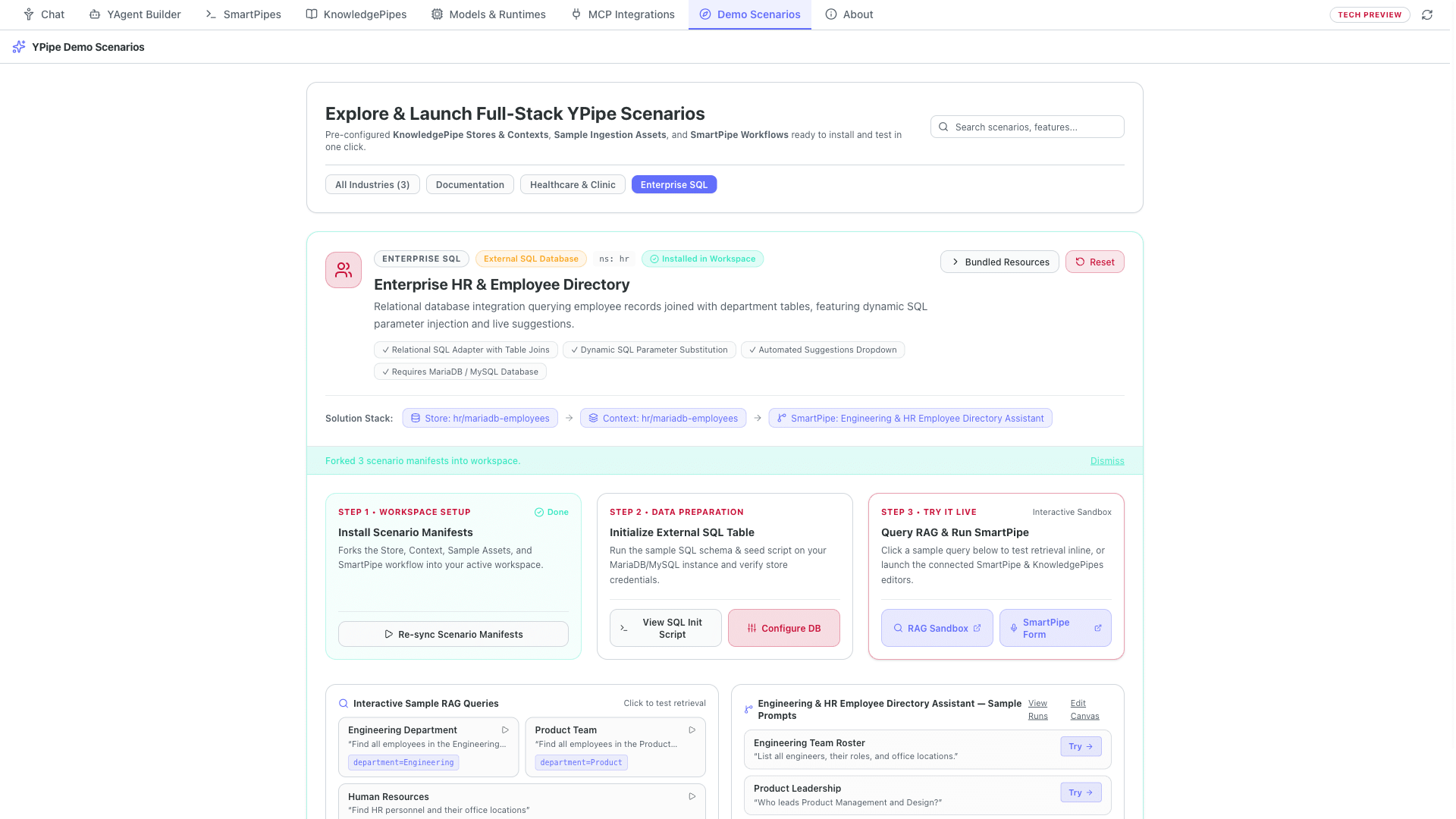
Table of Contents
- Key Takeaways
- Unlocking Existing Company Databases Without Copying Data or Risking Leaks
- Why Pre-Approved Database Lookups Beat Generic AI Connectors
- Strict Department-Level Access Control: Protecting HR & Financial Privacy
- Seamless Integration into Everyday Business Forms and Workflows
- Generic AI Database Connector (Raw MCP) vs. YPipe Controlled Database Lookup
- Step-by-Step Walkthrough Inside YPipe
- Frequently Asked Questions
- Related Articles & Video Series
Key Takeaways
- Use Your Existing Company Databases Directly: Connect HR directories, financial records, and inventory tables directly to YPipe without copying or rebuilding your data.
- No AI Guessing or Invented Numbers: Unlike generic AI database tools (MCP servers) where the AI has to guess database structures on the fly, YPipe uses clear, pre-approved lookups so answers are always reliable.
- Strict Department-Level Access Control: Easily restrict an AI assistant to a single department or team (for example, only Engineering or only HR) so confidential records from other departments are never exposed.
- Easy Dropdown Selection for Business Users: Automatically provides clean department and category dropdowns so non-technical staff can look up information effortlessly.
- Zero Cloud Data Leaks: Every employee record and business figure stays 100% on your company’s own hardware.
Unlocking Existing Company Databases Without Copying Data or Risking Leaks
The most valuable business information in any organization—human resources employee directories, controlling cost centers, financial ledgers, and inventory tables—already lives in structured relational databases such as MariaDB, PostgreSQL, and MySQL. Business leaders in HR, finance, and operations want their teams to ask natural-language questions over this data, but they cannot accept cloud data leaks, expensive data-duplication projects, or an AI that invents numbers.
With YPipe by iunera, companies connect their existing databases directly to on-premise AI in strictly read-only mode—without moving or copying a single table.
Why Pre-Approved Database Lookups Beat Generic AI Connectors
When companies connect a generic AI database connector (a raw MCP server) directly to a production database, two problems happen immediately: first, the AI model has to guess how dozens of tables and foreign keys fit together on the fly, leading to wrong figures or slow queries; second, the AI gains broad visibility across sensitive tables (The Hidden Data Leakage Risk of MCP Servers).
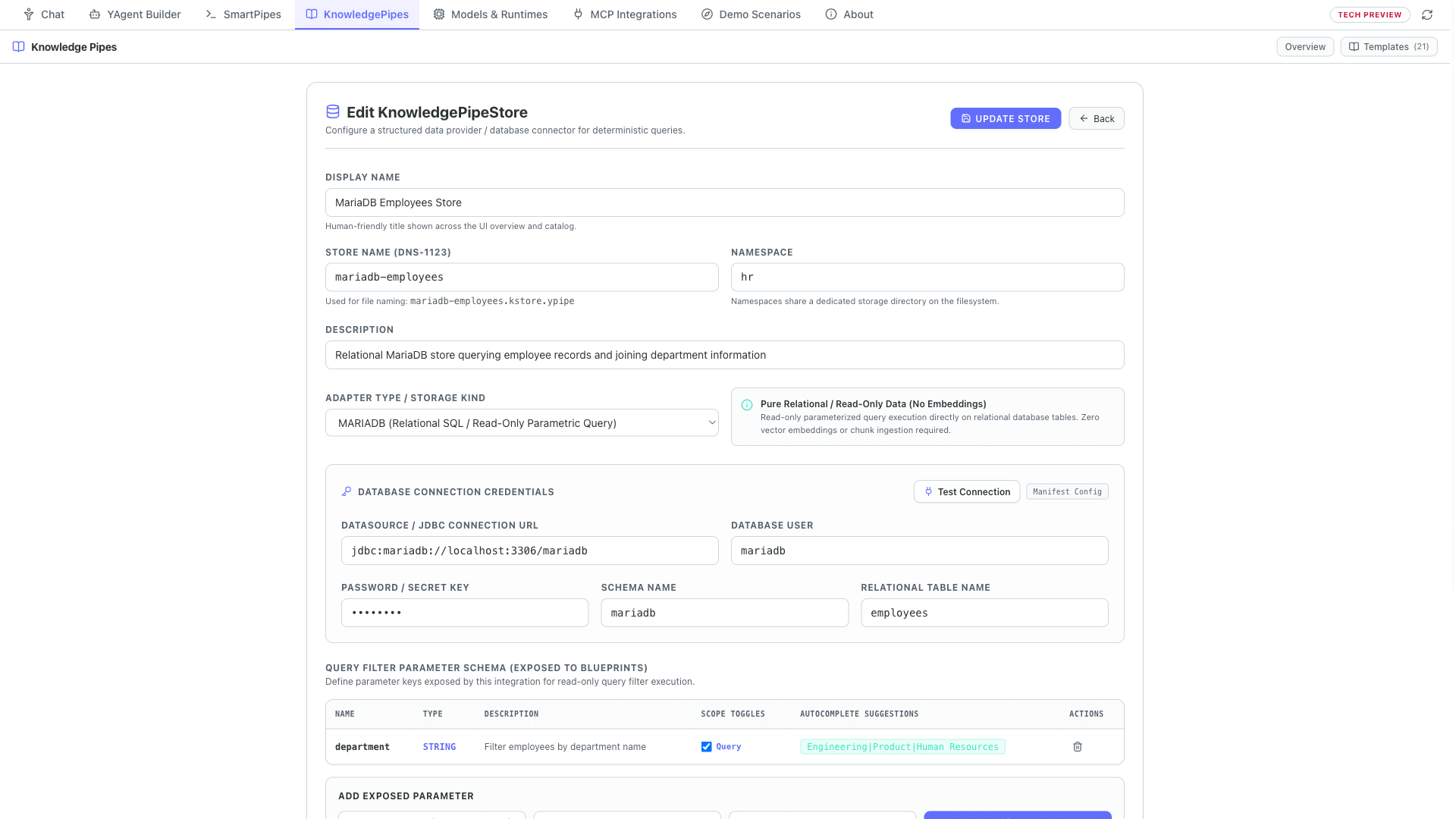
In YPipe, IT defines a clear, pre-approved read-only lookup with the exact table connections once up front, and automatically provides clean dropdown suggestions (such as active department names and job roles) so business users get 100% accurate figures every time.
Strict Department-Level Access Control: Protecting HR & Financial Privacy
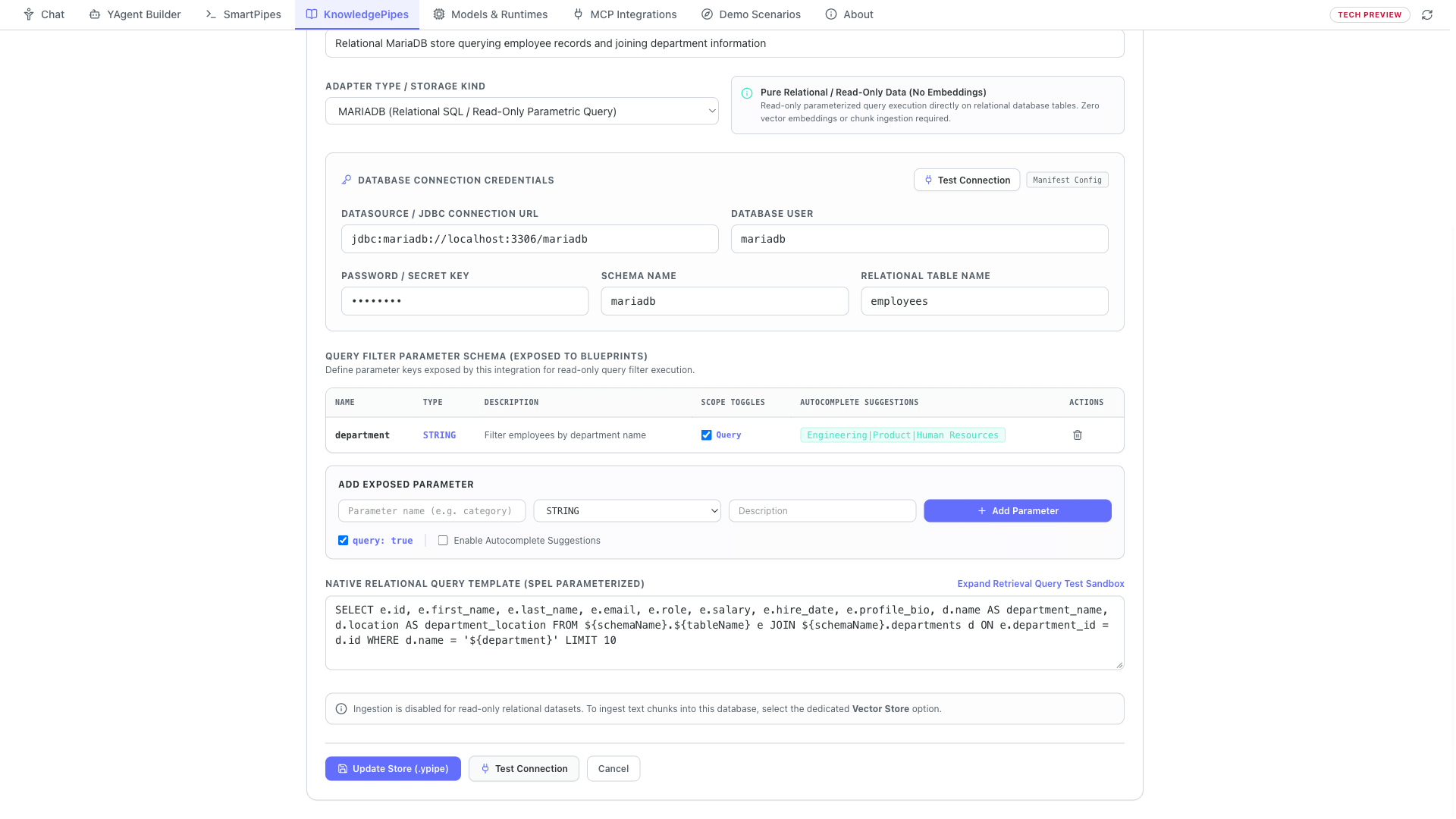
Even within the same company, an Engineering manager should not be able to pull executive compensation or HR records from Finance or Legal. YPipe lets you create a Department-Locked View (`KnowledgePipe Context`) on top of your database connection that permanently restricts retrieval to a specific department, team, or cost center (role-based access control).
When an Engineering lead queries the assistant, YPipe guarantees that only Engineering records are returned—preventing unauthorized cross-department browsing and eliminating any risk of accidental data modification.
Seamless Integration into Everyday Business Forms and Workflows
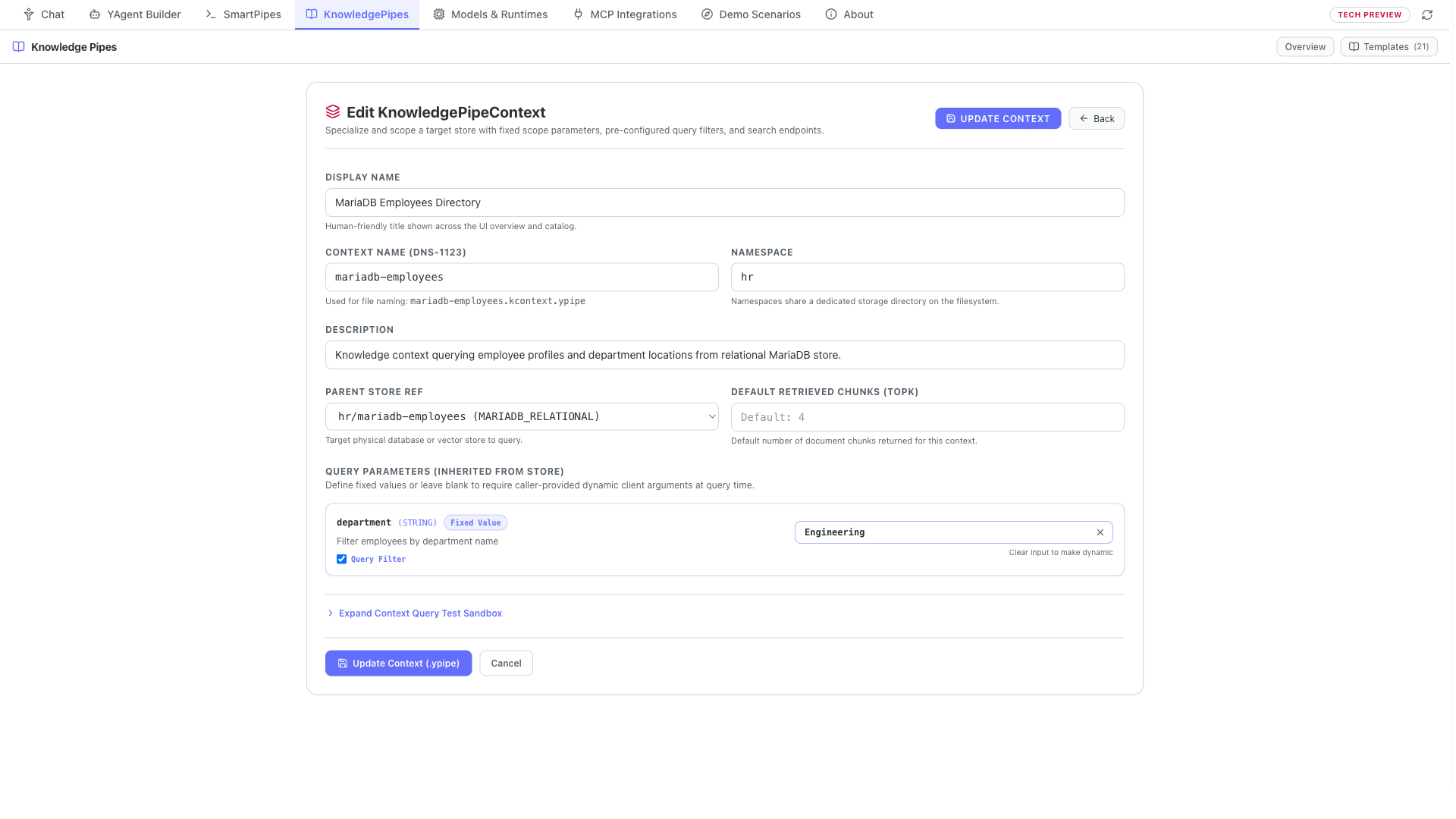
Once configured, these department-locked database views plug directly into YPipe’s interactive Web Forms and automated workflows—allowing HR specialists, controllers, and team leads to generate accurate staffing and budget summaries in seconds, 100% on-premise.
Generic AI Database Connector (Raw MCP) vs. YPipe Controlled Database Lookup
| Security & Accuracy Control | Generic AI Database Connector | YPipe Controlled Database Lookup |
|---|---|---|
| Query Accuracy & Table Joins | AI guesses SQL joins at runtime (high risk of wrong numbers) | IT defines pre-approved, verified SQL joins once up front |
| Department & Role Isolation | Exposes entire database tables to the AI model | Locks each view to a specific department or cost center |
| Data Modification Risk | Risk of unintended writes if credentials are broad | Enforced read-only connection & parameterized lookups |
| Data Migration / ETL Required | Often requires syncing to external vector stores | Zero-ETL: queries live MariaDB, PostgreSQL & MySQL tables directly on-premise |
Step-by-Step Walkthrough Inside YPipe
Step 0: Zero-ETL Relational SQL Grounding & Department Isolation
How do you connect local AI directly to live Maria-D-B and PostgreSQL tables with zero vector duplication, zero SQL injection risk, and strict department isolation?
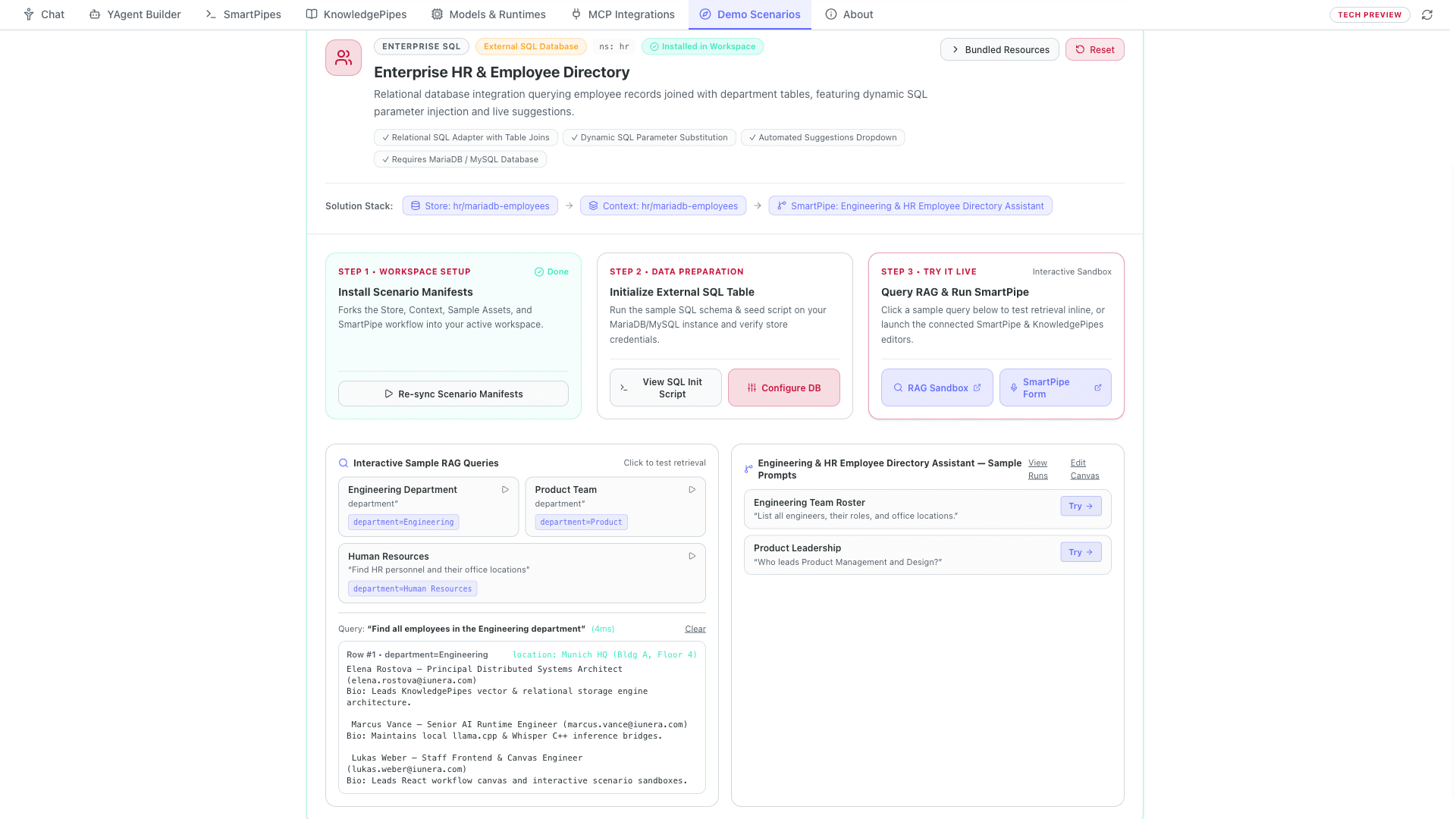
Step 1: Enterprise SQL Scenario — Zero-ETL Relational Database Grounding
Not all enterprise knowledge belongs in a vector database. Critical records like human resources directories, inventory tables, and financial ledgers already live in structured relational databases. Y-Pipe’s Enterprise SQL Scenario connects your AI workflows directly to live Maria-D-B, My-S-Q-L, and PostgreSQL tables without duplicating data into vector embeddings.
Step 2: MariaDB Relational Adapter — Clear SQL Joins vs. Raw MCP Queries
Inside the Maria-D-B Employees Store, the Relational SQL Adapter offers a major advantage over generic database MCP servers. Instead of letting a model guess table schemas or write unconstrained SQL queries at runtime, you define a clear, read-only SQL statement with exact table joins up front. Here, employee records are joined with department locations deterministically, and enabling autocomplete suggestions automatically queries distinct column values to populate UI dropdowns.
Step 3: Scoped Relational Context — Strict Row Isolation & Safe Parameters
Even more importantly, a Knowledge-Pipe Context lets you lock and scope that SQL query to specific parameters—such as a single department—which is impossible with a raw database MCP server that exposes entire tables. When Y-Pipe, a Smart-Pipe, or a Y-Agent queries the HR Directory Context, Y-Pipe safely injects the permitted department parameter into the prepared statement, guaranteeing zero SQL injection risk, zero foreign data leakage, and zero hallucinated employee records.
Step 4: Unified SmartPipe Integration — Live SQL Lookups + Local LLM
Finally, these scoped relational Contexts plug directly into Smart-Pipes and Y-Agents using the exact same interface as vector stores—combining deterministic, on-premise SQL lookups with local language model synthesis in a single governed workflow.
Frequently Asked Questions
Do we have to copy our company database into a new system to use YPipe? No. YPipe connects directly to your existing MariaDB, MySQL, or PostgreSQL databases on-premise without duplicating or migrating your data.
Why is YPipe safer than a standard AI database connector? A standard connector lets the AI write arbitrary SQL queries and see entire tables. YPipe uses pre-approved, read-only database lookups and locks each assistant view to a specific department.
Can we restrict an AI assistant so a manager only sees their own department’s records? Yes. You can create a department-locked Context (for example, locked to Engineering or Sales) so the AI can never retrieve rows from other departments.
Can the AI accidentally delete or change records in our company database? No. YPipe enforces strictly read-only database connections and pre-approved parameterized queries, making data modification or SQL injection impossible.
How does YPipe prevent the AI from inventing numbers or guessing wrong table joins? Because IT defines the exact SQL join across your tables once in the Store configuration, the AI never has to guess how tables relate.
Does YPipe provide dropdown suggestions for business users? Yes. YPipe can automatically populate dropdown menus with valid department names, roles, or categories straight from your database.
Are employee records or financial numbers ever sent to an external cloud? Never. Both the database lookup and the AI summarization run 100% on-premise on your company’s own hardware.
How can HR, controlling, or IT teams test this with their own database? Visit ypipe.com or iunera.com to explore YPipe and request an on-premise enterprise evaluation.
Related Articles & YPipe Video Series
YPipe by iunera is The Sovereign Local-First AI Platform—running 100% locally on workstations or on-premise on your enterprise and clinic servers with full GDPR, HIPAA, and EU AI Act sovereignty. Explore our related engineering studies on Kraken and the full video series below:
Related Kraken Articles on YPipe & Local AI
- PostgreSQL MCP Server in Ypipe: Engineering Secure Transactional AI Memory
- MariaDB MCP Server in Ypipe: Engineering Reliable Relational AI
- The Hidden Data Leakage Risk of MCP Servers
- Apache Druid MCP Server in Ypipe: Engineering Real-Time AI Analytics
Explore All Episodes in the YPipe Video Series
- Episode 01: YPipe — The Sovereign Local-First AI Platform | Manifold Engine, MCP, SmartPipes & On-Premise RAG
- Episode 02: Re:Think Local AI — 800M Qwen 3.5 & YPipe Manifold Engine: Tool Calling & Reasoning on Laptops
- Episode 03: YPipe SmartPipes — Visual Multi-Model AI Workflows (Whisper, Vision OCR, REST Webhooks & MCP Tools)
- Episode 04: YPipe KnowledgePipes — Declarative Local & On-Premise RAG | Vector DBs, SQL & Scoped Contexts
- Episode 05: Private AI for Hospitals & Clinics — Voice Ward Rounds, Patient Privacy & Drug Safety in YPipe
- Episode 06: Private AI Meeting Minutes & Company Knowledge — Record Confidential Meetings Safely with YPipe
- Episode 07: Alibaba Qwen + MariaDB + AMD Ryzen — Sovereign Enterprise AI on Everyday CPUs with YPipe
- Episode 08 (This Article): Safe On-Premise AI for Company Databases & HR — Controlled Department Data Access with YPipe
Official YPipe Resources
- Official YPipe Website: https://ypipe.com
- iunera Company Website: https://www.iunera.com
- GitHub Repository: https://github.com/iunera/ypipe
- Full YouTube Video Series Playlist: https://www.youtube.com/playlist?list=PLIB7VtTuXX3Y