
Introduction
In modern enterprise architectures, the bottleneck for AI is rarely the reasoning capability of the underlying Large Language Model (LLM). The real bottleneck is context. LLMs are functionally isolated brains; without high-throughput, low-latency access to organizational data, they degrade into generic text generators.
We built the Model Context Protocol (MCP) ecosystem in Ypipe to bridge this exact gap. But while integrating standard operational databases like PostgreSQL or SQLite (see our deep dives on PostgreSQL MCP Server in Ypipe and SQLite MCP Server in Ypipe) solves for transactional state, it falls fundamentally short for analytical workloads. When an LLM needs to reason over billions of event streams, network telemetry logs, or real-time clickstreams, traditional RDBMS architectures choke.
Enter the Apache Druid MCP Server in Ypipe.
This article deconstructs why we integrated Apache Druid into the Ypipe MCP ecosystem, how the architecture functions under the hood, and the specific engineering decisions required to expose sub-second OLAP queries to autonomous AI agents safely and efficiently.
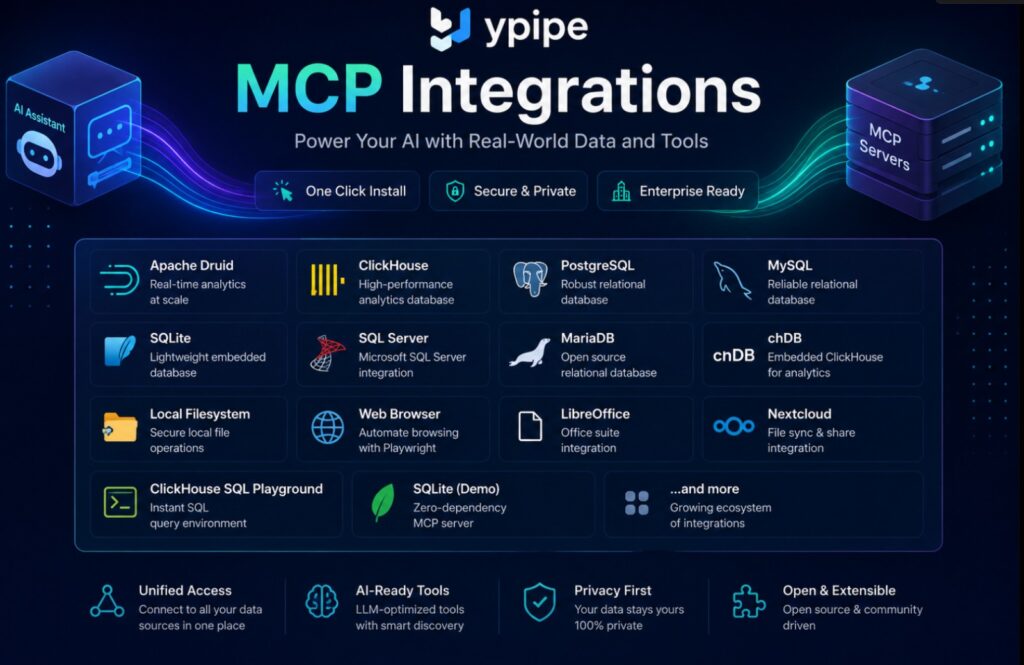
Table of Contents
- What is Apache Druid?
- Why Apache Druid?
- What problems does it solve?
- Why enterprises use Apache Druid
- Apache Druid Architecture
- How Apache Druid works
- What is Apache Druid MCP?
- Why Apache Druid needs MCP
- How Apache Druid MCP works
- How Ypipe integrates Apache Druid MCP
- Ypipe Integration Blueprints
- Installation in Ypipe
- Configuration Explained
- How tool discovery works
- How vector search improves MCP
- Why Ypipe avoids context pollution
- Security
- Performance
- Enterprise AI Use Cases
- Best Practices
- Common Mistakes
- Architecture Decisions
- How Ypipe improves the experience
- GitHub Repository
- Project Maintainers
- License
- Official Documentation
- Further Reading
- FAQ
- Conclusion
- SEO & Social Assets
What is Apache Druid?
Apache Druid is a high-performance, real-time analytics database designed for fast slice-and-dice analytics (OLAP) on large data sets. It is written in Java and built to ingest massive quantities of event data, providing low-latency queries on top of that data.
Think of it as a specialized engine that sits at the intersection of a time-series database, a search system, and a column-oriented analytical database.
Why Apache Druid?
Standard data warehouses (like Snowflake or BigQuery) are built for complex, heavy batch queries. They are not optimized for concurrent, sub-second latency queries spanning real-time and historical data simultaneously.
We look to Druid when we need:
- Sub-second query responses over petabytes of data.
- High concurrency, supporting thousands of concurrent queries (and in our case, concurrent AI agent requests).
- Real-time ingestion, where data is queryable within milliseconds of creation.
What problems does it solve?
From an engineering perspective, bridging AI with data involves dealing with the “recency vs. volume” tradeoff.
- The Recency Problem: Batch-processed warehouses contain stale data (hours or days old). If an LLM is analyzing a live DDoS attack, yesterday’s data is useless.
- The Volume Problem: Time-series databases handle recency well but struggle with high-cardinality aggregations and complex JOINs across broad historical timeframes.
Druid solves the convergence of these problems. By exposing Druid through MCP, we allow LLMs to instantly ask questions like, “What is the anomaly rate in network traffic over the last 30 seconds compared to the 30-day historical baseline?” and receive an answer immediately.
Why enterprises use Apache Druid
Enterprises adopt Druid when their analytical applications cross a threshold of scale that breaks traditional systems.
- Telecoms use it for network telemetry.
- AdTech uses it for clickstream and programmatic bidding analytics.
- FinTech uses it for real-time fraud detection.
When paired with Enterprise AI, Druid shifts from being a backend for human-facing dashboards (like Apache Superset) to a high-speed sensory organ for AI agents.
Apache Druid Architecture
To understand the MCP integration, you must understand Druid’s distributed, multi-process architecture. It is not a monolith.
Druid separates storage and compute across specialized nodes:
- Master Nodes (Coordinator / Overlord): Manage data availability and ingestion tasks.
- Query Nodes (Broker / Router): Route queries and merge results from historical and real-time nodes.
- Data Nodes (Historical / MiddleManager): Execute the actual ingestion and store the immutable segments.
This separation of concerns is critical for MCP. When configuring the Druid MCP server in Ypipe, we specifically point the LLM’s tooling towards the Router and Coordinator APIs, abstracting the underlying node complexity away from the LLM.
How Apache Druid works
Druid partitions data by time into “Segments”. Each segment contains column-oriented, dictionary-encoded, and bitmap-indexed data.
When a query arrives at the Broker (or Router), the Broker identifies which historical and real-time nodes hold the relevant segments, scatters the query to those nodes, and gathers/merges the partial results. This scatter-gather architecture is what enables the sub-second latency, making it the perfect analytical backend for iterative LLM reasoning loops (like ReAct).
What is Apache Druid MCP?
The Apache Druid MCP (Model Context Protocol) Server is a standardized interface that translates the complex, distributed capabilities of a Druid cluster into discrete, discoverable tools that an LLM can understand and execute.
Instead of writing a custom Python script with pydruid for every AI project, the MCP server provides a standardized contract. It exposes Druid’s SQL API, ingestion supervisors, and cluster diagnostic endpoints as native tools to any compatible AI client.
Why Apache Druid needs MCP
Before MCP, exposing Druid to an LLM was fraught with brittle abstractions. You had to:
- Build a custom middle-tier API.
- Hardcode SQL generation capabilities into the LLM prompt.
- Manually handle the massive JSON payloads Druid returns, which would easily blow up the LLM’s context window.
Druid needs MCP to provide structured tool boundaries. An LLM shouldn’t just send raw text to a Druid endpoint; it needs a deterministic tool that says execute_druid_sql(query: string, limit: int) and handles the protocol-level serialization, error handling, and context window management automatically.
How Apache Druid MCP works
The Druid MCP Server operates as a lightweight bridge.
- The LLM (via the MCP Client in Ypipe) requests the list of available tools.
- The Druid MCP Server returns tools like
druid_sql_query,druid_cluster_health,druid_supervisor_status. - When the LLM decides to analyze data, it invokes
druid_sql_querywith a dynamically generated SQL string. - The MCP Server translates this into a Druid SQL HTTP POST request to the
DRUID_ROUTER_URL. - The JSON response is parsed, optionally summarized (to prevent context overflow), and returned to the LLM.
How Ypipe integrates Apache Druid MCP
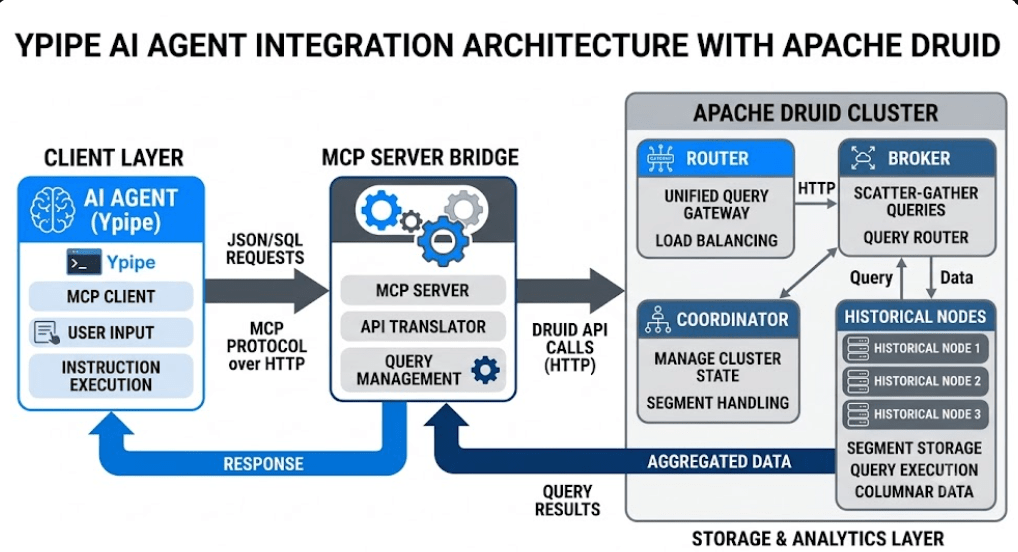
Integrating an MCP server into a local desktop app is easy. Integrating it into a secure, distributed enterprise platform is hard.
Ypipe treats MCP servers as first-class citizens using a Package by Feature architecture. Rather than lumping all database connectors into a single monolithic data layer, Ypipe encapsulates the Druid MCP server—its dependencies, configuration schemas, and discovery hints—into an isolated, deployable feature module.
Ypipe Integration Blueprints
To eliminate configuration drift across enterprise environments, Ypipe uses Integration Blueprints. A blueprint is a declarative configuration file that defines exactly how an MCP server should be instantiated, what environment variables it requires, and what security constraints are placed upon it.
The Druid MCP Server uses the druid blueprint, linking directly to the community server at https://github.com/iunera/druid-mcp-server.
Installation in Ypipe
Installing the Apache Druid MCP server in Ypipe is designed to be frictionless for Platform Engineers. Through the Ypipe UI, administrators navigate to the MCP Integrations panel, select “Install Community MCP Servers,” and choose Apache Druid.
This triggers the blueprint engine to provision the server sandbox and prompt the administrator for the specific configuration required to securely connect to their internal Druid cluster.
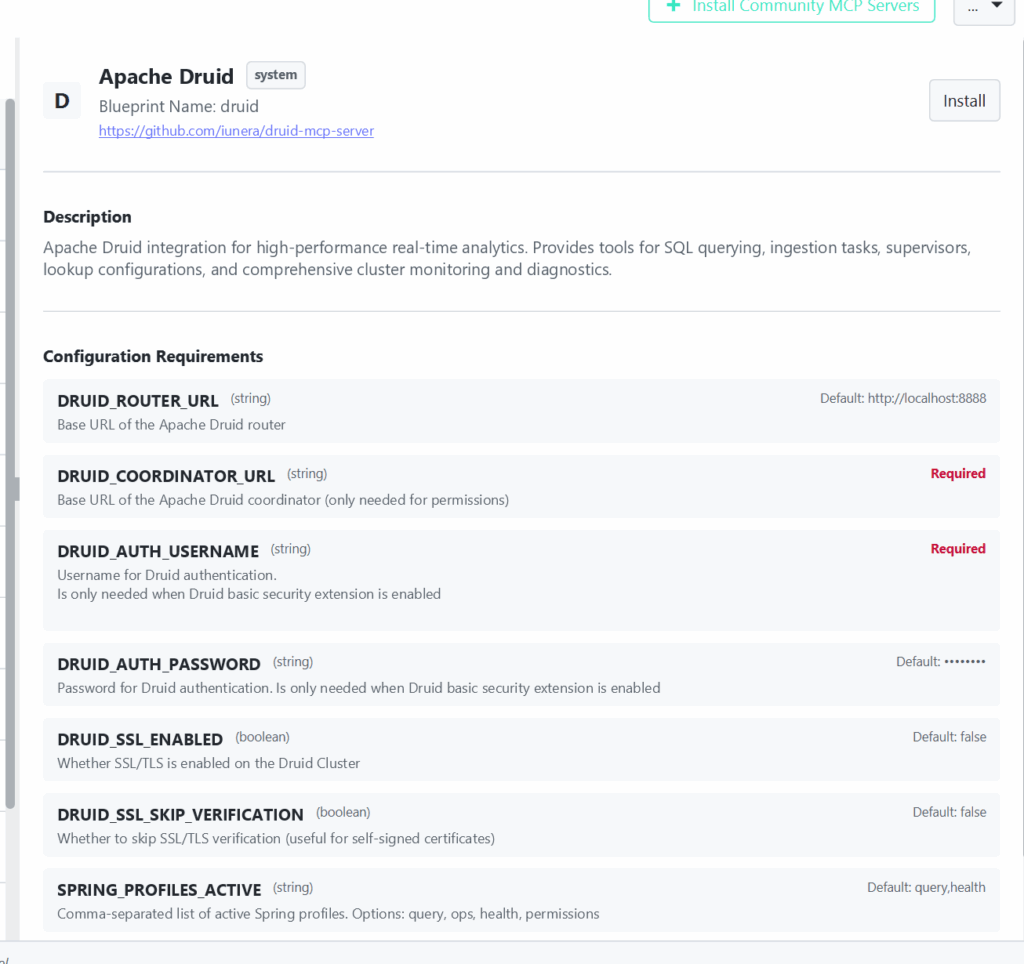
Configuration Explained
Let’s break down the exact configuration parameters shown in the Ypipe interface, why they exist, and the engineering logic behind them.
DRUID_ROUTER_URL
- Type: String
- Default:
http://localhost:8888 - What it does: This is the base URL of the Apache Druid Router (or Broker). All SQL queries and data lookups executed by the LLM will be routed through this endpoint.
- Why it exists: The Router is the unified API gateway for a Druid cluster. By pointing the MCP server here, we avoid needing to individually address brokers, historicals, or middle managers.
- Enterprise Action: Enterprises should change this to their internal load balancer or ingress controller URL that fronts the Druid Routers (e.g.,
https://druid-router.internal.company.com).
DRUID_COORDINATOR_URL
- Type: String
- Requirement: Required
- What it does: The base URL of the Druid Coordinator node.
- Why it exists: While the Router handles data queries, the Coordinator manages metadata, permissions, segments, and cluster state. If the LLM needs to check if a specific data source is fully loaded or manage permissions (if the
permissionsprofile is active), it must talk to the Coordinator. - Enterprise Action: Set this to the internal DNS of the Coordinator load balancer.
DRUID_AUTH_USERNAME & DRUID_AUTH_PASSWORD
- Type: String
- Requirement: Required (Username), Default
********(Password) - What it does: Credentials for the Druid Basic Security extension.
- Why it exists: Enterprise Druid clusters are never unauthenticated. Ypipe injects these securely into the MCP server’s environment so that the server can authenticate its HTTP requests to Druid on behalf of the AI agent.
- Enterprise Action: Use a dedicated service account for the Ypipe MCP Server. Do not use an admin account. Apply the principle of least privilege—the Ypipe service account should only have
READaccess to the specific datasources the AI needs.
DRUID_SSL_ENABLED & DRUID_SSL_SKIP_VERIFICATION
- Type: Boolean
- Default:
false - What it does: Toggles TLS for the HTTP connections to Druid, and allows bypassing certificate validation.
- Why it exists: In zero-trust networks, all internal traffic must be encrypted.
SKIP_VERIFICATIONis a pragmatic inclusion for dev/staging environments using self-signed certificates. - Enterprise Action: Always enable
DRUID_SSL_ENABLEDin production. Only useSKIP_VERIFICATIONin local development.
SPRING_PROFILES_ACTIVE
- Type: String
- Default:
query,health - What it does: A comma-separated list that controls which specific feature sets (tools) the MCP server exposes to the LLM. Options include
query,ops,health, andpermissions. - Why it exists: This is a masterstroke in Good MCP Design. You do not want every LLM agent to have the ability to run operational tasks (
ops) or alter RBAC (permissions). By activating onlyqueryandhealth, Ypipe ensures the LLM can only query data and check if the cluster is up. - Enterprise Action: Strictly control this. For an analytics chatbot, limit this to
query. Only grantopsto dedicated SRE autonomous agents.
How tool discovery works
When Ypipe initializes the Druid MCP Server, it uses Discovery Hints. Instead of dumping all tools into the LLM’s context immediately, Ypipe parses the SPRING_PROFILES_ACTIVE configuration.
If only query is active, Ypipe dynamically prunes the tool schema sent to the LLM. The LLM only “discovers” druid_sql_query and druid_list_datasources. This use-case driven approach prevents the LLM from hallucinating calls to tools it shouldn’t have access to.
How vector search improves MCP
While Druid is an OLAP database, not a vector database, Ypipe leverages local Vector Search to augment MCP tool selection.
When an enterprise has 50+ MCP servers connected to Ypipe (Druid, Postgres, Filesystem, Jira, etc.), feeding all tool schemas into a Small LLM (like Llama 3 8B) instantly exhausts its context. Ypipe embeds the tool descriptions and user prompt, performs a local vector search, and only injects the relevant MCP tools (e.g., the Druid SQL tool) into the context when the user asks an analytical question.
Why Ypipe avoids context pollution
Context pollution occurs when you feed an LLM massive amounts of irrelevant data or oversized schemas, degrading its ability to reason.
An unoptimized Druid query might return 100,000 rows of JSON. If an MCP server naively pipes that back, the LLM fails. Ypipe mitigates this via Tool Overrides and the MCP server’s internal design, which forces a hard LIMIT on SQL queries and provides data summarization (e.g., returning schema definitions and aggregated stats rather than raw rows) to keep the context pristine.
Security
Ypipe’s integration of the Druid MCP is built on the premise of Data Sovereignty and Local AI.
- Network Isolation: The MCP server runs entirely within the enterprise’s VPC. It does not phone home.
- Credential Management: Ypipe handles the
DRUID_AUTH_PASSWORDsecurely in memory; it is never exposed to the LLM itself. The LLM only knows it can call a tool; the MCP server handles the bearer token authentication. - RBAC Mapping: By limiting
SPRING_PROFILES_ACTIVE, you create a hard security boundary at the application tier, completely independent of the LLM’s instructions.
Performance
To optimize for Small LLM optimization, Ypipe handles the heavy lifting asynchronously. When the LLM requests a Druid query, the MCP server utilizes connection pooling to the DRUID_ROUTER_URL.
Because Druid returns results in milliseconds, the end-to-end latency for an AI agent to ask a question, query 10 billion rows, and generate a natural language insight is often under 2 seconds. This unlocks synchronous conversational analytics that were previously impossible.
Enterprise AI Use Cases
- Automated Root Cause Analysis (RCA): An SRE agent detects an anomaly in Datadog, uses the Druid MCP server to run deep-dive SQL aggregations on live network flow logs, and generates an RCA report automatically.
- Real-time Fraud Triage: A FinTech support agent can query Druid to check a user’s transaction velocity over the last 5 minutes compared to their 12-month history, without needing an engineer to write the SQL.
- Dynamic Ad-Hoc Reporting: Business users can ask, “Show me the conversion rate drop-off in EMEA over the last hour,” and the LLM translates that into a Druid SQL query instantly.
Best Practices
- Never use
SELECT *: Instruct your LLMs (via system prompts) to always use aggregations (SUM,COUNT,GROUP BY) when querying Druid. - Use time bounds: Druid is partitioned by time. Every query generated by the LLM must include a
__timefilter to ensure efficient segment pruning. - Isolate Workloads: Point the
DRUID_ROUTER_URLto a dedicated set of Brokers for AI workloads to prevent LLM-generated queries from impacting human-facing dashboards.
Common Mistakes
- Treating Druid like Postgres: LLMs often try to execute standard OLTP queries (like deep joins across massive unindexed tables). Ensure your Druid schema is well-optimized and use prompt engineering to remind the LLM of Druid’s SQL dialect limitations.
- Ignoring Context Limits: Failing to set row limits in the MCP server configuration will crash your AI application when the LLM queries a high-cardinality dimension.
- Over-permissioning: Enabling the
opsprofile for standard chatbots introduces significant risk.
Architecture Decisions
Our decision to avoid building a “simple API wrapper” and instead use the official MCP specification means this integration is future-proof.
Ypipe’s Package by Layer vs Package by Feature philosophy directly applies here. By packaging the Druid MCP as a feature, all UI components (like the configuration screen shown above), backend routing, and LLM prompt injections are tightly coupled and versioned together. This makes maintaining the integration across Ypipe updates seamless.
How Ypipe improves the experience
Ypipe acts as the enterprise control plane for MCP. While you could run the Druid MCP server via a CLI, Ypipe provides:
- Visual configuration and secrets management.
- Dynamic tool routing via Vector Search.
- Strict audit logging of every query the LLM executes against Druid.
- One-click blueprint deployments for rapid scaling.
GitHub Repository
The core community MCP server for Apache Druid is maintained at: https://github.com/iunera/druid-mcp-server
Project Maintainers
This integration is maintained by the engineering teams at Ypipe and the iunera open-source community.
License
The Apache Druid MCP Server is open-source and typically licensed under the Apache 2.0 or MIT license. Check the repository for specific details.
Official Documentation
FAQ
1. What is the difference between Apache Druid MCP and a standard database connector? Standard connectors require human-written code to bridge the LLM and the database. MCP is a standardized protocol that allows the LLM to autonomously discover and execute queries using native tooling.
2. Does the LLM need to know Druid SQL? Yes, the underlying LLM should be proficient in SQL. However, the MCP server provides schema context so the LLM knows what tables and columns exist.
3. How does Ypipe handle massive JSON responses from Druid? Ypipe and the MCP server enforce limits on row returns and can summarize data to prevent context window overflow (Context Pollution).
4. Can I use this with local LLMs? Yes. Ypipe’s Local AI architecture allows you to run models like Llama 3 locally while querying a remote enterprise Druid cluster securely.
5. What does the SPRING_PROFILES_ACTIVE setting do? It acts as an application-level RBAC, defining which subsets of tools (querying, operations, health checks) the MCP server exposes to the LLM.
6. Is SSL supported? Yes, DRUID_SSL_ENABLED and DRUID_SSL_SKIP_VERIFICATION allow for secure TLS connections, including those using self-signed certificates in dev environments.
7. Why is the Coordinator URL required? The Coordinator node manages cluster state and segment metadata, which the MCP server needs to provide accurate schema information and tool functionality beyond simple queries.
8. Can this replace Apache Superset? No. Superset is for fixed, visual dashboards. Druid MCP is for dynamic, conversational, and autonomous AI analysis. They are complementary.
9. Does the MCP server cache queries? Query caching is typically handled by the Druid Broker natively, not the MCP server itself.
10. What happens if the LLM writes a bad query? Druid will return a SQL parse error, which the MCP server gracefully passes back to the LLM. The LLM can then auto-correct and try again.
11. How do I prevent the LLM from deleting data? Druid data is largely immutable, and ingestion is handled via distinct APIs, not standard DELETE SQL commands. By restricting SPRING_PROFILES_ACTIVE to query, you ensure read-only access.
12. Why do I need a blueprint? Integration Blueprints in Ypipe standardize deployments, ensuring that every time the Druid MCP is installed, it adheres to enterprise security and configuration standards.
13. What is context pollution? It is the degradation of LLM reasoning caused by flooding the prompt context with too much irrelevant data or schema definitions.
14. Can I connect multiple Druid clusters? Yes, in Ypipe you can install multiple instances of the Druid MCP server, each configured with different Router URLs and distinct tool names.
15. Is Ypipe free to use? Ypipe offers open-source components; please refer to the Ypipe GitHub for licensing and enterprise options.
Conclusion
The integration of the Apache Druid MCP Server in Ypipe represents a massive leap forward for Enterprise AI. By providing LLMs with direct, structured, and secure access to sub-second OLAP analytics, we move beyond basic RAG (Retrieval-Augmented Generation) text retrieval into true analytical AI reasoning.
Understanding how to configure the DRUID_ROUTER_URL, properly scope access via SPRING_PROFILES_ACTIVE, and leverage Ypipe’s built-in protections against context pollution allows Platform Engineers to safely deploy real-time AI agents at scale.