
“The question isn’t whether small models are perfect. It’s whether they’re useful enough to build with.”
A few months ago, I was convinced that anything worth calling “real AI” still needed a GPU. Not a great GPU, just a GPU. Something with VRAM. Something that cost real money.
Then I started running Qwen models on my CPU. No GPU. No cloud. No API key. Just a laptop, a quantized model file, and llama.cpp doing its thing in a terminal.
What happened next surprised me more than I expected.
The model was slow by cloud standards. But it worked. It extracted structured data from messy text. It grouped semantic categories. It generated clean JSON from OCR output. Not perfectly , but reliably enough to build a real workflow around.
That’s the story I want to tell here: not a lab benchmark, but what local AI actually feels like when you sit down and try to use it for something real.
Table of Contents
- The Assumption That’s Breaking Down
- Why Local AI Became Practical — And When
- Why Qwen Specifically
- How I Actually Tested These Models
- Why Quantization Is the Real Hero
- What the Numbers Actually Look Like
- CPU Inference: The Underrated Unlock
- Workflow Testing vs. Chat Testing
- What This Means for Students and Startup Builders
- The Bigger Shift Happening Right Now
- The Open-Source Flywheel
- The Most Surprising Thing I Learned
- Final Thoughts
The Assumption That’s Breaking Down {#assumption-breaking-down}
Let’s start with the belief that’s quietly becoming wrong:
“If you want useful AI, you need cloud infrastructure.”
For a long time, this wasn’t a belief , it was just the reality. Large language models required:
- Significant VRAM (8GB minimum for anything decent)
- Cloud API access with rate limits you couldn’t always predict
- Network latency baked into every request
- Per-token costs that added up fast at scale
- Someone else’s server handling your data
If you were a student or an early-stage startup, this created a specific kind of friction. Not a wall exactly — more like a tax on experimentation. Every test cost money. Every workflow depended on external availability. Every sensitive document had to leave your machine.
That’s changing. Not everywhere, not for every task , but in ways that matter for a growing number of real workflows.
Why Local AI Became Practical , And When {#why-local-ai-practical}
The shift didn’t happen because of one single breakthrough. It happened because three things improved at the same time:
Quantization got dramatically better. Compressing models from 32-bit to 4-bit weights used to mean sacrificing most of the useful performance. Modern quantization techniques preserve far more of the model’s actual capability.
Inference frameworks caught up. Projects like llama.cpp are specifically optimized for running quantized models on CPUs , not as a workaround, but as the actual design goal. The result is inference speeds that are genuinely usable for many workflow tasks.
Smaller models got smarter. Training improvements, better datasets, and architectural refinements mean that a 1.5B parameter model today performs tasks that a 7B parameter model struggled with two years ago.
These three things converging is what turned local AI from “interesting experiment” to “thing you can actually build with.”
Why Qwen Specifically {#why-qwen-specifically}
The open-source model landscape is crowded. Llama variants, Mistral derivatives, Phi models, Gemma ,there’s no shortage of options. So why do so many developers experimenting with local AI keep landing on Qwen?
A few reasons that became clear during testing:
The smaller variants are genuinely useful. A lot of model families have impressive flagship sizes and disappointing small variants. Qwen’s smaller models , 0.5B, 1.5B, 3B , feel like real models, not stripped-down compromises.
They quantize well. This is non-trivial. Some models lose a lot when you compress them to Q4. Qwen models tend to retain more of their useful behavior, which matters a lot when you’re trying to do structured extraction or semantic reasoning.
The task range is broad. Summarization, structured JSON generation, code assistance, semantic grouping, OCR reasoning support , these models were trained for breadth, which makes them flexible for workflow integration.
The ecosystem is active. Check the Qwen organization on Hugging Face , new model variants, community fine-tunes, and GGUF quantizations from the community appear constantly. The infrastructure of support around these models is real.
How I Actually Tested These Models {#how-i-tested}
I want to be upfront about what this is and isn’t: this isn’t a controlled research benchmark. It’s practical testing oriented around one question:
Can these models run locally and do real work?
The testing focused on:
- Quantized GGUF variants running via llama.cpp
- CPU-only inference , no GPU acceleration
- Workflow-style prompts rather than conversational chat
- Structured output tasks: extraction, classification, JSON generation, summarization
- Subjective usability: does this feel workable, or does it feel like fighting the tool?
The goal wasn’t to find the highest benchmark score. It was to understand where the floor of usefulness actually sits.
Why Quantization Is the Real Hero {#why-quantization}
If you’ve heard about local AI but haven’t dug into the technical details, here’s the key thing you need to understand: quantization is what made all of this accessible.
A full-precision language model stores its weights as 32-bit or 16-bit floating point numbers. That’s enormous. A 7B parameter model in full precision needs roughly 14GB of RAM just to load ,and that’s before you run any inference.
Quantization compresses those weights down to 4-bit or 5-bit integers. The GGUF format packages these compressed weights in a single file that llama.cpp can load and run efficiently.
The result? A model that would’ve needed enterprise hardware now runs on a MacBook or a mid-range Windows laptop.
The quality loss is real , quantization isn’t free. But for many operational tasks, the performance is still more than sufficient. That’s the surprising part: the tasks that matter most for workflow automation are often not the tasks where quantization hurts the most.
Common quantization levels and their tradeoffs:
| Format | Size Reduction | Quality Impact | Best For |
|---|---|---|---|
| Q4_K_M | Very aggressive | Moderate | RAM-constrained systems |
| Q5_K_M | Moderate | Small | Balance of speed and quality |
| Q8_0 | Conservative | Minimal | Higher-quality local inference |
What the Numbers Actually Look Like {#actual-numbers}
Here’s what you can expect running quantized Qwen models on a consumer laptop with 16GB RAM, CPU only:
| Model | RAM Usage (Q4) | CPU Inference Feel | Practical Use Cases |
|---|---|---|---|
| Qwen 0.5B | ~1.5–2 GB | Extremely fast | Classification, simple extraction |
| Qwen 1.5B | ~3–4 GB | Fast and smooth | Summarization, structured output |
| Qwen 3B | ~6–8 GB | Comfortable | Reasoning tasks, complex prompts |
| Qwen 7B+ | 10+ GB | Slower, still usable | Better quality, needs more RAM |
A few things worth noting:
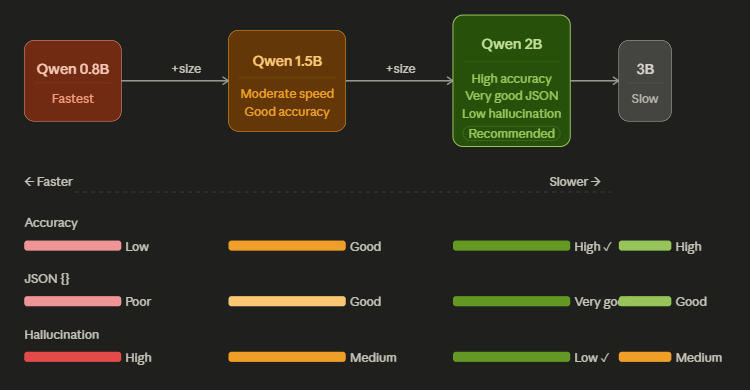
The 0.5B model is genuinely surprising. It’s fast enough that it feels almost instant for short prompts. For simple classification or extraction tasks, it’s often sufficient.
The 1.5B model is the sweet spot for most workflow use cases. Fast enough to be practical, capable enough to handle moderately complex structured tasks.
The 3B model is where things get interesting. It handles more nuanced prompts and produces more reliable structured output , at the cost of being a bit slower and needing more RAM.
These numbers aren’t theoretical. They’re what you’ll actually experience.
CPU Inference: The Underrated Unlock {#cpu-inference}
Most AI discourse is GPU-centric. It makes sense , GPUs are dramatically faster for most AI workloads. But for local deployment, CPU inference matters more than people give it credit for.
Here’s why: CPUs are everywhere.
Every laptop, every desktop, every development machine has a CPU. Deploying a model that runs on CPU means you can run it on virtually any machine , no driver installation, no CUDA version compatibility issues, no VRAM requirements to check.
For workflow automation, this is incredibly valuable. You can:
- Deploy locally on any developer’s machine for testing
- Run inference on servers that don’t have GPUs
- Build systems that work in edge environments without GPU infrastructure
- Prototype without blocking on hardware procurement
CPU inference will never match GPU inference for raw throughput. But for many workflow tasks , especially those that don’t require high concurrency , it’s fast enough. And “fast enough” is what unlocks adoption.
Workflow Testing vs. Chat Testing {#workflow-vs-chat}
One of the most important lessons from this experimentation: testing models in workflows reveals a very different picture than testing them in chat.
Chat testing optimizes for things like:
- Conversational fluency
- Helpfulness and tone
- Handling ambiguous questions
- Long context management
Workflow testing optimizes for things like:
- Consistent structured output
- Reliable JSON formatting
- Deterministic behavior given similar inputs
- Latency per operation
- Failure mode predictability
Smaller models often look mediocre in chat evaluations but surprisingly capable in workflow evaluations. Why? Because many workflow tasks are fundamentally narrower. “Extract these five fields from this text and return JSON” is a much more constrained task than “have a useful conversation about anything.”
The models I tested showed this clearly. Conversationally? They were fine but not impressive. In structured extraction workflows? They were genuinely useful.
That distinction matters enormously for how you think about deploying local AI.
What This Means for Students and Startup Builders {#students-and-startups}
Let me be direct about something: this shift in local AI capability is disproportionately good news for people who can’t afford cloud API budgets.
Students building AI projects used to face a practical ceiling. You could experiment with small examples, but anything at real scale got expensive fast. Cloud credits run out. Rate limits kick in. You end up constrained by your budget rather than your ideas.
Small local models change that equation. You can:
- Download a model once and run it indefinitely for free
- Test against hundreds or thousands of examples without watching a cost counter
- Iterate rapidly without worrying about API availability
- Build workflows that actually run locally on a demo machine
For startup builders, the value proposition is different but equally real. You can prototype an AI-powered workflow and demonstrate it running locally before committing to cloud infrastructure costs. That lowers the risk of building in a direction that turns out to be operationally too expensive.
The question shifts from “Who has the biggest infrastructure?” to “Who builds the best workflows?” That’s a much more interesting competition.
The Bigger Shift Happening Right Now {#bigger-shift}
Zoom out for a second and the pattern becomes clear.
AI is slowly shifting from being primarily a conversational product , a chatbot you talk to , toward being operational infrastructure , a system component that does specific jobs inside larger pipelines.
That shift changes what matters:
- Conversational AI optimizes for intelligence, helpfulness, and breadth
- Operational AI optimizes for reliability, speed, cost, and deployability
For operational AI, smaller local models are often a better fit than large cloud models. Not because they’re smarter, but because they’re:
- Faster to invoke (no network round-trip)
- Cheaper to operate at scale
- Easier to deploy in constrained environments
- Controllable in ways cloud APIs aren’t
The developers building production workflows with local models today are building toward this operational future. It’s worth understanding that context.
The Open-Source Flywheel {#open-source-flywheel}
None of this ecosystem exists in isolation. The reason local AI is improving as fast as it is comes down to open-source collaboration moving at an unusual speed.
Hugging Face acts as the distribution layer ,where quantized variants get shared, community benchmarks accumulate, and new optimizations spread from person to person almost instantly. A new Qwen model drops and within days there are multiple GGUF quantizations available, tested by community members, with benchmark comparisons posted.
llama.cpp keeps getting faster through community contributions. New architectures get support added. Inference optimizations compound over time.
The GGUF format gives the community a common packaging standard, which means tooling built around one model works for others.
This flywheel , models, tools, and knowledge all improving together in the open , is what makes local AI move faster than most people expect. And it’s why the gap between “what’s possible locally” and “what’s possible in the cloud” keeps narrowing.
The Most Surprising Thing I Learned {#most-surprising}
If I had to distill everything from this experimentation into one insight, it’s this:
The threshold for “useful” arrived earlier than I expected.
Not perfect. Not impressive by frontier standards. But useful ,reliable enough to build a workflow around, fast enough to not feel painful, controllable enough to integrate into a real system.
That threshold matters more than the distance to perfection. Because once something crosses from “not useful” to “useful enough,” adoption starts. Workflows form. The ecosystem grows.
I expected to be disappointed by small local models. Instead I kept being surprised by where they were already sufficient.
That surprise is worth paying attention to.
Final Thoughts {#final-thoughts}
Running small Qwen models on consumer hardware isn’t a replacement for cloud AI. For complex reasoning, long-context tasks, and frontier capability, cloud models still win by a significant margin.
But for a growing category of real-world workflow tasks , structured extraction, document processing, semantic reasoning, lightweight automation , the smaller local variants are already in the “good enough to ship with” range.
And “good enough to ship with” is where things get interesting.
The hardware is already in your hands. The models are free to download. The inference framework is open source. The only thing left is figuring out what to build.
References & Resources
| Resource | What It Is |
|---|---|
| llama.cpp GitHub | The CPU inference engine that makes all of this run |
| Hugging Face | Where to find quantized Qwen model variants |
| Qwen on Hugging Face | Official Qwen model repository and releases |
| GGUF Format Documentation | Technical spec for the quantized model format |
Related Reading
- Why Small Qwen Models Are Becoming the Most Interesting Local AI Systems
- OCR vs LLM Receipt Extraction: What Actually Works
- Testing OCR and AI Models for Structured Receipt Extraction
- Building Validation Layers for Reliable AI Receipt Extraction
- Processing 100 Receipts with OCR and LLMs on CPU
Building something with local AI? Ran your own benchmarks on consumer hardware? The ecosystem grows when people share what they’re actually seeing , not just what the benchmarks predict.