
1. Introduction
When we discuss equipping Large Language Models (LLMs) with data querying capabilities, the conversation invariably defaults to network-attached databases. We connect AI agents to remote instances of PostgreSQL for transactional context, or spin up heavy, distributed clusters like Apache Druid for real-time analytics.
However, as Enterprise AI architectures mature, a new paradigm is emerging: Local AI and Edge Analytics.
What happens when your AI agent is operating on a local workstation or an ephemeral CI/CD runner, and it needs to analyze a 50GB local Parquet file? Pushing that data over the wire to a cloud data warehouse is an architectural anti-pattern. It introduces massive network latency, security vulnerabilities, and unnecessary egress costs. Similarly, relying on the LLM to write a local Python script using pandas often results in Out-Of-Memory (OOM) errors and sluggish execution times.
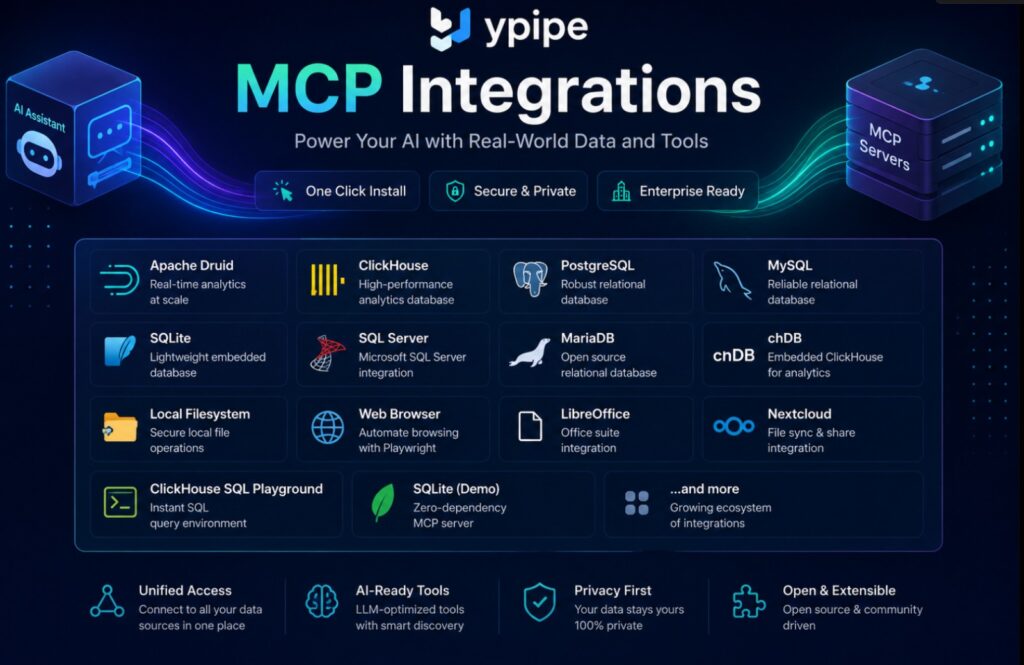
The solution requires bringing the database engine to the data, entirely within the local process space. This is why we integrated the chDB (Embedded ClickHouse) MCP Server into the Ypipe ecosystem.
This article dissects the engineering philosophy behind chDB, how it transforms ClickHouse from a distributed monolith into a serverless library, and how exposing it via the Model Context Protocol (MCP) in Ypipe fundamentally alters the way autonomous agents interact with local data lakes.
2. What is chDB (Embedded ClickHouse)?
chDB (ClickHouse Database) is an embedded SQL OLAP (Online Analytical Processing) engine. It takes the core vectorized query execution engine of standard ClickHouse and compiles it down into a lightweight, serverless library (often running via C++ bindings or WebAssembly).
If SQLite is the embedded standard for OLTP (Online Transaction Processing), chDB aims to be the embedded standard for OLAP.
Unlike a traditional database system, chDB does not run as a background daemon or a system service. It does not listen on network ports (like 8123 or 9000). Instead, it runs directly within the host process. You pass it a SQL query string and a target local file (such as a Parquet, CSV, or JSON file), and it executes the analytical query instantly, leveraging the local machine’s CPU caching and memory without network serialization overhead.
3. Why Enterprises Use It
Enterprise architecture is rapidly decentralizing. While centralized data warehouses remain the source of truth, engineers and AI systems frequently need to analyze data “on the edge” or in ephemeral environments.
Enterprises deploy chDB for several critical reasons:
- Zero Infrastructure Provisioning: You do not need to deploy a cluster, manage Zookeeper/Keeper nodes, or configure load balancers to run a query.
- Direct File Querying: chDB can natively query data lakes resting on the local filesystem or in Amazon S3 without requiring a preliminary data ingestion step.
- Cost Efficiency: By executing queries on the compute node where the data already resides, organizations eliminate network transit costs.
- Air-Gapped Analytics: In highly secure, air-gapped environments where external network calls are blocked, chDB provides high-performance analytics completely offline.
4. Problems It Solves
When building AI agents that analyze structured data, engineers typically rely on one of two methods, both of which have severe limitations that chDB elegantly resolves.
Problem A: The Python Pandas Bottleneck
The most common approach for giving an LLM data analysis capabilities is a Python Code Interpreter. The LLM writes a script using pandas to load and analyze a CSV.
- The Flaw: Pandas is notoriously memory-hungry. Loading a 10GB dataset often requires 30GB to 50GB of RAM. In an automated agent workflow, this quickly leads to OOM crashes. Furthermore, Pandas is generally single-threaded.
- The chDB Solution: chDB uses advanced memory mapping (mmap) and streams data through a vectorized execution pipeline. It can query datasets much larger than the available RAM, utilizing all available CPU cores without blowing up the agent’s memory footprint.
Problem B: The Ingestion Tax
If Python isn’t viable, the alternative is to have the agent load the local data into a remote warehouse (like Snowflake or standard ClickHouse).
- The Flaw: This requires moving gigabytes of data over a network, creating a massive latency bottleneck before the AI can even begin reasoning about the data.
- The chDB Solution: Schema-on-read. chDB queries the raw
.parquetor.csvfiles precisely where they sit on the disk. There is no ingestion tax.
5. Architecture Overview
To appreciate how chDB functions within the Ypipe MCP ecosystem, one must understand its underlying architecture.
chDB inherits the ClickHouse C++ core. This means it utilizes a columnar storage format and vectorized query execution.
- Columnar Storage: Instead of reading data row by row, chDB reads data column by column. If an LLM writes a query like
SELECT sum(revenue) FROM 'sales.parquet', chDB only reads therevenuecolumn from the disk, ignoring all other columns. This drastically reduces disk I/O. - Vectorized Execution: chDB processes data in blocks (vectors) rather than individual values. This allows the CPU to use SIMD (Single Instruction, Multiple Data) instructions, processing arrays of data in single clock cycles.
- In-Process Execution: Because the MCP Server and the chDB engine share the same execution environment, the JSON query results generated by the C++ engine are passed directly back to the MCP layer in memory. There is no TCP/IP stack overhead, no HTTP connection pooling, and no REST payload serialization delays.
6. What is the chDB MCP Server?
The chDB MCP Server is a specialized bridge built on the Model Context Protocol specification. It exposes the raw power of the embedded ClickHouse engine to AI agents via a standardized set of discoverable tools.
Instead of requiring an LLM to understand how to install chDB via pip, write boilerplate Python wrapper code, and manage memory buffers, the MCP server provides a clean, abstract tool interface:
execute_chdb_query(sql_query: string)
The LLM determines the SQL logic, passes it to the tool, and the MCP server handles the underlying C++ library invocation, error handling, and JSON result serialization.
7. Why AI Needs This MCP
AI agents are phenomenal at generating SQL, but they are terrible at managing state and execution environments.
If an AI agent needs to analyze a directory containing 5,000 JSON application logs, it needs a fast, deterministic, and fault-tolerant way to aggregate that data. The chDB MCP server acts as the perfect analytical sensory organ. It allows the agent to iteratively explore the data—running lightweight DESCRIBE queries to understand the schema, followed by complex GROUP BY and window functions to extract insights—all with millisecond latency.
By utilizing MCP, we provide the LLM with discoverability. The LLM knows instantly that it has access to a local analytical engine without requiring a massive, convoluted system prompt.
8. Why Ypipe Includes It
Ypipe’s architectural philosophy heavily prioritizes Local AI and Data Sovereignty. We believe that enterprise AI should be capable of operating entirely on-premises, without relying on SaaS dependencies.
While we integrated the SQLite MCP Server in Ypipe to handle local transactional state and memory, SQLite is fundamentally an OLTP database. It uses B-trees and row-oriented storage. If an LLM tries to run an analytical aggregation over a 10-million-row SQLite database, it will take minutes.
Ypipe includes the chDB MCP Server to complete the local data architecture stack. By providing chDB, we empower Ypipe AI agents to perform heavy-duty local OLAP tasks at the speed of thought. This adheres to our Package by Feature philosophy, ensuring that analytical capabilities are seamlessly pluggable and highly optimized.
9. Installation in Ypipe
Platform Engineers can provision the chDB MCP Server directly from the Ypipe integrations interface. By selecting “Install Community MCP Servers” and choosing the chDB (Embedded ClickHouse) blueprint, the system automatically pulls the underlying codebase from https://github.com/ClickHouse/mcp-clickhouse.
The Ypipe blueprint system automatically handles the orchestration, ensuring the correct underlying C++ binaries and WebAssembly runtimes are present in the host environment, completely abstracting the complex build requirements from the user.
10. Configuration Explained
The configuration surface area for an embedded database is intentionally minimalist. Unlike the Apache Druid MCP Server in Ypipe, there are no complex router URLs, coordinator nodes, or Zookeeper strings to manage.
The elegance of chDB lies in its simplicity. Let’s examine the exact configuration required in Ypipe.
CHDB_DATA_PATH
- Type: String
- Default:
:memory: - What it does: This field defines where chDB maintains its state, caching, and metadata.
- Why it exists: An embedded database can operate in two primary modes: Ephemeral and Persistent.
- In-Memory (
:memory:): When set to:memory:, the database state is completely ephemeral. It exists only for the duration of the MCP server’s process life. Once the process terminates, all temporary tables, views, and caching disappear. This is the default and the most common use case for AI agents performing ad-hoc analysis on external files (e.g., querying a static Parquet file). - Persistent Path (e.g.,
/var/lib/chdb/data): Providing a valid filesystem path allows chDB to persist state to disk. If the agent needs to create permanent materialized views, ingest data into native ClickHouse tables (MergeTree), or maintain a persistent catalog of data sources across reboots, it requires a persistent storage directory.
- In-Memory (
- Enterprise Action: For standard ad-hoc RAG (Retrieval-Augmented Generation) and file analysis, leave this as
:memory:. If your AI agent workflow involves building ongoing analytical state (e.g., aggregating daily logs into a cumulative embedded table), provide a secure, volume-mounted path.
11. Screenshot Walkthrough
Let’s analyze how this configuration is presented within the Ypipe administrative interface.
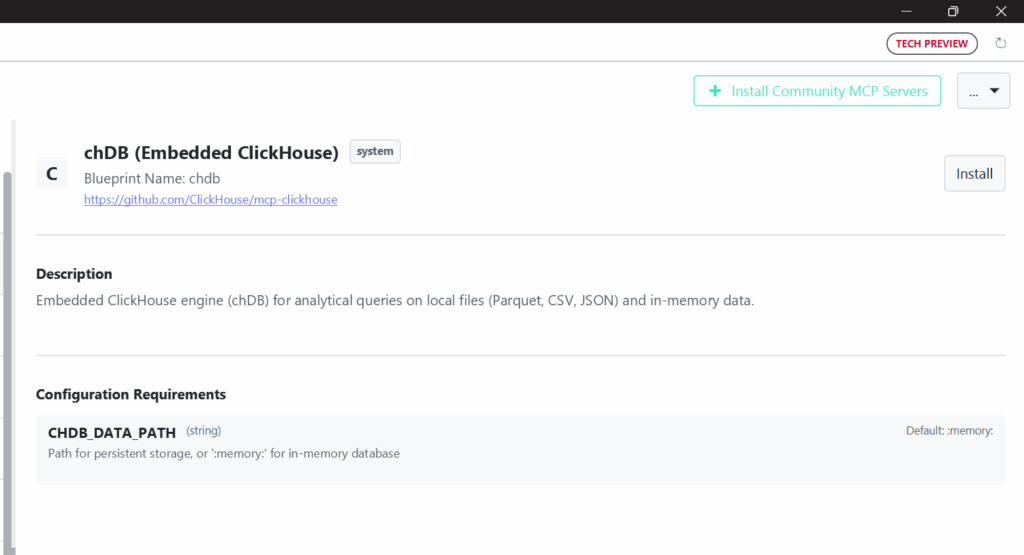
- Blueprint and Source Indication: At the top, Ypipe clearly identifies the Blueprint Name (
chdb) and links directly to the upstream open-source repository (https://github.com/ClickHouse/mcp-clickhouse). This transparency is crucial for enterprise security teams auditing the supply chain of AI tools. - Use-Case Driven Description: The description explicitly mentions “local files (Parquet, CSV, JSON) and in-memory data.” This is a vital UX decision. It manages expectations, ensuring engineers understand this is for local file analytics, not for connecting to a remote ClickHouse Cloud instance.
- Minimalist Configuration: The UI deliberately exposes only
CHDB_DATA_PATH. By hiding the underlying threading configurations, memory limits, and C++ bindings behind sensible defaults in the blueprint, Ypipe radically simplifies the deployment process. Platform engineers don’t need to read a 50-page tuning manual to enable local analytics.
12. Enterprise Use Cases
How are Fortune 500 companies and advanced engineering teams utilizing the chDB MCP Server within their Ypipe deployments?
- Automated Security Log Auditing: An AI security agent running on a specialized local server is tasked with analyzing 100GB of AWS CloudTrail logs (stored locally as Parquet). Using chDB, the LLM can instantly execute a query to find anomalous IP addresses and generate a threat report without pushing the sensitive logs to a SaaS provider.
- CI/CD Pipeline Analytics: In an ephemeral GitHub Actions runner, an AI agent uses chDB to analyze massive test coverage and performance regression JSON files generated during a build, providing an instant natural language summary of the build health before the runner is destroyed.
- Financial Quant Analysis: A quant AI assistant uses the chDB MCP to run complex time-series aggregations on local CSV tick data, allowing the human trader to converse with the dataset (“What was the moving average of AAPL during the flash crash?”) with zero network latency.
13. Performance
The performance characteristics of the chDB MCP Server are profound when compared to traditional database connections.
Because the AI agent (via the MCP Client) and the chDB execution engine reside on the same physical hardware, the “Time To First Byte” (TTFB) is virtually nonexistent.
Furthermore, because it utilizes the ClickHouse SQL dialect, the LLM can generate highly optimized queries using ClickHouse-specific functions (like argMax, quantiles, and array functions) that are designed for raw speed. When querying Parquet files, chDB pushes down filters to the Parquet row groups, reading only the exact bytes from the disk necessary to fulfill the AI’s request.
This optimization is crucial for preventing context pollution. Instead of dumping an entire CSV into the LLM’s context window, the LLM uses chDB to compute the exact statistical aggregations it needs, returning just a few rows of highly dense information.
14. Security
Security in a local embedded database paradigm differs significantly from a network database.
- No Network Attack Surface: chDB does not open TCP/UDP ports. It is immune to network scanning, brute-force attacks, and DDoS. It only responds to function calls from the host process.
- Filesystem Sandboxing: The primary security concern shifts from network access to filesystem access. When deploying this via Ypipe, the MCP server runs within a restricted environment (e.g., a Docker container or restricted user context). The agent can only instruct chDB to query files that exist within the paths explicitly mounted or permitted by the Ypipe runtime.
- Data Sovereignty: Because data never leaves the local disk, this MCP server is perfectly suited for highly regulated industries (HIPAA, SOC2, GDPR) where data residency rules prohibit the use of external APIs for data processing.
(For a deeper understanding of the risks associated with providing LLMs access to local systems, read our comprehensive guide: The Hidden Privacy Risk of MCP Servers).
15. Best Practices
To maximize the efficacy of the chDB MCP Server, adhere to these engineering best practices:
- Prefer Parquet: While chDB can read CSV and JSON, you should explicitly instruct your LLM (via system prompts) to convert or prefer Parquet files. Parquet’s columnar nature aligns perfectly with chDB’s engine, resulting in queries that are orders of magnitude faster.
- Use the
file()function correctly: Train your AI agents on the ClickHouse SQL syntax for querying files. Example:SELECT count(*) FROM file('data.parquet', 'Parquet'). - Limit Result Sets: Ensure your LLM understands that it must append
LIMITclauses or use strong aggregations to prevent returning a 1-million-row JSON payload back through the MCP protocol, which will crash the LLM’s context. - Ephemeral by Default: Unless you have a specific requirement to build a local data warehouse using ClickHouse’s MergeTree engines, keep
CHDB_DATA_PATHset to:memory:. It prevents disk clutter and state contamination between different agent sessions.
16. Common Mistakes
- Treating it like an OLTP Database: chDB is not a replacement for SQLite. Do not use it for row-by-row
INSERT,UPDATE, orDELETEoperations. It is designed for massive analyticalSELECTqueries and batch inserts. - Expecting Distributed Scale: While blazing fast, chDB is bounded by the CPU, RAM, and Disk I/O of the single machine it is running on. It cannot leverage a 100-node cluster like full Apache Druid or standard ClickHouse.
- Incorrect File Paths: When the LLM generates a query, it must use file paths that are valid relative to where the Ypipe MCP Server process is executing, not relative to the user’s local machine (if they are separate).
17. Why This Integration Matters
The integration of the chDB MCP Server is a testament to Ypipe’s commitment to the Package by Feature vs Package by Layer architecture.
By treating local analytical capabilities as an encapsulated, deployable feature via MCP, we provide developers with incredible flexibility. You are no longer forced to build monolithic data pipelines just to let an AI look at a file. You deploy the Ypipe agent, attach the chDB MCP blueprint, and you instantly have a world-class, serverless data analyst running directly on your edge infrastructure.
This bridges the critical gap between unstructured AI reasoning and structured, high-performance data engineering.
18. Related MCP Servers
To understand how chDB fits into the broader Ypipe ecosystem, explore our deep dives into other data-focused MCP integrations:
- PostgreSQL MCP Server in Ypipe (For remote transactional databases)
- SQLite MCP Server in Ypipe (For local transactional embedded databases)
- Filesystem MCP Server in Ypipe (For basic file reading and writing)
- Apache Druid MCP Server in Ypipe (For remote, real-time distributed OLAP)
- ClickHouse MCP Server in Ypipe (For connecting to remote ClickHouse clusters)
- What are MCP Servers?
19. Frequently Asked Questions
1. What is the difference between chDB and standard ClickHouse?
Standard ClickHouse is a standalone server designed for distributed clusters. chDB is an embedded library version of the ClickHouse engine designed to run inside another application process without network overhead.
2. Can chDB replace SQLite?
No. SQLite is optimized for transactional workloads (OLTP) and row-based storage. chDB is optimized for analytical workloads (OLAP) and columnar storage. They serve entirely different purposes.
3. Does chDB support the full ClickHouse SQL dialect?
Yes, chDB supports nearly the entire ClickHouse SQL dialect, including all the advanced analytical functions, array manipulations, and JSON extraction tools.
4. How does the LLM know how to use the ClickHouse SQL syntax?
Modern LLMs (like GPT-4, Claude 3.5 Sonnet, and Llama 3) have extensive training on ClickHouse syntax. However, providing a brief syntax guide in the agent’s system prompt can improve reliability.
5. Why would I use chDB over DuckDB?
DuckDB is another excellent embedded OLAP engine. chDB is preferred if your organization already uses ClickHouse (ensuring dialect consistency between edge and cloud) or if you heavily rely on specific ClickHouse functions not available in DuckDB.
6. What happens if I set CHDB_DATA_PATH to a directory?
chDB will create files in that directory to persist databases, tables, and metadata. This allows data to survive process restarts.
7. Can chDB query Amazon S3 directly?
Yes, utilizing the ClickHouse s3() table function, chDB can query data resting in S3 buckets directly, though this will introduce network latency compared to local files.
8. Is the Ypipe chDB MCP Server secure?
Yes, it benefits from Ypipe’s containerized execution model. It has zero network attack surface and is constrained by local filesystem permissions.
9. How do I prevent the LLM from executing malicious queries?
As an embedded database querying local files, the primary risk is unauthorized file access. You mitigate this by sandboxing the MCP server’s execution environment so it only has read access to specific, approved directories.
10. Can I insert data into chDB?
Yes. Even if CHDB_DATA_PATH is :memory:, you can create temporary tables and insert data into them using standard SQL, though this data is lost when the process stops.
11. Why shouldn’t I just use pandas?
Pandas processes data in memory. If your dataset exceeds your RAM, pandas crashes. chDB streams data and can efficiently query datasets far larger than available memory.
12. Do I need to install ClickHouse Server to use this?
No. The chDB MCP blueprint handles pulling the necessary embedded binaries. No external server installation is required.
13. What file formats are supported for direct querying?
Parquet, CSV, TSV, JSONEachRow, ORC, Arrow, and many others natively supported by ClickHouse.
14. Is this integration free?
Both the Model Context Protocol and the chDB library are open-source. Please check the Ypipe GitHub for specifics regarding enterprise deployment features.
15. How does this help with Context Pollution?
Instead of the LLM reading an entire raw CSV file into its prompt window (which causes it to forget instructions or hallucinate), it uses chDB to generate exactly the summary statistics it needs, drastically reducing the token payload.
20. Conclusion
The chDB (Embedded ClickHouse) MCP Server fundamentally redefines how AI agents interact with local data. By sidestepping the network entirely and bringing a world-class columnar execution engine directly to the local filesystem, Ypipe enables a new class of high-performance, edge-based autonomous analytics.
Whether you are building ephemeral CI/CD analysis pipelines, secure on-premises financial tools, or simply trying to give an LLM the ability to read a massive Parquet file without crashing, understanding and utilizing the CHDB_DATA_PATH configuration is a critical skill for modern AI engineers.