
When building ReceiptFlow, the goal was simple: take messy OCR output from receipts and convert it into clean, structured JSON. Tool calling seemed like the perfect solution because it promised strict structure and predictable outputs, reducing the need for heavy post-processing.
However, in a local setup using llama.cpp and Qwen 2.5 (3B), it failed consistently. Instead of producing structured JSON, the model ignored constraints, hallucinated data, and generated unreliable outputs. This article walks through the exact setup, experiments, observed failures, and the key realization that ultimately changed the direction of the pipeline.
Keywords
tool calling failure, llama.cpp structured output, Qwen 2.5 limitations, OCR to JSON extraction, LLM hallucination receipts, local LLM pipeline, JSON extraction errors
Introduction
When I started building a receipt processing pipeline using local LLMs, my initial approach was to use tool calling to enforce structured output. The idea was simple: define a strict schema and force the model to respond in that format. This is similar to how function calling works in APIs like OpenAI, where the model is constrained to return structured JSON. However, when implementing this using a local setup (llama.cpp + Qwen 2.5 3B), the results were far from expected. This article documents the exact setup, experiments, failures, and why tool calling did not work reliably in this environment.
Where this fits in the pipeline
– Tool calling failure → [01-tool-calling-failure](./01-tool-calling-failure.md)
– Model evaluation → you are here
– Input optimization → [03-input-format-optimization](./03-input-format-optimization.md)
– Debugging → [04-debugging-llm-output](./04-debugging-llm-output.md)
– Validation → [05-validation](./05-validation.md)
System Setup
The inference pipeline was built using:
- Model: Qwen 2.5 (3B, GGUF format)
- Runtime: llama.cpp (
llama-server) - Endpoint:
http://127.0.0.1:8081/v1/chat/completion
Reference:
https://github.com/ggerganov/llama.cpp
Server Execution
./llama-server -m qwen-3b.gguf --port 8081
Below is the actual runtime environment:
This setup allowed local inference without relying on external APIs, which was important for experimentation and control.
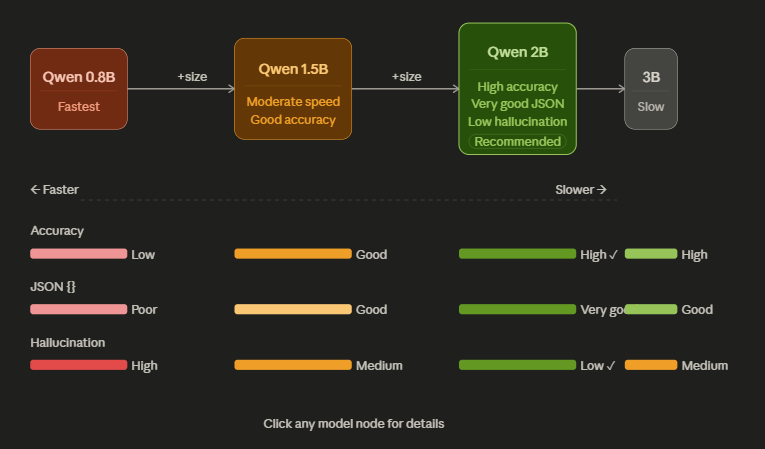
Evaluation Criteria
Each model was evaluated on:
– JSON structure consistency
– Field extraction accuracy
– Hallucination frequency
– Latency (CPU inference)
– Stability across different receipts
Model Comparison
Initial Approach: Tool Calling
The idea was to define a strict schema inside the prompt and instruct the model to ONLY output that structure.
Tool Schema
<tool_call>
 <tool_name>receipt_parser</tool_name>
 <arguments>
 {
   "merchant_name": "string",
   "date": "string",
   "total_amount": "string",
   "items": [...]
 }
 </arguments>
</tool_call>
Prompt Constraints:
- DO NOT explain anything
- ONLY output tool_call
- DO NOT hallucinate
- USE ONLY provided receipt
This was combined with OCR-extracted HTML as input.
Observed Behavior
Despite strict constraints, the model consistently failed to comply.
Common Failure Patterns
- Ignoring the tool schema
- Output included explanations
- Extra text outside JSON
- Hallucinating data
- Generated fake receipts
- Ignored input content
- Malformed outputs
- Broken JSON
- Missing fields
Example Failure
In several cases, the model responded with:
Since no receipt was provided, I will create a hypothetical example...
This clearly shows that the model was not respecting the input or constraints.
Root Cause Analysis
After multiple iterations, the failure was not random — it was systemic.
- Lack of Tool Calling Enforcement: Unlike APIs such as OpenAI, llama.cpp does NOT enforce tool calling.
- The schema is treated as plain text
- No structural constraints exist at runtime
- This means:
The model is "suggested" to follow the format, not forced
- Stateless Inference Each request was independent:
- No conversation memory
- No reinforcement of output format So the model had to interpret the schema from scratch every time.
- Model Size Limitations At 3B parameters:
- Limited ability to strictly follow structured instructions
- Tendency to prioritize natural language over rigid format
This becomes worse when the input is noisy (OCR HTML) and prompt is complex. 4. Input Complexity The input itself (OCR HTML) contained nested tags, inconsistent structure, irrelevant tokens.
This increased cognitive load on the model.
What Changed
Instead of forcing tool calling, I simplified the approach : I Removed tool schema entirely and asked model to output JSON directly.
Example:
Extract the following receipt into JSON with fields:
merchant_name, date, items, total
Result After Change:
This change led to more consistent JSON output , reduced hallucination and easier downstream processing.
While the model still made mistakes, outputs were predictable enough to fix.
Key Insight
Tool calling is not inherently flawed , but it requires:
- API-level enforcement
- strong model alignment
- structured runtime support
In local setups like llama.cpp: Prompt simplicity > schema rigidity
Practical Takeaway
For local LLM pipelines one should avoid over-constraining the model, prefer simple, structured promptsand handle strict validation in post-processing.
Conclusion
Tool calling failed not because of incorrect prompting, but because the underlying system does not support enforcing structured outputs. Switching to prompt-based JSON extraction proved to be more reliable and practical.
Why did tool calling fail in this setup?
Because llama.cpp does not enforce structured outputs.
Was the issue related to prompt design?
No, the issue was primarily due to system limitations rather than prompt quality.
Did model size affect performance?
Yes, the 3B model struggled with strict structured constraints.
What worked better than tool calling?
Simple JSON extraction prompts without rigid schema enforcement.
Can tool calling work in local environments?
Only if the runtime provides enforcement mechanisms, which were not present here.
Next Step
Once tool calling was removed, the next challenge was selecting the right model for extraction.
References
- Brown, T. B., et al. Language Models are Few-Shot Learners, NeurIPS, 2020
- OpenAI, Function Calling in Language Models, 2023
- Kiela, D., et al. Hallucinations in Neural Models, ACL, 2021
- Smith, R. Tesseract OCR Engine, ICDAR, 2007
- llama.cpp Documentation → See: 02-Model-evaluation.md