
The Hidden Design Mistake Slowing Down Enterprise AI
The Model Context Protocol (MCP) ecosystem is exploding. New MCP servers appear every week for databases, cloud platforms, office suites, project management tools, development environments, and enterprise systems.
On the surface, this looks like a clear win for AI adoption: more tools should mean more capability. In practice, many MCP servers are built with a design pattern that produces the opposite outcome. Instead of making AI systems smarter, it makes them slower, more expensive to run, harder to maintain, and significantly more difficult for language models to use well.
The root cause is simple: most MCP servers are built as API wrappers instead of user-focused systems.
Table of Contents
- The API Wrapper Trap
- The MS Office Example
- Why More Tools Are Not Better
- The Context Window Problem
- A Better Question to Start With
- User Tasks vs API Endpoints
- The Difference Between Tools and Capabilities
- Designing Around Intent
- Why This Matters More for Small Models
- How Ypipe Approaches MCP Design
- The Future of MCP Is Not More Tools
- Conclusion
- Frequently Asked Questions
- Related Articles
The API Wrapper Trap
Many developers approach MCP server design the same simple way:
REST API Endpoint → MCP Tool
REST API Endpoint → MCP Tool
REST API Endpoint → MCP Tool
If an application exposes 100 API endpoints, the MCP server exposes 100 tools. If it exposes 300 endpoints, the server exposes 300 tools.
Technically, this works. Architecturally, it is often a disaster, because it treats “expose every endpoint” as equivalent to “make the system usable by an AI model.” Those are not the same goal.
The MS Office Example
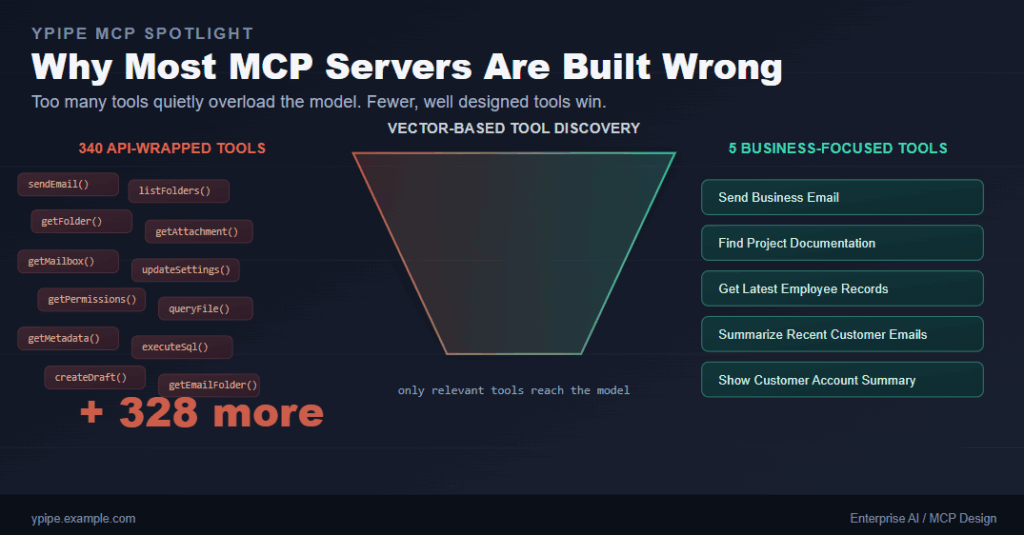
During our MCP evaluations, one example made the problem obvious immediately: an MS Office MCP implementation exposed roughly 340 separate tools. Every action available through the Microsoft API became its own individual tool.
- Need to send an email? Tool.
- Need to list folders? Tool.
- Need to search documents? Tool.
- Need to modify permissions? Tool.
- Need to retrieve metadata? Tool.
- Need to update settings? Another tool. And another. And another.
Until the server contains hundreds of available functions.
From a pure software engineering perspective, this implementation is technically correct: every endpoint got wrapped. From an AI usability perspective, it creates a serious problem.
Why More Tools Are Not Better
Language models do not reason about tools the way people do. Before a model can use any tool, it has to work out:
- The tool name
- The tool description
- The tool parameters
- The intended use case for that tool
Now imagine asking a small language model to choose the right one out of 340 options. For every request, the model has to determine which tool is relevant, whether the description actually matches the user’s intent, which parameters to pass, and whether some other tool might fit better.
At that point, the model is no longer reasoning about the user’s problem. It is running a search problem across hundreds of near-duplicate options.
The Context Window Problem
Every tool consumes context, even a small one. Take a simple example:
{
  "name": "sendEmail",
  "description": "Send an email to a recipient using the configured mailbox."
}
That single definition looks harmless on its own. Now multiply it by 340. A significant portion of the model’s available context window ends up occupied by tool metadata before the conversation has even started.
The downstream effects stack up quickly:
- Higher token consumption
- Increased inference costs
- Slower responses
- Lower reasoning quality
- Tool confusion
- Poor performance on smaller models
The model ends up spending more effort figuring out what tools exist than actually solving the user’s problem.
A Better Question to Start With
Instead of asking “how do I expose every API endpoint?”, a better starting question is “what task is the user actually trying to accomplish?”
That single shift in framing changes MCP design completely, because it moves the unit of design from a technical endpoint to a business action.
User Tasks vs API Endpoints
Bad MCP design:
createEmailDraft()
sendEmail()
listFolders()
getFolder()
getMailbox()
getAttachment()
Good MCP design:
Send Business Email
The underlying implementation can still call five or ten API endpoints internally. That complexity never has to reach the user, and the model does not need to understand it either. Only the MCP server needs to know how the plumbing works.
The Difference Between Tools and Capabilities
One of the biggest misconceptions in MCP development is assuming every capability needs its own separate tool. In reality, a single well designed tool can represent an entire business workflow.
Instead of exposing:
getCustomer()
getOrders()
getInvoices()
getPayments()
a business-oriented MCP server could expose a single tool:
Show Customer Account Summary
The MCP server absorbs the complexity internally. The model gets to focus on the task instead of the plumbing.
Designing Around Intent
A good MCP server starts from user intent, not from an API reference doc.
| Bad | Better |
|---|---|
executeSql() | Get Latest Employees |
queryFile() | Find Project Documentation |
getEmailFolder() | Summarize Recent Customer Emails |
Notice the pattern: each “better” tool represents a business action rather than a technical implementation detail. That is the shift that matters.
Why This Matters More for Small Models
Large frontier models can often brute-force their way through poor tool design simply because they have more context and more reasoning headroom to spare. Small, local models cannot do the same.
A 7B model handed 300 tools becomes overwhelmed almost immediately. The same 7B model given 10 carefully designed business tools performs dramatically better. This distinction becomes especially important for organizations adopting local AI systems, where context windows and available compute are both limited by design.
How Ypipe Approaches MCP Design
Ypipe takes a different approach than the raw API-wrapper pattern. Instead of blindly exposing every available tool to the model, Ypipe adds an optimization layer in front of the model.
Vector-Based Tool Discovery
Before any tool enters the model’s context, Ypipe runs a semantic search step so only relevant tools get injected:
340 Available Tools
      ↓
Vector Search
      ↓
5 Relevant Tools
      ↓
LLM Context
The model only ever sees what it actually needs for the task at hand.
Custom Tool Naming
Ypipe lets organizations rename tools to match how the business actually talks about them. Instead of:
querySql()
a team can define:
Get Latest Employee Records
That name is immediately understandable, both to the people configuring the system and to the model choosing between tools.
Custom Tool Descriptions
Tool descriptions can be specialized the same way, aligning MCP servers with business terminology instead of technical jargon pulled straight from an API reference. The result is better discoverability and noticeably better tool selection by the model.
The Future of MCP Is Not More Tools
Many teams currently measure MCP success by counting integrations: more integrations, more tools, more endpoints wrapped. But the future of MCP is not about exposing more functionality, it is about exposing the right functionality.
The most successful MCP servers will not be the ones with the longest tool list. They will be the ones that best represent what users are actually trying to do.
Conclusion
The first generation of MCP servers largely treated MCP as a simple API wrapping exercise. That approach is easy to implement, but it creates real problems for language models: context pollution, tool overload, higher costs, reduced accuracy, and a worse overall user experience.
A better approach designs MCP servers around business tasks rather than technical endpoints. Instead of asking “how do I expose my API?”, developers should ask “what is the user trying to achieve?”
That shift alone can turn an MCP server from a pile of endpoints into a genuinely useful AI capability.
Frequently Asked Questions
Why do too many MCP tools hurt AI performance? Every tool’s name, description, and parameters get loaded into the model’s context before it can respond. With hundreds of tools, a large share of that context gets used on tool metadata instead of solving the user’s actual request, which lowers reasoning quality and raises cost.
Is wrapping every API endpoint as its own tool a bad practice? It is a common pattern, but it usually produces a server that is technically complete and practically hard to use. A smaller set of tools designed around business actions tends to perform far better than a one-to-one mapping of API endpoints.
Do small or local language models struggle more with large tool lists? Yes. Large frontier models can often work around a bloated tool list because they have more context and reasoning capacity to spare. Small models, such as 7B parameter local models, get overwhelmed much faster and benefit disproportionately from a curated, business-oriented tool set.
How does Ypipe reduce tool overload? Ypipe uses vector-based tool discovery to run a semantic search before any tools reach the model, so only the handful of tools relevant to a given request are added to context, instead of the entire catalog.
What does “designing around intent” mean in practice? It means naming and describing tools after the business action they perform, such as “Get Latest Employees” or “Show Customer Account Summary,” rather than after the underlying technical function, such as executeSql() or getOrders().