
Meta Description: Looking for the best Qwen uncensored models to run locally in 2026? This complete guide compares the top 10 variants by use case, hardware requirements, and real-world performance.
Target Keywords: Qwen uncensored models, best Qwen model 2026, run Qwen locally, local uncensored LLM, Qwen 8B uncensored, Dolphin Qwen, Qwen 32B local, open source uncensored LLM, Qwen GGUF, local AI model comparison
Why Everyone Is Searching for Qwen Uncensored Models Right Now
The restrictions and availability issues surrounding cloud AI services in 2026 have pushed a significant wave of developers, researchers, and AI enthusiasts toward local, uncensored language models.
And one model family keeps coming up at the top of every list: Qwen.
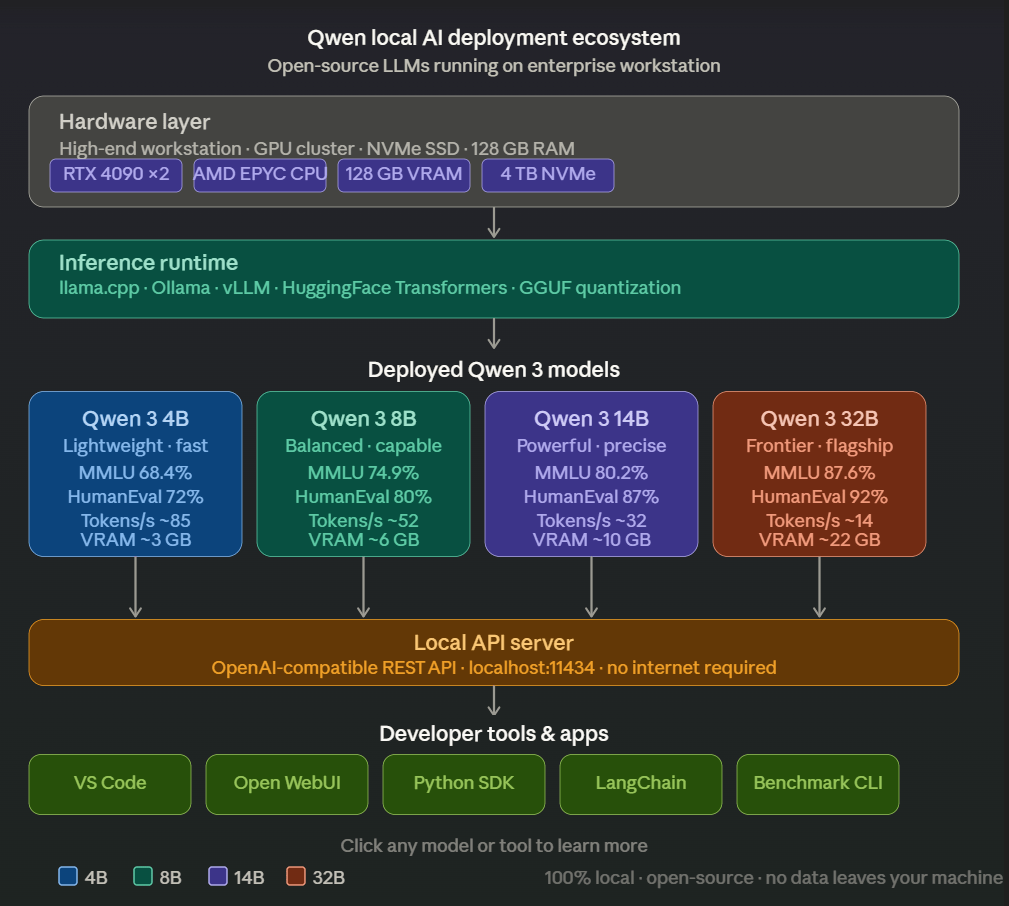
Alibaba’s Qwen series has rapidly become one of the strongest open-source AI ecosystems available. The base models are already excellent. But it is the uncensored and fine-tuned variants built on top of Qwen that have captured the attention of the local AI community, because they combine strong underlying capability with far fewer content restrictions than cloud-hosted alternatives like OpenAI, Anthropic, or Google Gemini.
People searching for Qwen uncensored models typically want to:
- Run AI entirely locally without API costs or usage limits
- Maintain full privacy and data ownership over sensitive workflows
- Experiment with unrestricted reasoning and creative tasks
- Build local AI assistants and automation pipelines
- Avoid sudden model deprecations and cloud provider policy changes
This guide breaks down the top 10 Qwen uncensored models available in 2026, who each one is for, and which one you should actually run based on your hardware and use case.
For a broader look at why enterprises are moving away from cloud AI entirely, read our guide on Sovereign AI and data sovereignty for European enterprises.
What Makes a Qwen Model “Uncensored”?
Before diving into the list, it helps to understand what uncensored actually means in this context.
Most base language models, including Qwen’s official releases on Hugging Face, include alignment fine-tuning that restricts certain types of outputs. This process, sometimes called RLHF (Reinforcement Learning from Human Feedback), is designed to make models safer but also introduces refusal behavior that many developers find limiting.
Uncensored variants are typically created through one of two methods:
Fine-tuning on unrestricted datasets: Community trainers fine-tune the base model on datasets specifically curated to remove refusals and content restrictions while preserving underlying capability. Datasets like Dolphin by Eric Hartford are commonly used for this purpose.
Abliteration: A more technical approach pioneered by researchers like FailSpy that directly modifies model weights to remove refusal behavior without additional training. Abliterated models tend to retain more of the original model’s capabilities since they avoid the quality degradation that can come with fine-tuning on lower-quality datasets. The technique is explained in detail in this Hugging Face blog post on model abliteration.
Neither approach is inherently better for every use case. Fine-tuned models often have better instruction following for specific domains. Abliterated models often have stronger reasoning retention. The right choice depends on what you are actually trying to do.
Top 10 Qwen Uncensored Models in 2026
1. Qwen 3 4B Uncensored
Best for: Laptops, consumer hardware, and always-on local assistants
The 4B parameter Qwen 3 uncensored variant is the entry point for running Qwen locally without significant hardware investment. It runs comfortably on machines with 8GB of RAM and handles everyday assistant tasks, light coding help, and general Q&A reliably. You can find GGUF versions optimized for llama.cpp on Hugging Face.
| Spec | Detail |
|---|---|
| Parameters | 4 billion |
| RAM Required | 6 to 8 GB |
| Inference Speed | Very fast |
| Best Format | GGUF Q4 or Q5 |
Pros: Fast inference, very low memory requirements, strong instruction following for its size, runs well on CPU-only machines.
Cons: Limited reasoning depth on complex multi-step tasks. Not suitable for advanced coding or long-document analysis.
Who should use it: Anyone who wants a fast, always-available local assistant on a standard laptop without dedicated GPU hardware. Tools like LM Studio or Ollama make setup straightforward.
2. Qwen 3 8B Uncensored
Best for: The best all-round local model for most users
The 8B uncensored variant hits the sweet spot that most local AI users are looking for. It delivers noticeably better reasoning, coding performance, and conversational quality than the 4B while still running on consumer hardware with a decent GPU or 16GB of RAM. On the Open LLM Leaderboard, Qwen 3 8B consistently ranks among the top models at its parameter count.
| Spec | Detail |
|---|---|
| Parameters | 8 billion |
| RAM Required | 10 to 16 GB |
| Inference Speed | Fast |
| Best Format | GGUF Q4 or Q5 |
Pros: Excellent coding performance, strong conversational abilities, suitable for building local assistants, good balance between speed and quality.
Cons: Requires more RAM than the 4B. Noticeably slower on CPU-only machines.
Who should use it: Developers, researchers, and AI enthusiasts who want a capable everyday model and have access to at least a mid-range GPU or 16GB of system RAM. Works great with Open WebUI for a polished chat interface.
3. Dolphin Qwen 8B
Best for: Creative tasks, roleplay, and unrestricted assistant building
Dolphin Qwen is one of the most well-known community fine-tunes in the local AI space. Built by Eric Hartford at Cognitive Computations, the Dolphin series applies a specific fine-tuning methodology designed to create helpful, uncensored assistant behavior. The Qwen 8B base gives Dolphin Qwen strong underlying capability that makes it one of the most popular downloads on Hugging Face.
| Spec | Detail |
|---|---|
| Parameters | 8 billion |
| RAM Required | 10 to 16 GB |
| Inference Speed | Fast |
| Best Format | GGUF Q4 or Q5 |
Pros: Creative and expressive responses, popular and well-tested in the community, great for building custom assistants and roleplay applications, actively maintained.
Cons: Can occasionally hallucinate on factual tasks more than the base model. Fine-tuning trade-offs may affect reasoning consistency on technical tasks.
Who should use it: Anyone building creative AI applications, custom assistants, or exploring unrestricted conversational AI locally. Pairs well with SillyTavern for advanced conversational setups.
4. Qwen 3 14B Uncensored
Best for: Advanced reasoning and complex coding tasks
The jump from 8B to 14B is meaningful. Qwen 3 14B uncensored delivers noticeably stronger multi-step reasoning, better code generation across more languages, and more reliable performance on longer, more complex prompts. In coding benchmarks like HumanEval and MBPP, the 14B class of Qwen models consistently outperforms smaller variants by a meaningful margin.
| Spec | Detail |
|---|---|
| Parameters | 14 billion |
| RAM Required | 16 to 20 GB |
| Inference Speed | Moderate |
| Best Format | GGUF Q4 |
Pros: Significantly better reasoning than 8B variants, reliable code generation, handles longer context windows more consistently, good choice for research tasks.
Cons: Requires a capable GPU or large amounts of RAM for comfortable inference speeds. Slower on CPU-only machines.
Who should use it: Developers working on complex coding tasks, researchers needing reliable reasoning, and users with a dedicated GPU who want meaningfully better output quality. Can be served via vLLM for multi-user team deployments.
5. Qwen 3 32B Uncensored
Best for: Enterprise-grade local deployments and maximum local capability
The 32B uncensored variant represents the high end of what most enterprise hardware can run locally without specialized infrastructure. It delivers output quality that competes seriously with proprietary cloud models on many benchmarks while keeping everything on-premise. This is the model that makes the case for sovereign AI most convincingly, delivering near-frontier capability with zero external dependency.
| Spec | Detail |
|---|---|
| Parameters | 32 billion |
| RAM Required | 24 to 48 GB |
| Inference Speed | Slow on CPU, moderate on high VRAM GPU |
| Best Format | GGUF Q3 or Q4 |
Pros: Near-frontier output quality for local deployment, excellent reasoning and analysis, serious coding capability, strong long-document handling.
Cons: Requires significant hardware investment. Not suitable for laptops or consumer-grade machines without a high VRAM GPU such as an NVIDIA RTX 4090 or A100.
Who should use it: Enterprise teams running local AI on dedicated servers, researchers needing the best available local model quality, and power users with high-end GPU hardware. For governed enterprise deployment, Ypipe provides orchestration and audit infrastructure on top of local inference.
Want to understand why enterprises running 32B models locally still need a governance layer? Read our article on why local AI does not automatically make you EU AI Act compliant.
6. Qwen 2.5 Instruct Uncensored
Best for: General-purpose tasks where broad community support matters
Qwen 2.5 instruct uncensored variants remain widely available and well-tested across the community. While Qwen 3 represents a capability improvement in most areas, Qwen 2.5 uncensored models have a larger library of community fine-tunes, more extensive TheBloke-style GGUF quantizations, and longer track records of community testing on platforms like Reddit r/LocalLLaMA.
Pros: Wide availability, extensive community testing, many fine-tuned variants for specific use cases, stable and reliable, well-documented behavior.
Cons: Outperformed by Qwen 3 variants in most benchmarks.
Who should use it: Users who prefer proven, widely-tested models with extensive community support over cutting-edge releases. The Qwen 2.5 model card on Hugging Face provides detailed capability documentation.
7. Abliterated Qwen Models
Best for: Users who want unrestricted capability with minimal fine-tuning quality loss
Abliteration is a weight-modification technique pioneered by FailSpy and popularized by mlabonne that removes refusal behavior directly from the model without additional fine-tuning. Abliterated Qwen models across the size range (4B through 32B) are available on Hugging Face and tend to retain more of the original model’s reasoning and coding capability than some fine-tuned alternatives.
Pros: Retains original model capability more faithfully, no fine-tuning quality degradation, available across all Qwen size variants, technically interesting approach.
Cons: Less community testing than fine-tuned alternatives, behavior can be less predictable on edge cases.
Who should use it: Technical users who want unrestricted capability with the least possible deviation from the base model’s performance characteristics. The mergekit library is commonly used for abliteration and related model modification techniques.
8. OpenThoughts Qwen
Best for: Reasoning-heavy tasks and chain-of-thought workflows
OpenThoughts fine-tunes are specifically optimized for multi-step reasoning, mathematical problem solving, and structured thinking tasks. Built on Qwen base models, they prioritize reasoning quality and are a strong choice for research and analytical workflows. They draw inspiration from approaches like DeepSeek-R1 and Qwen’s own QwQ reasoning models.
Pros: Strong reasoning chain quality, good for mathematical and logical tasks, structured output reliability, competitive on MATH and GSM8K benchmarks.
Cons: Less general-purpose than standard uncensored variants, not optimized for casual conversation or creative tasks.
Who should use it: Researchers, data analysts, and users whose primary use case involves complex reasoning, math, or structured analysis. Also worth exploring alongside Qwen’s official QwQ models for comparison.
9. Qwen Agent Variants
Best for: Tool use, automation, and agentic workflows
Qwen Agent variants are fine-tuned specifically for tool calling and automation tasks. They are designed to reliably invoke tools, follow structured output formats, and execute multi-step workflows with less hallucination than general-purpose models. The Model Context Protocol (MCP) has become the standard integration layer for connecting these models to enterprise systems and databases.
Pros: Reliable tool calling, strong structured output compliance, designed for automation pipelines, good integration with MCP frameworks and LangChain.
Cons: Less capable for open-ended conversation and creative tasks. Over-specialized for users who just want a general assistant.
Who should use it: Developers building local AI automation pipelines, tool-calling agents, and workflow orchestration systems. These models pair particularly well with orchestration platforms like Ypipe that manage multi-model agentic workflows locally with governed MCP integrations to enterprise databases and systems.
Read our deep-dive on the hidden governance gap in local AI to understand why agentic models need an orchestration layer, not just an inference runtime.
10. Community Fine-Tuned Qwen Models
Best for: Specific domain use cases with targeted fine-tuning
The Qwen ecosystem on Hugging Face includes hundreds of community fine-tunes targeting specific domains including medical question answering, legal document analysis, customer support, code review, and more. Platforms like Hugging Face, Civitai, and communities like r/LocalLLaMA are the best places to discover and evaluate these models.
Pros: Domain-specific optimization, targeted capability improvements for niche use cases, often developed by practitioners with real domain expertise.
Cons: Variable quality, less community testing, models may become unmaintained. Always check the model card and community feedback before deploying.
Who should use it: Users with very specific domain requirements who are willing to evaluate multiple community variants to find the best fit. Tools like LM Studio make it easy to swap between variants for comparison.
Which Qwen Uncensored Model Should You Use?
| Use Case | Recommended Model | Minimum RAM |
|---|---|---|
| Personal AI assistant | Qwen 3 8B Uncensored | 16 GB |
| Creative writing and roleplay | Dolphin Qwen 8B | 16 GB |
| Complex coding | Qwen 3 14B Uncensored | 20 GB |
| Research and analysis | Qwen 3 32B Uncensored | 48 GB |
| Low-RAM laptop | Qwen 3 4B Uncensored | 8 GB |
| Local automation and agents | Qwen Agent Variants | 16 GB |
| Multi-step reasoning | OpenThoughts Qwen | 16 GB |
| Minimal capability loss | Abliterated Qwen | Varies by size |
| Enterprise local deployment | Qwen 3 32B + Ypipe | 48 GB |
| Domain-specific tasks | Community Fine-Tunes | Varies |
How to Run Qwen Uncensored Models Locally
Most users deploy Qwen uncensored models through one of the following tools. For a complete comparison, see our guide on the top 20 tools to run LLMs locally in 2026.
Ollama: The simplest path for most users. Pull a GGUF model and run it with a single command. Limited governance and workflow features but excellent for personal use. See the Ollama model library for available Qwen variants.
LM Studio: A polished GUI for downloading and running GGUF models directly from Hugging Face. Great for users who prefer a visual interface over command-line tools. Available for Windows, macOS, and Linux.
Open WebUI: A browser-based interface that connects to Ollama or other backends. Adds a polished chat UI layer. Can be self-hosted via Docker.
llama.cpp: The foundational inference engine underneath most local AI tools. Maximum control and efficiency but requires more technical setup. Supports Apple Metal, CUDA, and Vulkan acceleration.
vLLM: Better suited for serving models to multiple users simultaneously. Higher hardware requirements but stronger throughput for team deployments. Supports OpenAI-compatible API out of the box.
AnythingLLM: An all-in-one desktop and server AI application with built-in RAG, agent support, and multi-user workspace management. Good middle ground between personal use and team deployment.
GPT4All: A user-friendly desktop app for running local models. Good for non-technical users who want a simple setup without command-line tools.
Ypipe: A Java-native local AI client and MCP orchestration engine that adds governance, workflow management, and governed enterprise integrations on top of local inference. Particularly well suited for teams and enterprise deployments that need more than personal model serving. Ypipe includes built-in inference with no dependency on external runtimes and supports direct model import from Hugging Face in GGUF format.
For personal experimentation, Ollama or LM Studio will get you running in minutes. For teams, enterprise deployments, or workflows that connect AI to internal systems and databases, an orchestration layer like Ypipe provides the governance and integration management that standalone inference tools do not offer.
If you are evaluating local AI for enterprise use, read our guide on what enterprises need beyond Ollama and vLLM for EU AI Act compliance.
Final Thoughts
Qwen has become one of the most important model families in the open-source AI ecosystem. The combination of strong base capability, active community development on Hugging Face, and a wide range of uncensored variants makes it the go-to choice for local AI users who want flexibility and performance without cloud dependency.
For most users, Qwen 3 8B Uncensored is the right starting point. It delivers excellent all-round performance on accessible hardware. Users who need more reasoning depth should step up to Qwen 3 14B. Teams running serious local AI infrastructure should evaluate Qwen 3 32B alongside an orchestration platform like Ypipe that can govern and manage it properly in a production environment.
The best model is always the one that fits your hardware, your use case, and your workflow. Use this guide as a starting point, test the top candidates for your specific tasks on Hugging Face, and let real-world performance guide the final decision.
Frequently Asked Questions
Are Qwen uncensored models legal to use?
Yes. Qwen base models are released under open licenses that permit community fine-tuning and modification. Uncensored variants are legal to download and use from Hugging Face. As with any AI tool, users are responsible for how they use the outputs.
What is the best Qwen uncensored model for coding?
Qwen 3 14B Uncensored delivers the best coding performance for most users at a manageable hardware requirement. Users with high-VRAM GPUs should evaluate Qwen 3 32B for complex, multi-file coding tasks.
Can I run Qwen 32B on a consumer GPU?
Qwen 3 32B requires significant VRAM, typically 24GB or more for comfortable inference at Q4 quantization. Consumer GPUs with 8 to 12GB of VRAM will struggle. CPU offloading via llama.cpp is possible but results in significantly slower inference speeds. An NVIDIA RTX 4090 (24GB VRAM) is the minimum practical consumer GPU for this model.
What is the difference between abliterated and fine-tuned uncensored models?
Fine-tuned uncensored models are retrained on datasets like Dolphin that encourage unrestricted responses. Abliterated models have their refusal behavior removed directly through weight modification without additional training. Abliterated models generally retain more of the base model’s capability but have less predictable behavior on edge cases.
Where can I find and download Qwen uncensored models?
Hugging Face is the primary source. Look for GGUF quantized versions from trusted quantizers like bartowski and LoneStriker for use with Ollama and LM Studio.
Which Qwen uncensored model works best with local AI orchestration tools?
Qwen Agent variants are specifically designed for tool use and agentic workflows. For multi-model orchestration, Ypipe supports models across the full Qwen size range and provides hardware-matched model selection, governed MCP integrations, and workflow management for enterprise deployments.
Looking to run Qwen models as part of a governed local AI workflow? Ypipe provides built-in inference, MCP orchestration, and enterprise governance for local AI deployments. Developed by iunera.
Related reading: Hidden Governance Gap in Local AI | EU AI Act and Local AI Compliance | Sovereign AI for European Enterprises | Top 20 Tools to Run LLMs Locally in 2026