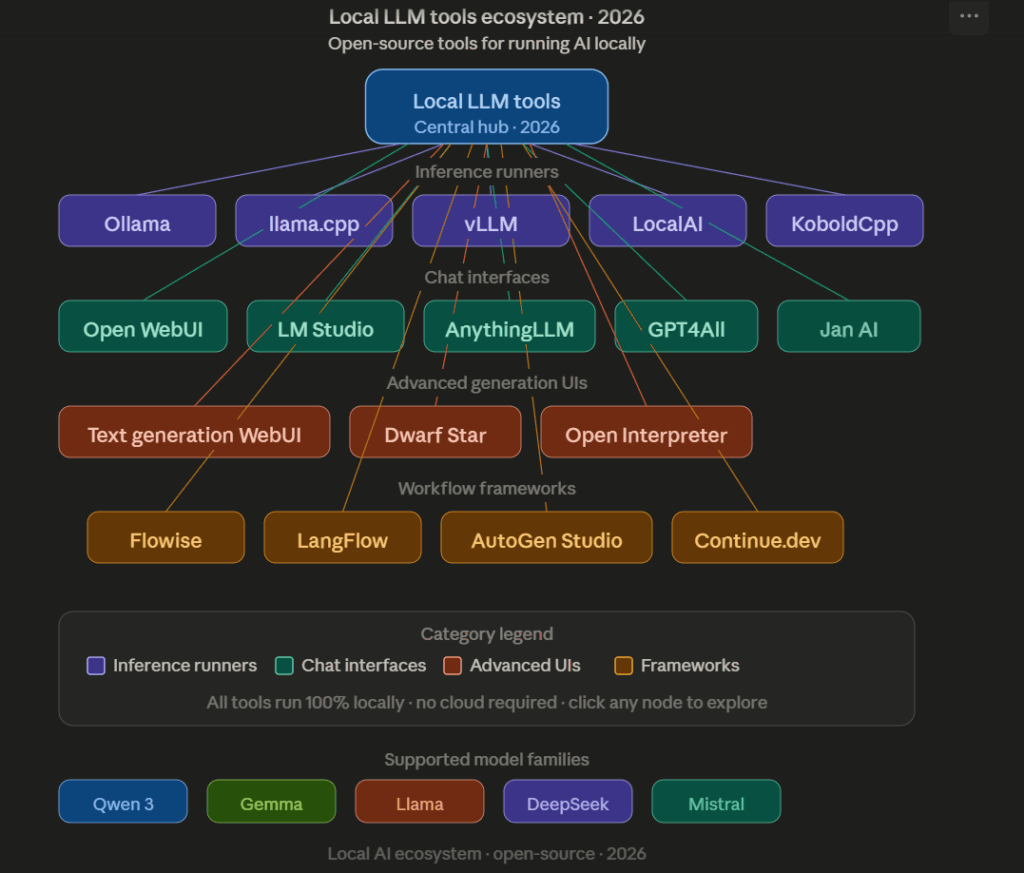
Meta Description: The complete 2026 guide to running LLMs locally. We compare all 20 tools including Ollama, LM Studio, vLLM, Open WebUI, AnythingLLM, llama.cpp and more so you can pick the right local AI stack.
Target Keywords: local LLM tools 2026, run LLMs locally, Ollama alternatives, best local AI tools, self hosted LLM, open WebUI vs Ollama, AnythingLLM review, local AI stack, llm hosting tools, local llm software
The Local AI Moment Is Here, And the Tool Choices Have Never Been More Overwhelming
The AI landscape is shifting fast. Recent restrictions on cloud AI services, growing data privacy concerns, rising OpenAI and Anthropic API costs, and accelerating interest in sovereign AI have pushed developers, researchers, and enterprises toward running models on their own hardware.
The good news: running powerful Large Language Models locally in 2026 is easier than ever. Whether you are experimenting with Qwen, Gemma, Llama, DeepSeek, or Mistral, there are now dozens of tools that make local AI accessible without a PhD in infrastructure.
The bad news: with 20+ legitimate tools in the ecosystem, knowing which one to actually use for your workflow is genuinely confusing.
This guide fixes that. We cover all 20 tools, compare them honestly, and tell you exactly which one to pick.
New to local AI? Start with our guide on top 10 Qwen uncensored models in 2026 to understand which models are worth running before choosing a tool to run them with.
Why Developers and Enterprises Are Moving to Local AI
The shift to local LLMs is not a trend. It is a structural change driven by concrete concerns:
Data privacy: Sensitive documents, customer data, and internal IP never leave organizational infrastructure
Cost control: No per-token billing, no surprise API invoices, predictable infrastructure costs
Operational independence: No dependency on provider uptime, pricing decisions, or policy changes
Regulatory compliance: EU AI Act and GDPR requirements are easier to satisfy when data stays on-premise
Speed: Local inference eliminates network latency for real-time applications
Customization: Full control over model selection, fine-tuning, and deployment configuration
Less suitable for agentic or multi-step workflow automation
Best For: Personal knowledge assistants, internal documentation search, and small teams wanting local AI with document context.
3. Open WebUI
The most polished chat interface for local AI
Open WebUI (formerly Ollama WebUI) provides a ChatGPT-style interface for local models. It connects to Ollama backends and supports multi-user environments, making it a popular choice for teams who want a clean shared interface without building one from scratch.
Deployment is straightforward via Docker and the project is actively maintained with regular releases on GitHub.
Pros:
Modern, polished interface familiar to ChatGPT users
Multi-user support with authentication
Supports image generation, voice input, and RAG
Active development and large community
Cons:
Requires a separate backend like Ollama for model serving
Not a full governance or orchestration platform
Best For: Teams wanting a shared, user-friendly local AI chat experience without building a custom interface.
4. LM Studio
The best desktop app for local model management
LM Studio makes it genuinely easy for non-technical users to download, manage, and run local models. Its Hugging Face integration lets you search and pull GGUF models directly from within the app. It also runs a local server compatible with the OpenAI API, so other tools can connect to it.
Primarily a desktop tool, not designed for server or team deployment
Less suitable for automation and agentic workflows
Best For: Researchers, beginners, and anyone who wants a visual interface for downloading and testing GGUF models from Hugging Face.
5. vLLM
The production standard for high-throughput local inference
vLLM has established itself as the go-to inference engine for organizations serving local AI at scale. Its PagedAttention algorithm dramatically improves GPU memory utilization and throughput compared to naive implementations, making it the standard for production deployments.
Best For: Organizations serving AI applications to multiple users at scale, teams with dedicated GPU infrastructure, and production deployments where throughput matters.
6. llama.cpp
The engine powering most of the local AI ecosystem
llama.cpp by Georgi Gerganov is the foundational inference library underneath most local AI tools. It introduced the GGUF format for quantized models and made CPU inference practical, enabling local AI on hardware without dedicated GPUs.
Best For: Developers who want maximum control over inference optimization, or those building tools on top of a local inference engine.
7. GPT4All
Offline AI for everyone, no technical setup required
GPT4All by Nomic AI is designed for users who want offline AI without touching a terminal. The desktop application handles model downloads and runs entirely locally. It supports Windows, macOS, and Linux.
Pros:
Genuinely beginner-friendly with zero command-line requirement
Completely offline operation
Simple model management
Local document chat support
Cons:
Less flexible and extensible than alternatives like Ollama
Smaller model selection than Hugging Face-connected tools
Best For: Non-technical users who want private, offline AI without any setup complexity.
8. Jan
A clean, cross-platform desktop AI experience
Jan offers a ChatGPT-style desktop experience for local models with a clean, modern interface. It is fully open source on GitHub and supports local model inference alongside connections to cloud APIs for hybrid workflows.
Full OpenAI API compatibility including multimodal endpoints
Self-hosted with no data leaving your infrastructure
Supports a wide range of model backends
Docker and Kubernetes deployment support
Cons:
More infrastructure overhead than simpler alternatives
Configuration can be complex for non-developers
Best For: Organizations that want to replace OpenAI API calls with a self-hosted alternative across existing applications without changing client code.
10. KoboldCpp
Local AI for creative writers and storytellers
KoboldCpp is built specifically for creative writing, roleplay, and storytelling applications. It runs llama.cpp under the hood but adds a specialized interface and features for narrative and character-driven workflows. Popular on r/LocalLLaMA and in the SillyTavern community.
Pros:
Lightweight and easy to run
Specialized features for creative and narrative use cases
Compatible with SillyTavern and other creative AI frontends
Best For: Power users who want maximum control over model configuration, quantization settings, and inference parameters.
12. Open Interpreter
Turn your local LLM into a computer-controlling agent
Open Interpreter lets local and cloud LLMs run code on your machine, browse files, and automate computer tasks through natural language. It is inspired by ChatGPT’s Code Interpreter but runs locally with full system access. The Open Interpreter GitHub is actively maintained.
Powerful for data analysis, file management, and system automation
Open source and extensible
Cons:
Requires careful permissions management since it executes real code
Not suitable for untrusted model outputs without sandboxing
Best For: Developers and power users who want to automate computer tasks through natural language with a locally running model.
13. Dwarf Star
An emerging local AI workflow platform
Dwarf Star is a newer entrant focused on local AI workflow management. It targets users who need more structure than a simple chat interface but want to stay within local infrastructure.
Pros:
Flexible workflow architecture
Growing ecosystem and active development
Designed for structured local AI workflows
Cons:
Smaller community than established tools
Less documentation and community content available
Best For: Users exploring emerging local AI workflow platforms who are comfortable with early-stage tooling.
14. Continue.dev
Local AI directly in your code editor
Continue is an open-source AI coding assistant that integrates directly into VS Code and JetBrains IDEs. It connects to local models via Ollama or LM Studio, keeping all code context private. Widely used as a local alternative to GitHub Copilot.
Focused specifically on coding, not general AI assistance
Quality depends heavily on chosen local coding model
Best For: Developers who want a private, local GitHub Copilot alternative that keeps all code on their own machine.
15. Aider
Terminal-based coding agent for local AI
Aider is a command-line AI coding assistant that works with your local git repository. It supports local models via Ollama and cloud providers, and is designed for pair-programming style interactions where the AI can read, edit, and commit code changes. The Aider GitHub has an active leaderboard tracking model performance on coding tasks.
Pros:
Git-aware coding assistant that understands repository context
Works with local models via Ollama for full privacy
Best For: Developers who prefer terminal-based workflows and want a git-integrated local AI coding assistant.
16. LiteLLM
Unified API gateway for local and cloud models
LiteLLM provides a unified OpenAI-compatible API that routes requests across 100+ model providers including Ollama, vLLM, and all major cloud providers. It handles load balancing, fallbacks, cost tracking, and rate limiting in a single proxy layer.
Best For: Engineering teams managing multiple model providers who need a unified routing and observability layer across local and cloud AI.
17. Flowise
Visual drag-and-drop AI workflow builder
Flowise provides a visual interface for building LangChain-based AI workflows without writing code. It supports local models, RAG pipelines, tool calling, and agent workflows through a drag-and-drop canvas interface. The Flowise GitHub is actively maintained with regular updates.
Visual approach has limitations for complex programmatic workflows
Can become difficult to manage for large workflow graphs
Best For: Non-developers and teams who want to build AI pipelines visually without writing code.
18. LangFlow
Open-source visual pipeline builder for AI applications
LangFlow is a visual framework for building RAG and multi-agent AI applications. Similar to Flowise but with a stronger focus on developer extensibility and LangChain integration. The LangFlow GitHub is backed by DataStax.
Pros:
Powerful visual pipeline builder for complex AI workflows
Learning curve for users unfamiliar with RAG pipeline concepts
More complex than simpler chat interfaces
Best For: Developers and data teams building complex RAG applications and multi-step AI pipelines.
19. OpenDevin
Autonomous software engineering agents, locally
OpenDevin (now All-Hands AI) is an open-source autonomous software engineering agent that can write code, run tests, fix bugs, and navigate repositories with minimal human intervention. It supports local models via Ollama and cloud providers.
Pros:
Truly autonomous software engineering capability
Open source and self-hostable
Supports local models for full privacy
Active research-driven development
Cons:
Advanced setup requirements
Autonomous agents require careful oversight and sandboxing
Hardware requirements are significant for reliable performance
Best For: Engineering teams exploring fully autonomous local AI agents for software development tasks.
20. AutoGen Studio
Visual multi-agent system builder from Microsoft
AutoGen by Microsoft Research is a framework for building multi-agent AI systems where multiple models collaborate to complete complex tasks. AutoGen Studio provides a visual interface for designing these systems. Supports local models via Ollama.
Best For: Advanced teams building collaborative multi-agent AI systems for complex, long-horizon tasks.
Bonus: Ypipe
Enterprise local AI orchestration with governance built in
Ypipe by iunera occupies a different category from the tools above. Where most local AI tools focus on inference and chat interfaces, Ypipe focuses on the governance and orchestration layer that regulated enterprises need on top of local inference.
It is a Java-native local AI client and MCP orchestration engine with self-contained inference (no dependency on Ollama or vLLM), governed integrations to enterprise databases (Apache Druid, PostgreSQL, MySQL, SQL Server), and role-based model routing across models from 800M to 31B parameters.
More suited to enterprise and team deployments than personal use
Best For: Enterprises, regulated industries, and teams who need local AI with governance, audit logging, and managed integrations rather than just an inference runtime. Start instantly with JBang:
Enterprise Deployment With Governance Requirements
Ypipe for self-contained local AI with MCP orchestration, governed enterprise integrations, audit infrastructure, and EU AI Act compliance readiness.
Final Thoughts
The local AI ecosystem has matured dramatically. Running powerful language models locally is no longer limited to researchers and infrastructure engineers. Whether you are experimenting with Qwen uncensored models, DeepSeek, Gemma, or Llama, there is now a tool built for your exact workflow.
For most people just starting out, Ollama combined with Open WebUI or AnythingLLM remains the best entry point. For production and enterprise deployments, the combination of vLLM for inference and Ypipe for orchestration and governance is increasingly the professional standard.
As organizations continue prioritizing privacy, sovereign AI, and cost control, local AI infrastructure will become a standard component of enterprise AI strategy rather than an experimental alternative.
Frequently Asked Questions
What is the easiest way to run an LLM locally in 2026? Ollama is the easiest starting point. Install it, run ollama pull qwen3:8b, and you have a local model running in minutes. Add Open WebUI for a polished chat interface.
What is the best alternative to Ollama for enterprise use? Ypipe for governance and orchestration, vLLM for high-throughput production inference, and LocalAI for full OpenAI API compatibility. These tools go beyond inference to address enterprise operational requirements.
Can I run LLMs locally without a GPU? Yes. llama.cpp and Ollama both support CPU-only inference using GGUF quantized models. Smaller models like Qwen 3 4B run reasonably well on modern CPUs. GPU acceleration via Apple Metal, CUDA, or Vulkan significantly improves speed.
What is the difference between Ollama and vLLM? Ollama is optimized for ease of use on individual machines. vLLM is optimized for throughput when serving many concurrent users in production. For personal use, Ollama wins on simplicity. For team and production deployments, vLLM wins on performance.
Do local LLM tools work with the EU AI Act compliance requirements? Local deployment helps with data sovereignty but does not by itself satisfy EU AI Act governance requirements. You also need audit logging, workflow traceability, and access controls. Read our guide on why local AI does not automatically make you EU AI Act compliant for a full breakdown. Ypipe is built specifically to address this gap.
We use cookies on our website to give you the most relevant experience by remembering your preferences and repeat visits. By clicking “Accept”, you consent to the use of ALL the cookies. However you may visit Cookie Settings to provide a controlled consent.
This website uses cookies to improve your experience while you navigate through the website. Out of these cookies, the cookies that are categorized as necessary are stored on your browser as they are essential for the working of basic functionalities of the website. We also use third-party cookies that help us analyze and understand how you use this website. These cookies will be stored in your browser only with your consent. You also have the option to opt-out of these cookies. But opting out of some of these cookies may have an effect on your browsing experience.