
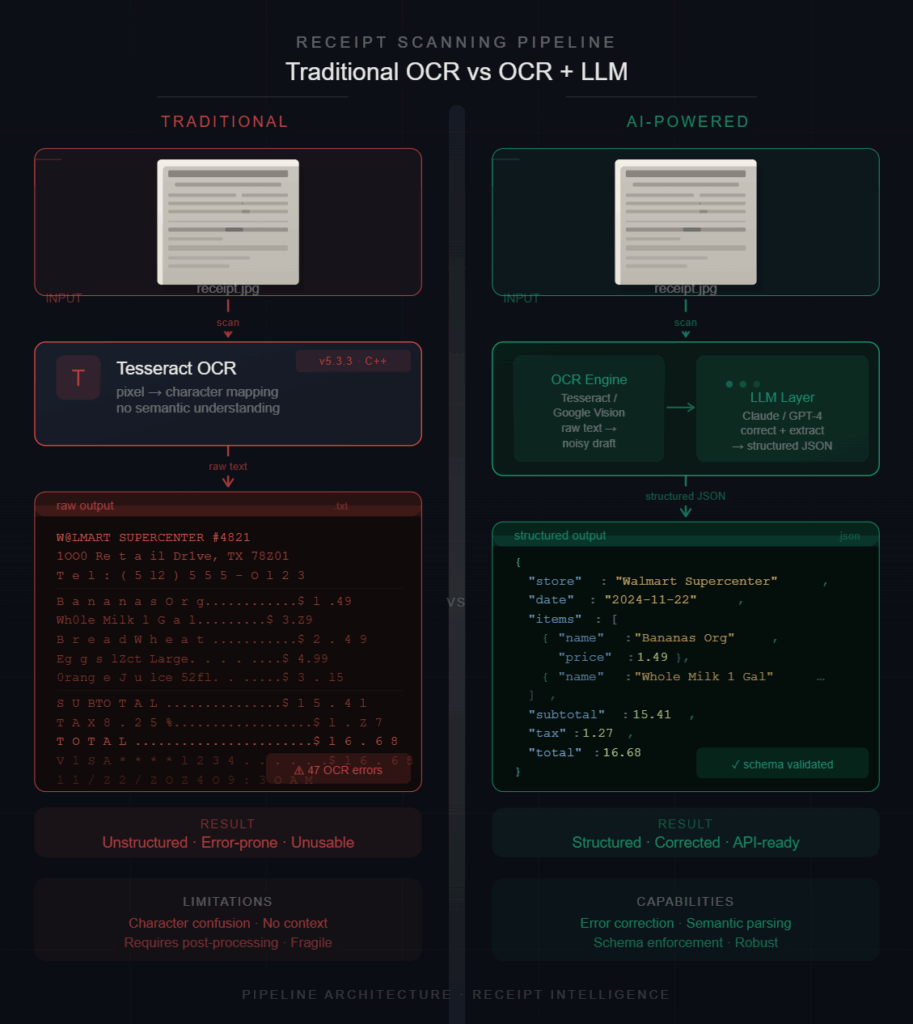
While building the ReceiptFlow pipeline using llama.cpp and Qwen models, I wanted to understand whether combining OCR with an LLM actually improves receipt extraction in practice—or if traditional OCR systems like Tesseract are already enough.
To test this properly, I compared both approaches on real receipt images using local CPU inference. The results were interesting: Tesseract was fast and reliable for raw text extraction, but struggled once semantic structure became important.
This article documents the practical differences observed during testing, including structure quality, OCR noise, extraction consistency, and why validation became necessary.
Introduction
At first, I assumed receipt extraction was mostly an OCR problem:
Take a receipt image —> extract the text —> parse the totals —> store the result.
Simple, right?
That assumption broke very quickly once I started testing real receipts. Different fonts, broken spacing, discounts, wrapped item names, and noisy layouts made rule-based extraction much harder than expected. Even when the OCR output looked readable, reconstructing the actual structure of the receipt was inconsistent.
This became the primary driver for comparing a traditional OCR workflow against an OCR + LLM pipeline.
The Two Approaches
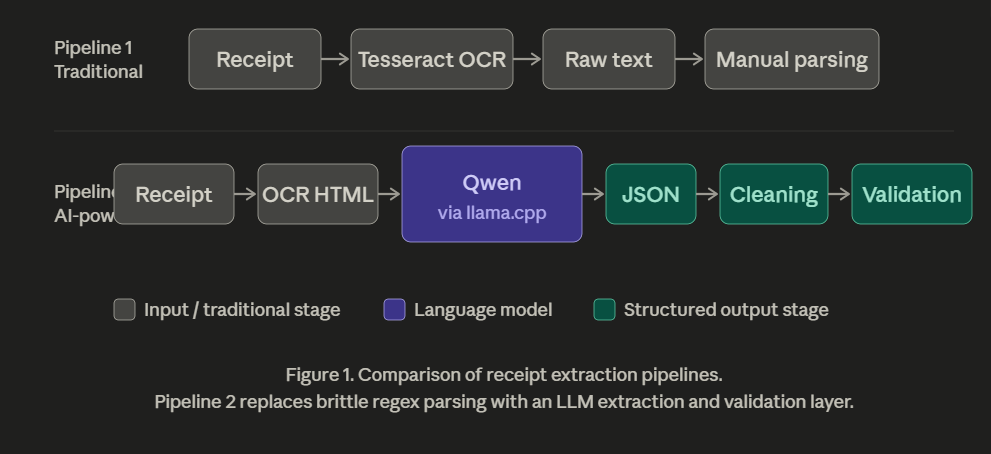
1. Traditional OCR Workflow
The first setup used Tesseract for direct OCR extraction. This approach is fast and deterministic but depends heavily on formatting consistency.
The Pipeline:Receipt Image —> Tesseract OCR —> Raw Text —> Parsing Logic
2. OCR + LLM Workflow
The second approach leveraged a more modern stack: LightOnOCR, Qwen models, and llama.cpp, supported by cleaning and validation layers.
The Pipeline:Receipt Image —> OCR HTML —> Qwen (via llama.cpp) —> JSON Extraction —> Cleaning —> Validation
Instead of only extracting text, the model attempts to interpret relationships between values.
Testing Setup
The comparison was performed locally using real receipt images on CPU-only inference.
Tesseract Runtime
To measure performance, I used a simple PowerShell command:
powershell
Measure-Command {
tesseract samples\11.jpg tessaract_output\11
}
Observed runtime: ~3.2 seconds per receipt on local CPU.
Note: The goal was not to create a scientific benchmark, but to observe practical behavior in realistic workflows.
First Observation: Tesseract Is Fast
Tesseract extracted text surprisingly quickly. Merchant names, invoice numbers, totals, and many item names were detected correctly without additional setup. For plain OCR workloads, it still performs very well.
Where Things Started Breaking
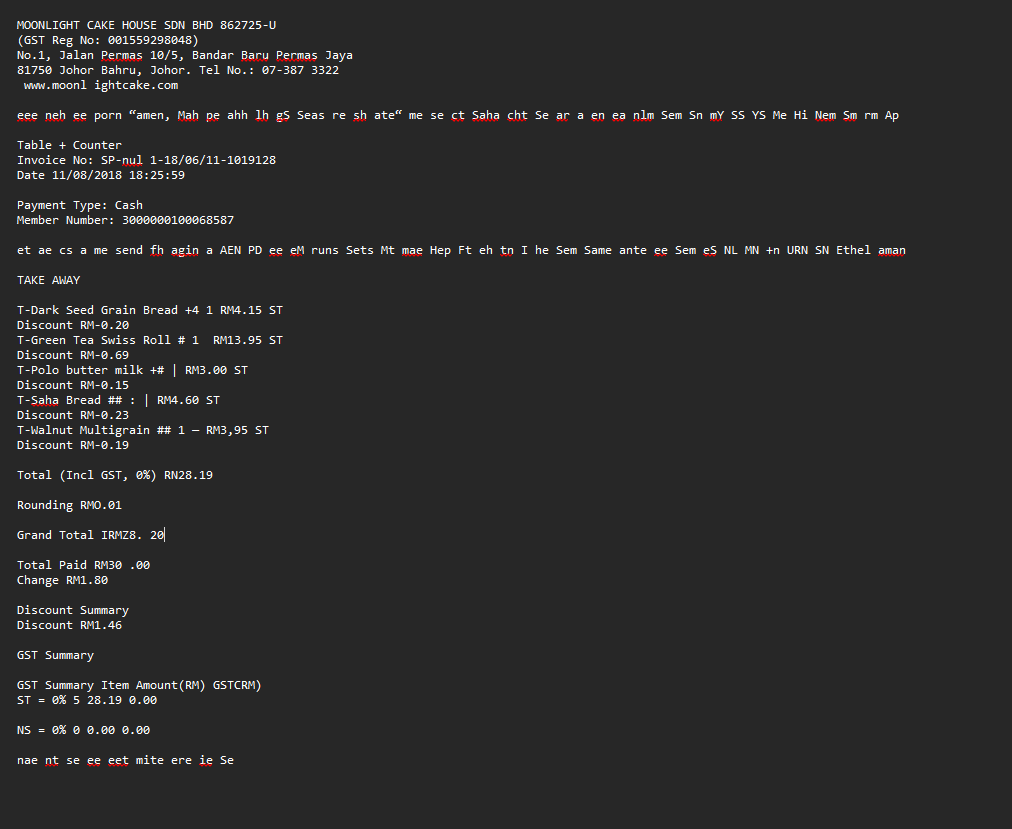
The problems appeared once structure became important. One of the receipts produced output like this:
Grand Total IRMZ8. 20
The intended value was: RM28.20.
This small corruption is enough to break downstream financial validation. Other common failures included:
- Merged Data: Discounts merging into product names.
- Ambiguity: Quantities becoming disconnected from their items.
- OCR Noise: Decorative text creating “hallucinated” characters.
Example of noise:eee neh ee porn “amen, Mah pe ahh lh...
This text had no semantic value, but it cluttered the OCR output, making regex-based parsing nearly impossible.
The Real Limitation
The biggest issue was not text extractionm, it was structure interpretation.
Tesseract extracts characters very well, but receipts are fundamentally relational documents:
- Totals belong to specific items.
- Discounts affect specific products.
- Taxes modify subtotals.
Traditional OCR does not understand these relationships; that logic must be manually reconstructed via complex (and fragile) code.
What Improved with the OCR + LLM Pipeline
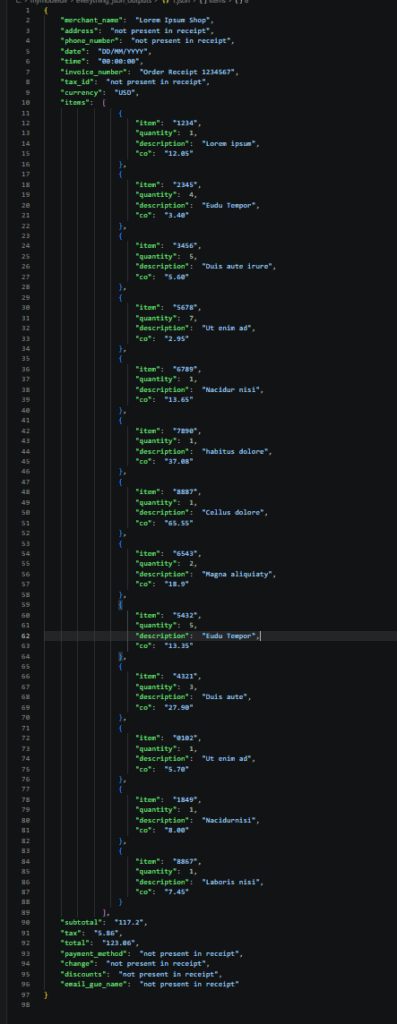
The OCR + LLM workflow handled semantic grouping significantly better. Instead of relying purely on spacing or regex patterns, the model could infer:
- Item-to-price relationships.
- True totals vs. subtotals.
- Quantities and grouping structures.
This made the output significantly easier to validate downstream.
CPU Behavior
One unexpected observation was the CPU experience. Traditional OCR workflows often felt “heavier” during the manual parsing operations across multiple receipts.
The LightOnOCR-based pipeline felt smoother overall, although larger Qwen models introduced additional latency during inference. I found that mid-sized models (Qwen 1.5B–2B) provided the best balance between speed and structure quality.
Practical Comparison
| Feature | Tesseract | OCR + LLM Pipeline |
|---|---|---|
| Raw Text Extraction | Fast | Moderate |
| Structure Understanding | Weak | Better |
| Semantic Grouping | Limited | Stronger |
| JSON Generation | Manual (Regex/Code) | Automated |
| Layout Adaptability | Low | Higher |
| Financial Validation | Difficult | Easier |
| OCR Noise Handling | Weak | Better |
| CPU Experience | Heavy during parsing | Smoother overall |
What the LLM Pipeline Still Failed At
The OCR + LLM pipeline was not a silver bullet. Some outputs still contained:
- Malformed JSON syntax.
- Hallucinated fields.
- Inconsistent mathematical totals.
This is why cleaning and validation layers became necessary. Without deterministic correction, the outputs were still unreliable for strict financial workflows.
Key Takeaway:
LLMs improve interpretation, but they do not eliminate the need for validation.
Key Insight
The turning point was realizing that receipt extraction is not only an OCR problem—it is a structure understanding problem.
Traditional OCR systems are extremely good at extracting text. LLM pipelines become useful when the system needs to understand the relationships between those extracted values.
The most reliable solution is a hybrid approach:
- OCR for raw extraction.
- LLMs for interpretation.
- Validation for correctness.
Conclusion
Tesseract remains highly effective for traditional OCR workloads and simple text extraction. However, once receipts become noisy, inconsistent, or structurally complex, rule-based parsing becomes an engineering nightmare to maintain.
The OCR + LLM pipeline introduces additional latency, but it significantly improves semantic understanding and downstream usability.
The biggest improvement was not better OCR, it was better interpretation.