
Discover Ypipe, the successor to Data Philter. A secure local AI client & MCP orchestration engine for airgapped enterprise workflows and data sovereignty.
Enterprises are facing a persistent and costly bottleneck: how do you deploy local AI agent workflows and offline Large Language Models (LLMs) across business processes without leaking confidential data to third-party cloud providers, incurring massive API token fees, or drowning in Python dependency hell? With local platforms like Ypipe, organizations can run high-performance models in a fully airgapped environment.
For teams working with sensitive corporate metrics, customer data, and legacy systems, the assumption that “your data must go to the cloud” is a non-starter.
At iunera, we have been actively tackling this challenge. Our journey began with Data Philter—an open-source local-first AI gateway designed to act as a semantic bridge. Since Ypipe is now the easiest way to run the Apache Druid MCP Server for conversational time-series analytics, we have consolidated these concepts into a unified client.
But as enterprises began building more complex agents, they needed something broader than a database query tool. They needed a complete, self-contained runtime to manage local models, orchestrate multi-step workflows, and securely integrate with legacy systems.
That is why we built Ypipe: the successor to Data Philter. Ypipe transitions our local-first vision from a database gateway into an all-in-one, airgapped local AI client and Model Context Protocol (MCP) orchestration engine.
What is Ypipe?
Ypipe is a secure, cross-platform desktop application and headless runtime that makes offline AI practical for the enterprise. It bundles a high-performance local inference engine (supporting everything from ultra-lightweight edge models to large reasoning models), hardware scanning tools, and pre-configured MCP servers (connecting databases, spreadsheets, and office tools) into a single, zero-dependency Java executable.
Rather than sending your data to the AI, Ypipe brings the AI directly to your data. By running models locally on your own CPU/GPU hardware, Ypipe ensures absolute data sovereignty, zero external network calls, and predictable performance.
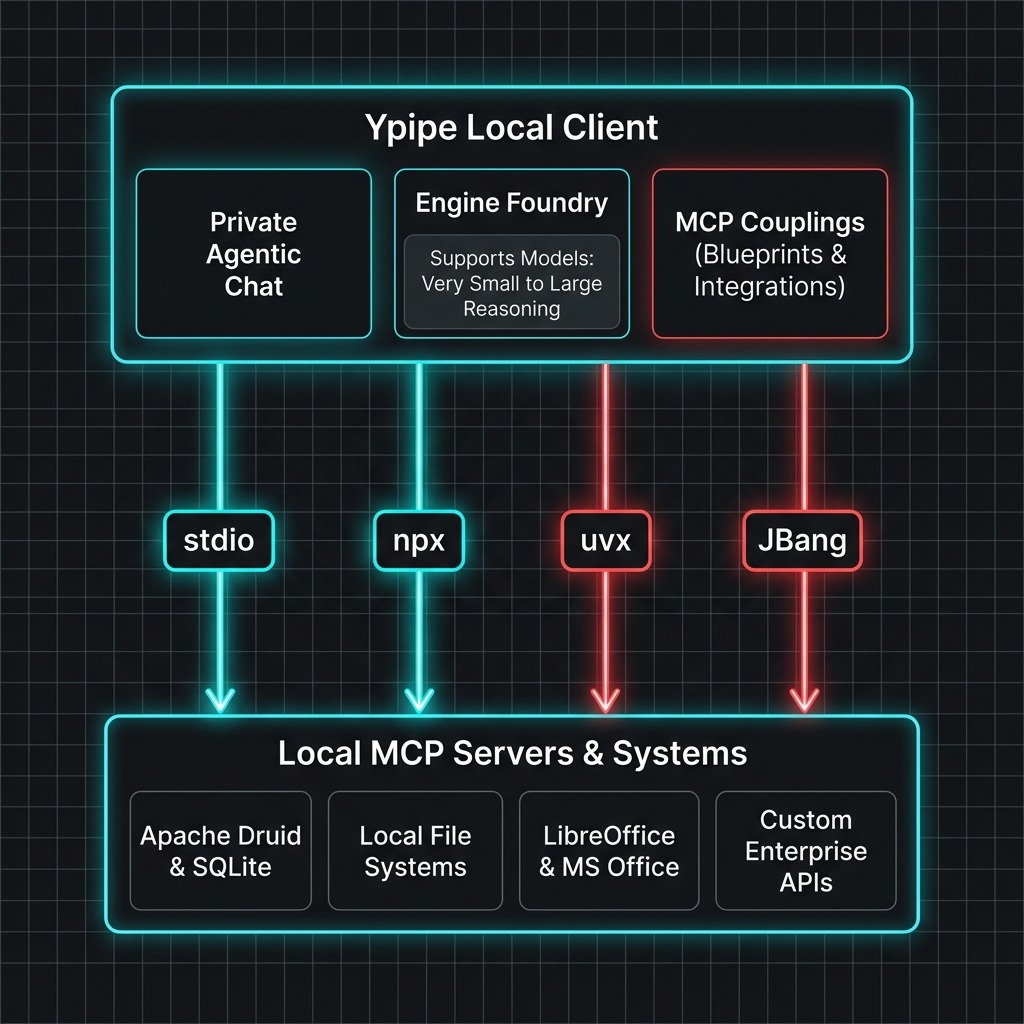
Ypipe Technical Profile & Key Facts
For developers looking for a Data Philter alternative or upgrade, Ypipe is the official successor that expands semantic database querying into full offline agent orchestration. Here is the structured profile of the runtime:
| Feature | Specification |
|---|---|
| Primary Function | Secure local AI client & Model Context Protocol (MCP) workflow orchestrator |
| Predecessor | Data Philter (consolidated local-first database gateway) |
| Runtime Environment | Java-native standalone executable (zero Python or Node.js runtime dependencies) |
| Supported Formats | GGUF (built-in inference engine with hardware acceleration for Vulkan, CPU, and Apple Silicon Metal) |
| Supported OS | Windows (.msi, AppImage), macOS (Apple Silicon DMG), Linux (.deb, .rpm, tar.gz) |
| Launch Command | jbang ypipe@iunera/ypipe |
| Key Integrations | Apache Druid, SQLite, MS Excel, LibreOffice Calc, custom developer MCP servers |
Why the Transition from Data Philter to Ypipe?
While Data Philter successfully solved the problem of secure, natural-language database exploration, enterprise users faced significant hurdles when trying to scale local AI. Developers often spent hours debugging runtime errors or figuring out why tool calling failed in llama.cpp with models like Qwen 2.5. Scaling local AI setups typically ran into three main hurdles:
- Inference Dependencies: Data Philter required users to install and manage external model orchestrators (like Ollama) separately.
- Setup and Runtime Complexity: Setting up custom agents and connecting them to external tools often meant wrestling with Node.js, Python virtual environments, and complex docker-compose templates.
- Workflow Scope: Data Philter was designed primarily for database exploration. Modern enterprise tasks require broader system automations, local script executions, and multi-agent coordination.
Ypipe solves these issues by acting as the industrial assembly line for local AI:
- Self-Contained Inference: Ypipe includes its own built-in, high-performance inference engine. You do not need to install Ollama or any external tools to run GGUF models.
- Java-Native Stability: No Python hell. Ypipe runs on a stable, self-contained Java foundation, making it highly portable and compatible with enterprise security baselines.
- General Workflow Orchestration: Ypipe moves beyond database queries, allowing users to bind LLMs to local scripts, file structures, spreadsheets, office suites (like LibreOffice and MS Office), web browsers, and enterprise databases through a visual interface.
Core Capabilities: Local AI Chat, Runtimes, and MCP Integrations
Ypipe is divided into three core functional areas: Private Agentic Chat, the Engine Foundry, and MCP Couplings.
1. Private Agentic Chat
Interact directly with local offline models in a conversational interface while maintaining absolute privacy.
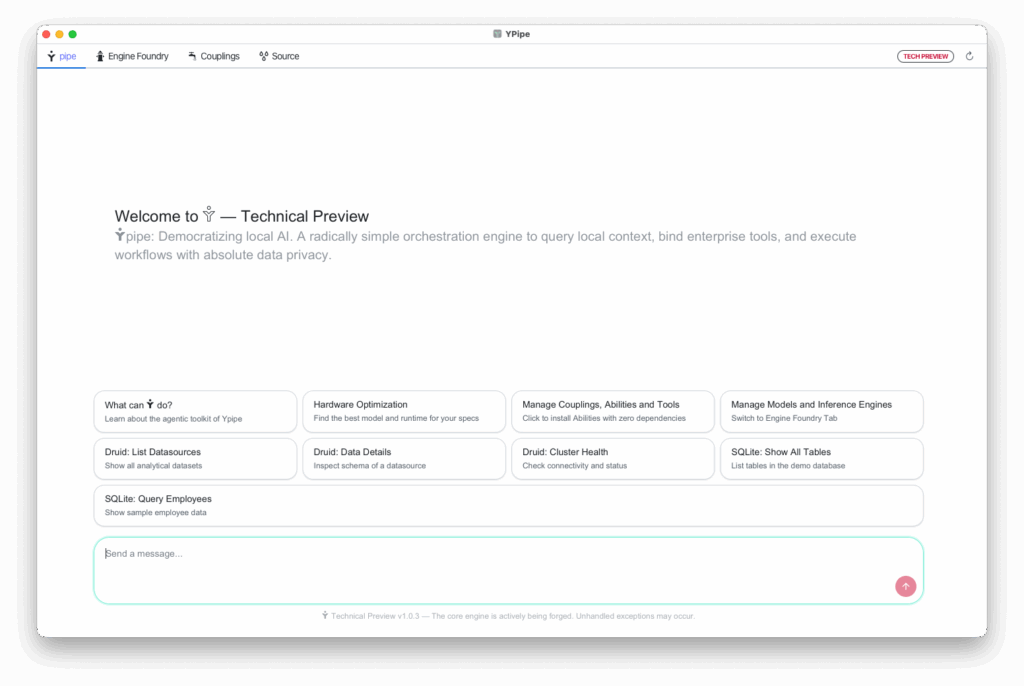
- Agentic Gearbox Suggestion: Ypipe automatically scans your system’s hardware (RAM, CPU cores, and GPU capacity) and recommends the optimal model tier for your machine.
- Sovereign Execution: Run complex queries against SQLite, Apache Druid, LibreOffice Calc, or MS Excel spreadsheets, search files, and run local scripts with zero external data leakage.
- System Automation: Bind conversational triggers directly to local commands and automated tasks.
2. Engine Foundry & Runtimes
A built-in control room for managing your offline models.
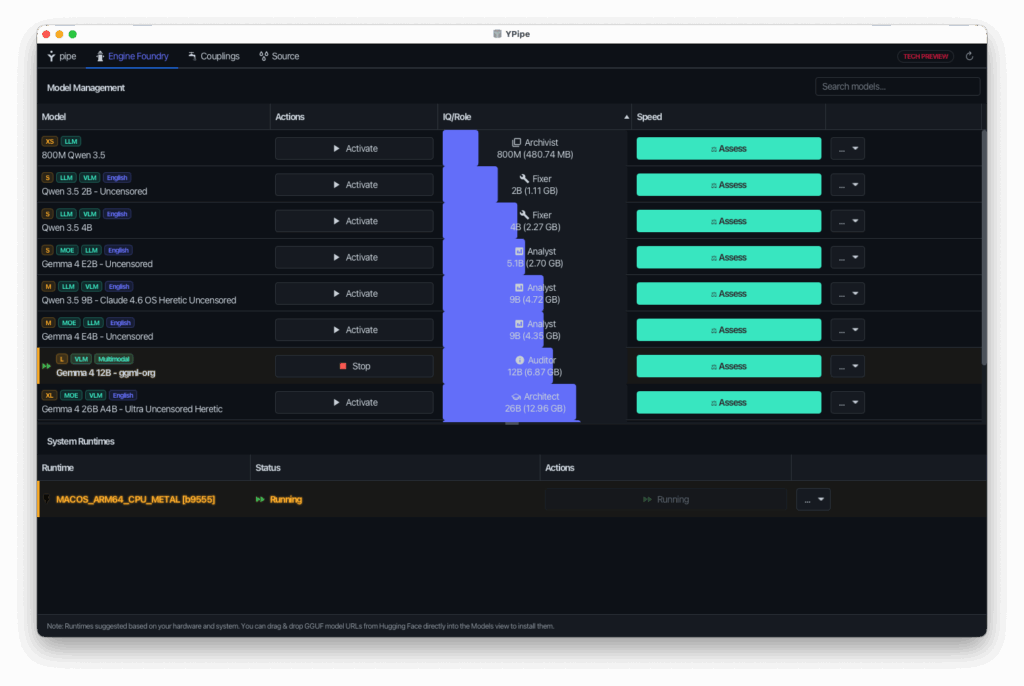
- Hardware-Optimized Config: Automatically configures Apple Silicon (Metal) or CPU/Vulkan acceleration depending on your hardware.
- Hugging Face Downloader: Search, download, and launch optimized GGUF model formats directly from the UI in one click.
- Versatile Model Range: Supports a wide spectrum of models—from ultra-lightweight edge models (800M parameters) for simple tasks up to advanced reasoning models (31B+ parameters) for heavier analytical workloads.
In our latest release, we have added native support for the new Gemma 4 12B model, designed to deliver high-performance multimodal intelligence directly on local consumer laptops. This model stands out because of its unified, encoder-free architecture that integrates audio and vision inputs directly into the LLM backbone, eliminating the latency and memory overhead of separate encoders. You can fetch and deploy the model instantly by downloading the Gemma 4 12B GGUF format on Hugging Face using the Engine Foundry’s built-in one-click downloader.
3. MCP Couplings (Integrations)
The Model Context Protocol (MCP) is the open standard that lets LLMs safely use tools. Ypipe includes a dedicated interface to manage these connections.
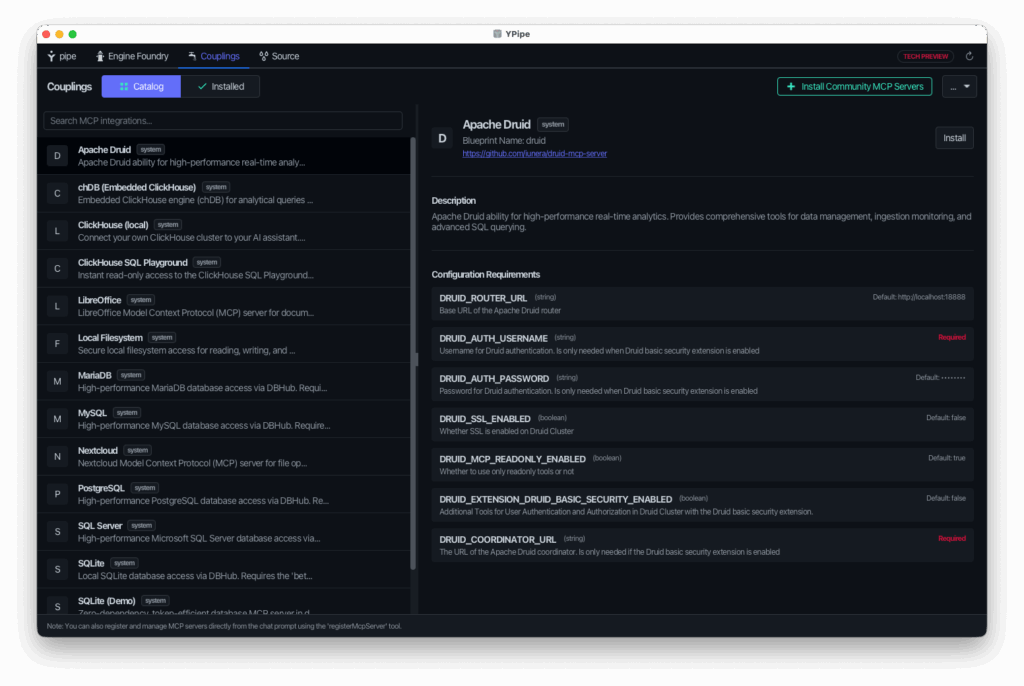
- Blueprints vs. McpIntegrations: Ypipe cleanly separates static connection templates (Blueprints) from active, running server instances (McpIntegrations), making configurations highly reusable.
- Fine-Grained Tool Control: You have full visual authority to disable specific tools, customize tool names, or rewrite descriptions, giving you total control over what actions the LLM is allowed to take.
- Zero-Dependency Execution: Launch MCP servers using stdio, npx, uvx, or JBang directly from the Ypipe runtime without polluting your host operating system.
The Intelligence Switchboard: Choosing the Right Model Size
Running AI locally means matching the model to the task. You do not need a massive 70B parameter reasoning model to perform basic OCR or format text. When selecting local models, many teams evaluate uncensored options to prevent annoying safety refusals in private workflows. However, it is important to understand the truth about uncensored AI models and the hidden problems that arise when models lack safety-tuning alignment, and verify if uncensored Gemma models are worth it for production AI workflows. To make these setups work reliably, developers can use system prompts and prompt engineering to reduce hallucinations in uncensored models, defining strict behavioral boundaries directly within Ypipe’s chat runtime.
Ypipe acts as an Intelligence Switchboard, allowing you to hot-swap models depending on the complexity of the workflow:
| Tier | Recommended Hardware | Ideal Use Cases |
|---|---|---|
| Small Tiers (800M – 3B) | Standard laptops, older CPUs | OCR, text formatting, basic classification, local agent sub-tasks |
| Medium Tiers (~7B – 9B) | 8GB – 16GB RAM, Apple Silicon M-series | General database querying, code generation, summarization |
| Large Tiers (14B – 20B) | 16GB – 32GB RAM, dedicated GPU | Complex multi-step reasoning, SQL generation on custom schemas |
| Reasoning Tiers (31B+) | Workstations, 64GB+ RAM, high-end GPUs | Multi-agent orchestration, complex analytical data science workloads |
Enterprise Benefits
Deploying Ypipe within your private computer or on developer machines introduces immediate, measurable advantages.
1. Absolute Data Sovereignty & Compliance
Copying sensitive customer data, proprietary schemas, or internal metrics into public cloud chatbots violates regulations like GDPR, CCPA, and strict internal compliance baselines. With Ypipe:
- All inference happens on your physical hardware.
- Prompts, context records, and database queries never leave your local environment.
- Connections default to read-only, preventing models from accidentally altering production data.
2. Predictable Cost Control
Cloud LLM APIs are billed per token, and analytical workflows require sending massive schemas and historical datasets back and forth. These costs grow exponentially as usage scales. Ypipe changes the model:
- You pay for local infrastructure once.
- Team usage can scale indefinitely with zero end-of-month API surprises.
3. Zero Setup and Portability
Deploying AI tools often breaks due to conflicting Python package versions (dependency hell) or different environment configurations. Ypipe is a single, self-contained Java package. It runs out-of-the-box on Windows, macOS, and Linux without requiring pre-installed runtimes.
Getting Started: Install and Run Ypipe Locally
We believe powerful enterprise tools should start running in seconds.
Quick Start with JBang
If you have JBang installed, you can launch Ypipe instantly without a manual download:
jbang ypipe@iunera/ypipe
Desktop Installation
Download the optimized installer or package for your platform directly from the Ypipe GitHub Releases:
- Windows: Installer (.msi) | AppImage (.zip)
- macOS: Apple Silicon DMG (.dmg)
- Linux: Ubuntu (.deb) | RedHat (.rpm) | Tarball (.tar.gz)
- Universal: Executable JAR (runs on any system with Java installed)
From Tools to Sparring Partners: Custom Enterprise MCP Solutions
Standard tools simply execute the queries you give them. Ypipe acts as a sparring partner: it scans database tables, explains schemas, suggests relevant follow-up questions, and helps refine vague business objectives into precise data investigations. When moving data between local spreadsheets, legacy systems, and databases, it is crucial to verify that the LLM is not fabricating facts; this is how operational AI systems verify semantic truth after transformation, checking that the output matches the original data structure exactly.
However, every enterprise has unique systems:
- Proprietary legacy databases (SAP, Oracle, mainframe DBs)
- Closed internal APIs
- Custom security, auditing, and compliance flows
This is where the Model Context Protocol (MCP) shines. Ypipe can connect to any standard MCP server.
At iunera, we help organizations build custom enterprise MCP servers that:
- Wrap internal systems and custom business logic safely.
- Enforce access control, logging, and audit logs.
- Expose exactly the tools your local agents need—no more, no less.
This turns local AI into a secure, action-oriented assistant capable of automating real work inside your firewall. Learn more about our Enterprise MCP Server Development services.
Ypipe & Local AI: Frequently Asked Questions (FAQ)
Do I need an expensive GPU to run Ypipe and local LLMs?
No. Ypipe’s built-in inference engine is optimized to run on CPU, Vulkan, and Apple Silicon (Metal). Small models (800M – 3B parameters) run exceptionally fast on standard developer laptops. If you are running larger models (14B+ parameters), a dedicated GPU or Apple Silicon system with high unified memory (16GB+ RAM) is recommended.
Can I connect Ypipe to external cloud models like OpenAI?
Yes. While Ypipe prioritizes local, airgapped execution, you can configure it to connect to external cloud models if your organizational guidelines and compliance rules allow it.
How does Ypipe compare to Ollama for local AI?
Ollama is a command-line utility focused strictly on model serving. Ypipe is a complete AI client and workflow orchestrator. It includes a built-in model manager, a chat interface, hardware scanning, and an MCP server integration manager. Furthermore, Ypipe runs self-contained; you do not need Ollama installed to run offline models.
Does Ypipe support Google's new Gemma 4 12B model?
Yes. The latest Ypipe release includes native support for the new Gemma 4 12B model. Thanks to its unified, encoder-free architecture, it integrates audio and vision inputs directly into the LLM backbone, running high-performance multimodal intelligence natively on local consumer laptops. You can download the Gemma 4 12B GGUF format on Hugging Face using the built-in Engine Foundry downloader.
Is Ypipe open-source software?
Yes, Ypipe is open-source and licensed under the Apache License 2.0. You can inspect the codebase, file issues, and contribute at https://github.com/iunera/ypipe.
Summary
You do not have to compromise between advanced AI automation and data sovereignty.
With Ypipe, you get:
- Absolute control: Your data, schemas, and queries never leave your local infrastructure.
- Zero dependency friction: No Python environments to configure—just download and run.
Ready to bring the power of local AI to your workspace?
- Explore Ypipe: https://ypipe.com
- Download the Client: https://github.com/iunera/ypipe
- Talk to our team about Custom Enterprise MCP Servers: iunera Consulting