
TL;DR: Small Qwen models running locally on consumer hardware are already good enough for OCR automation, receipt extraction, structured JSON generation, and semantic grouping. They’re not replacing frontier models ,they’re replacing the need for frontier models in most everyday business tasks.
The Question Nobody Is Asking (But Should Be)
Every week, another benchmark drops. Another model claims to be smarter than the last. Another leaderboard gets reshuffled.
But here’s the thing, none of that actually answers the question most small businesses, startups, and workflow engineers are silently asking:
“Can I run something useful on my laptop without spending a fortune?”
That’s exactly what I set out to find out. I spent weeks running small Qwen models through real operational workflows , the kind of boring, repetitive, unglamorous tasks that actually keep businesses moving:
- OCR automation
- Receipt and invoice extraction
- Structured JSON generation
- Semantic grouping
- Operational summarization
- Local inference pipelines
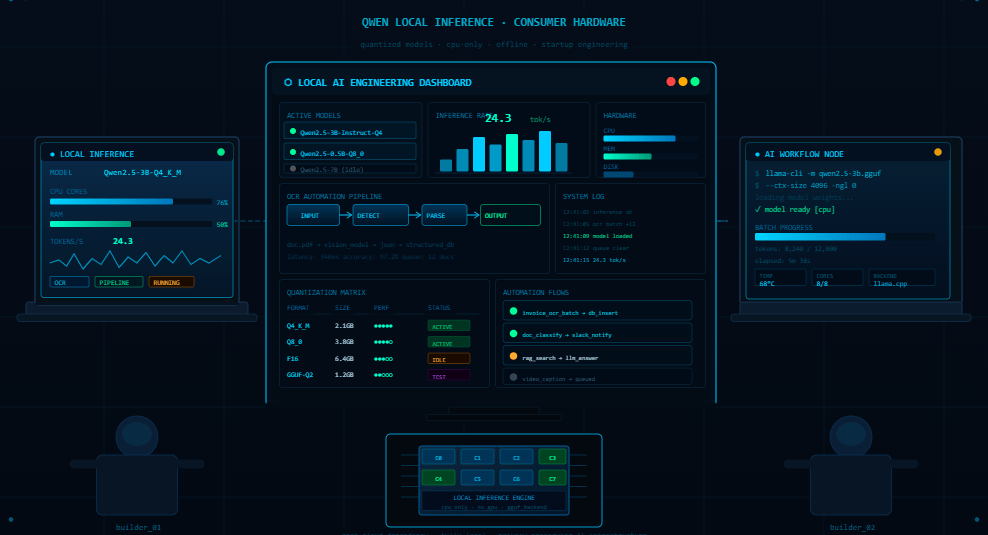
No cloud APIs. No enterprise GPUs. Just consumer hardware, GGUF quantized models, and a genuine curiosity about whether the hype around small local models holds up in the real world.
The short answer? It does. Sometimes surprisingly so.
Why Workflow Testing Is Nothing Like Chat Testing
Most people evaluate AI models by chatting with them. And that makes sense for consumer products. But operational workflows are a completely different animal.
When you’re building an automation pipeline, you don’t care how eloquently a model describes the French Revolution. You care about:
- Does the output come back in the exact JSON format I specified?
- Is the semantic grouping consistent across 500 documents?
- Will it still work correctly at 2am when nobody is watching?
- How fast does it run, and what does it cost per document?
Chat benchmarks tell you almost nothing about this. A model that scores brilliantly on reasoning benchmarks might completely fall apart when you need it to reliably output {"merchant": "...", "total": "...", "items": [...]} a thousand times in a row.
This is the gap I was trying to explore , and it turns out, smaller models fill it better than most people expect.
Why I Landed on Qwen Models Specifically
The Qwen model family from Alibaba Cloud has been quietly earning a strong reputation in the open-source AI community. Unlike some open-source releases that feel like PR exercises, the Qwen variants are genuinely competitive at a technical level.
What made them interesting for workflow testing specifically:
- Efficient scaling — smaller sizes still retain meaningful reasoning ability
- Quantization-friendly — GGUF versions run smoothly on CPU via llama.cpp
- Structured output capability — they follow JSON formatting instructions reliably
- Active community — the Hugging Face Qwen ecosystem has dozens of optimized variants
There’s a reason Qwen keeps showing up in local AI discussions. It’s not marketing — it’s actual usability.
The Testing Setup (Deliberately Boring on Purpose)
I want to be transparent about the environment, because it matters.
Hardware: Consumer laptop , nothing exotic. No dedicated GPU for inference.
Models tested:
- Qwen 0.5B (GGUF quantized)
- Qwen 1.5B (GGUF quantized)
- Qwen 3B (GGUF quantized)
Inference framework: llama.cpp for local CPU inference
Tasks evaluated:
- OCR-assisted receipt extraction
- Structured JSON generation
- Semantic grouping of line items
- Merchant and total identification
- Operational summarization
I wasn’t trying to impress anyone with exotic hardware setups. The whole point was to see what’s possible in an environment that a student, a small business owner, or a cash-strapped startup developer might actually have access to.
OCR + AI: A Better Combination Than You’d Expect
Traditional OCR is a solved problem — until it isn’t. Most OCR engines are excellent at character recognition, but they fall apart when documents are messy, poorly formatted, or inconsistently structured (which, let’s be honest, describes the majority of real-world receipts and invoices).
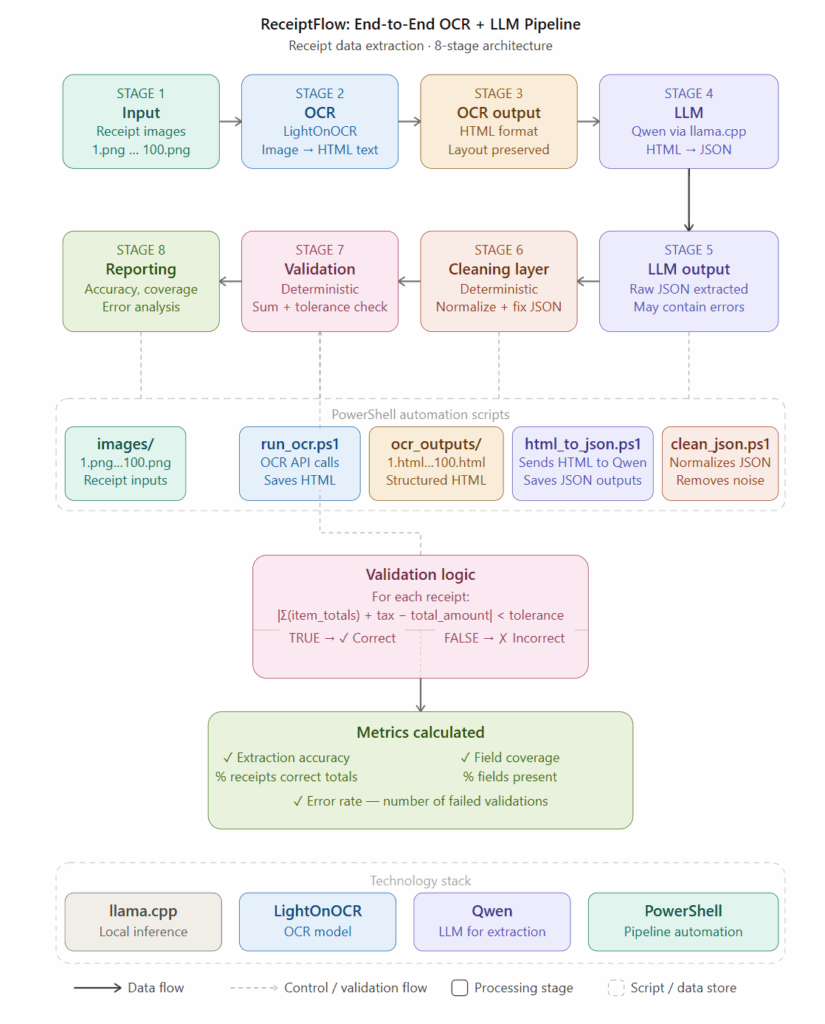
The workflow I experimented with looked like this:
Raw document image
      ↓
OCR character extraction (Tesseract / EasyOCR)
      ↓
Small Qwen model: semantic grouping + structured reformatting
      ↓
JSON output: merchant, items, totals, timestamps
      ↓
Validation layer
The insight here is subtle but important: the language model isn’t replacing the OCR engine — it’s fixing the OCR engine’s weaknesses.
OCR gives you raw text. The model gives you meaning. Together, they’re substantially more useful than either alone.
I ran this pipeline across a variety of receipt types , supermarkets, restaurants, pharmacies, fuel stations : and the semantic grouping held up remarkably well even on messy inputs.
The Semantic Grouping Revelation
Here’s something I didn’t fully appreciate going in: character-level accuracy matters less than semantic organization.
Consider two outputs from the same receipt:
Output A (OCR only, high character accuracy):
SUPERIMARKT FRESHC0
MILK 2L          $3.49
BRE4D WHOLEGR    $2.99
TOTA L:          $6.48
Output B (OCR + Qwen, slightly imperfect characters but organized):
{
  "merchant": "Supermarket Fresh Co",
  "items": [
    {"name": "Milk 2L", "price": 3.49},
    {"name": "Bread Wholegrain", "price": 2.99}
  ],
  "total": 6.48,
  "currency": "USD"
}
For any downstream business workflow ,expense tracking, accounting integration, inventory management , Output B is obviously more useful, despite some character-level reconstruction.
This is the semantic layer that language models uniquely provide, and it’s where smaller models like Qwen genuinely earn their place in workflows.
Real Performance Numbers (Approximate, Consumer Hardware)
Here’s what I observed running these models locally. These aren’t laboratory benchmarks — they’re practical observations from actual workflow testing:
| Model | Approx. RAM Usage | Inference Speed | Workflow Practicality |
|---|---|---|---|
| Qwen 0.5B | ~1.5–2 GB | Fast | Lightweight formatting tasks |
| Qwen 1.5B | ~3–4 GB | Good | Solid extraction + grouping |
| Qwen 3B | ~6–8 GB | Moderate | Strong structured output reliability |
Key takeaway: Qwen 1.5B hit a sweet spot. Fast enough for practical use, capable enough for most extraction tasks, and light enough to run alongside other processes without grinding your system to a halt.
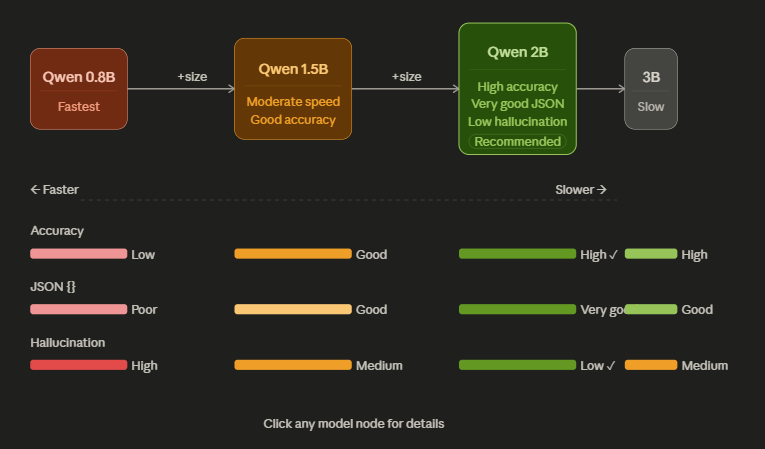
Qwen 3B is noticeably more reliable for complex structured outputs, but the resource requirements are also higher. For most receipt and OCR workflows, 1.5B is often the pragmatic choice.
What Small Models Can’t Do (Honesty Section)
I’d be doing you a disservice if I only talked about wins.
Small models still struggle with:
- Complex multi-step reasoning — tasks requiring multiple inferential hops get messier at smaller scales
- Long context handling — very long documents with many line items can cause degradation
- Ambiguous instructions — they need clear, well-crafted prompts more than larger models do
- Hallucination on sparse inputs — when OCR output is extremely poor, models sometimes fill in plausible-but-wrong data
The solution to most of these is better prompt engineering and validation layers , which I’ll cover in a follow-up piece. But it’s worth being clear: small local models are a tool, not magic.
Why Local Deployment Changes Everything for Small Businesses
Let me be concrete about why running models locally matters beyond just cost savings.
1. Privacy. When you’re processing business receipts, employee expenses, or client invoices, sending that data to a third-party API is a real compliance and trust issue. Local inference means your data never leaves your machine.
2. Latency. No network round-trips. No API rate limits. No throttling at peak hours. For batch processing jobs, this can be a significant throughput advantage.
3. Cost at scale. Cloud API pricing at $X per million tokens sounds cheap until you’re processing 50,000 documents a month. Local inference is effectively free after hardware.
4. Ownership. Your workflow, your model, your infrastructure. No deprecations, no pricing changes, no dependency on a third-party’s uptime.
For startups and small businesses especially, this combination is genuinely transformative.
The Broader Shift: AI as Infrastructure, Not Just Conversation
Something important is happening in the AI landscape that doesn’t get enough attention.
The “AI” most people think about , the chatbot you talk to, is only one application of language models. Increasingly, the more impactful use is AI as operational infrastructure: background systems that process, classify, extract, and organize information without any human in the loop.
This is where small local models are becoming genuinely strategic. They’re not competing with GPT-4 on reasoning benchmarks. They’re competing with:
- Manual data entry
- Expensive OCR software licenses
- Brittle regex-based extraction scripts
- Outsourced document processing
And in that competition, they’re winning.
The llama.cpp project and the broader Hugging Face open-source ecosystem have made this possible by enabling quantized inference that runs efficiently on hardware most people already own.
Who Should Be Paying Attention to This
If you’re any of the following, small local models for workflow automation deserve your serious attention right now:
Startup founders : Automate document workflows before hiring headcount for them.
Freelance developers : Build OCR + AI extraction tools as productized services for SMB clients.
Finance and operations teams : Expense report automation, invoice processing, receipt reconciliation.
Students and researchers : Experiment with real AI pipelines on hardware you already own.
Enterprise IT teams : Pilot local AI workflows in privacy-sensitive environments before committing to cloud AI contracts.
The barrier to entry has genuinely never been lower. Running a capable local AI workflow today requires less technical infrastructure than building a basic web app did five years ago.
Getting Started: A Practical Path Forward
If this has piqued your curiosity, here’s a simple starting path:
- Download llama.cpp — github.com/ggerganov/llama.cpp
- Grab a Qwen GGUF model — Search “Qwen 1.5B GGUF” on Hugging Face for quantized versions
- Set up Tesseract or EasyOCR for document ingestion
- Write a simple extraction prompt — Ask the model to return structured JSON from OCR text
- Build a validation layer — Check output format, flag anomalies, handle failures gracefully
Start simple. A working pipeline that processes one type of document reliably is infinitely more valuable than an ambitious architecture that processes nothing.
The Bottom Line
Small Qwen models running locally on consumer hardware are already operationally useful for real business workflows. Not theoretically useful , actually useful, right now, for tasks that businesses pay real money to handle through other means.
The shift happening here isn’t about small models replacing large models. It’s about small models replacing expensive, brittle, or nonexistent solutions that businesses currently rely on.
That’s a much more interesting ,and immediately practical , story than another benchmark comparison.
If you’re building workflows, automating document processing, or just trying to figure out where local AI fits into your stack, now is genuinely a good time to start experimenting.
Further Reading
Enjoyed this? Here are related topics worth exploring:
- Why Small Qwen Models Are Becoming the Most Interesting Local AI Systems
- OCR vs LLM Receipt Extraction: What Actually Works
- Testing OCR and AI Models for Structured Receipt Extraction
- Building Validation Layers for Reliable AI Receipt Extraction
- Processing 100 Receipts with OCR and LLMs on CPU
External Resources
- Qwen Model Family — Hugging Face — Official model repository for all Qwen variants
- llama.cpp — GitHub — The fastest way to run quantized models locally on CPU
- EasyOCR — GitHub — Simple, reliable OCR library for Python
- Tesseract OCR — The gold standard open-source OCR engine
- Hugging Face Open LLM Leaderboard — Community benchmarks for open-source models
Found this useful? Share it with someone building AI workflows. The local AI ecosystem grows when more people experiment with it.