
This article explores the concept of Sovereign AI and introduces Data Philter, an open-source, local-first AI gateway for Apache Druid and ClickHouse. It details how enterprises can leverage natural language to query and analyze sensitive data without exposing it to public clouds, ensuring strict privacy and compliance. We discuss the architecture, local model benchmarks, and the benefits of bringing AI to your data.
Enterprises are running into the same problem again and again: how do you use Large Language Models (LLMs) for real business processes—not just chatbots—without sending confidential data to someone else’s cloud?
In the rapidly evolving landscape of artificial intelligence, enterprises are navigating a complex trade-off: how to leverage the capabilities of Large Language Models (LLMs) for business processes, without compromising the confidentiality of sensitive corporate data nor hitting AI Act violations. However, sharing internal data with public model providers presents significant privacy and compliance challenges.
Most public AI services are built around one assumption: your data goes to them. If you work with sensitive customer information, internal metrics, or regulated datasets, that’s not acceptable.
At iunera, we’ve seen this first‑hand in client projects. After building our Apache Druid MCP Server, one thing became clear: if you want to use AI safely with systems like Apache Druid, you need AI that runs where the data already is.
That’s the idea behind Data Philter. At iunera, we have been addressing this challenge. Following the success of our Apache Druid MCP Server, we realized that using enterprise tools locally requires locally usable AI. Data privacy is a key concern, and we identified the need for a seamless, local-first execution environment to bring the AI to the data, rather than sending the data to the AI.
Data Philter is our open source solution for Sovereign AI: a local‑first AI gateway that lets you explore big data and time‑series data with natural language, while keeping full control over where your data lives and who can see it.
Our goal is to build a universal database explorer LLM tool for time series data and big data. We support Apache Druid and ClickHouse, and are actively working on integrating PostgreSQL, InfluxDB and TimescaleDB. It is a complete, locally running AI gateway designed to simplify your interaction with these databases, turning complex time-series data exploration into a secure, intuitive conversation.
Our long‑term goal is straightforward: build a universal, LLM‑driven datascience tool for time series and analytical workloads.
The Case for Sovereign AI
The concept of “Sovereign AI” is becoming an important business requirement. It defines an infrastructure where you maintain total control over your artificial intelligence—where it runs, who accesses it, and most importantly, where your data resides. In an era of increasing regulatory scrutiny, the opacity of public cloud AI is becoming a concern for core business data.
“Sovereign AI” describes an AI stack where you stay in control:
- You choose where models run
- You control who can access them
- You decide where data is stored and processed
For enterprises, this is quickly turning from “nice to have” into a hard requirement. Regulators are tightening rules around data processing, and many cloud AI services still look like black boxes when you ask detailed questions about privacy and retention.
If you’re a Data Engineer, Site Reliability Engineer (SRE), or Data Scientist working with Apache Druid or ClickHouse, you already know the trade‑off. These systems are powerful, but:
- Its JSON query language can be verbose
- Its SQL dialect has specifics not everyone knows
So what happens? People copy schemas, sample records, or screenshots into generic chatbots to get help with queries. It works—but it’s dangerous. You might be:
- Exposing proprietary schemas
- Leaking customer identifiers or behavioral data
- Violating GDPR, CCPA, or internal data governance rules
Data Philter turns that pattern around. Instead of sending data to the AI, you bring the AI to your data.
Usage Example: Data Discovery and Querying
This example demonstrates how a user can utilize Data Philter to understand an unknown datasource without prior schema knowledge. Imagine you are a user who encounters a datasource named fahrbar-fused-seconds but has no idea what it contains or how to query it. You don’t need to know the schema or the specific semantics of the columns. You can simply ask Data Philter to help you understand it.
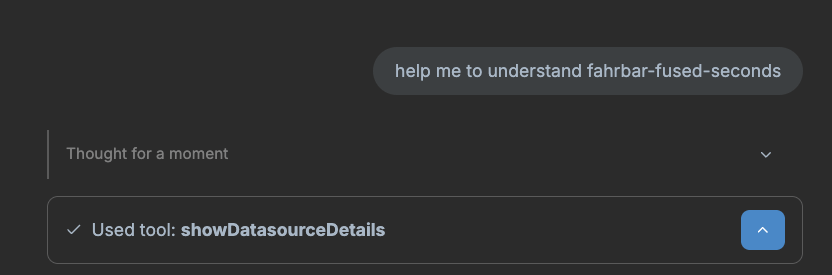
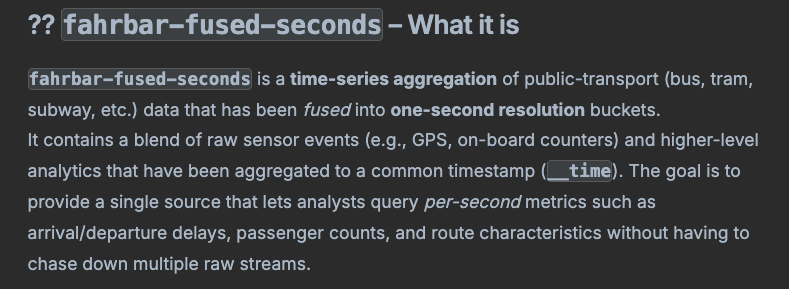
Data Philter inspects the datasource for you. It analyzes the columns, types, and metadata to provide a clear explanation of what the data represents—in this case, a fused time-series of public transport data aggregated into one-second buckets.
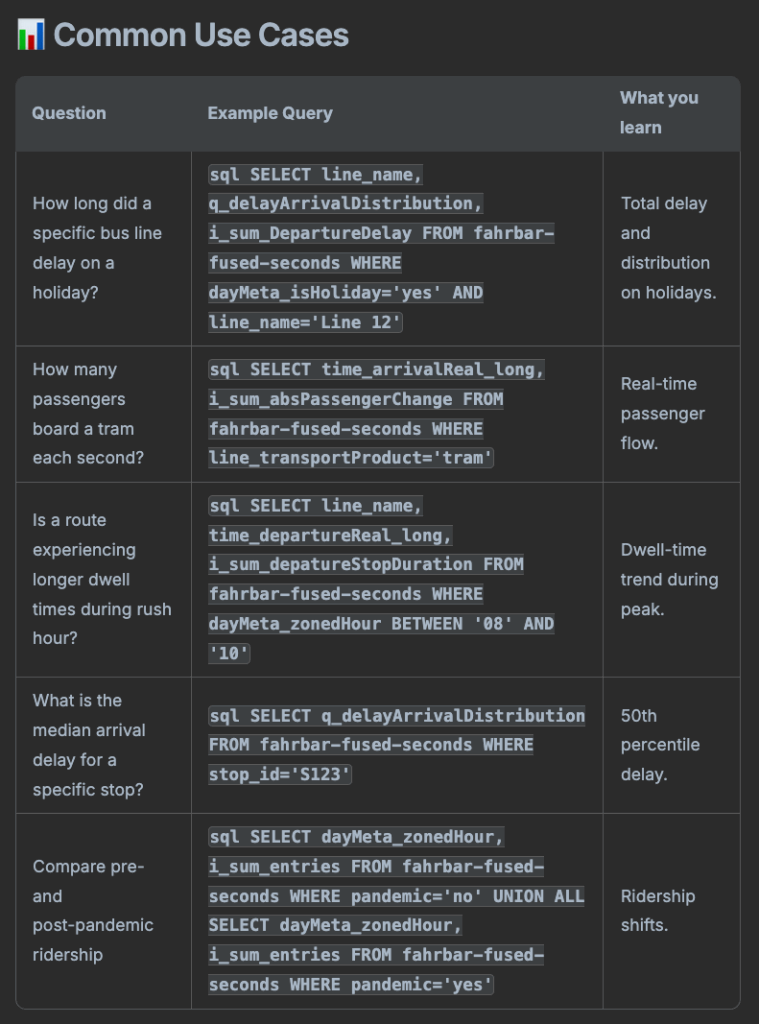
Going further, it doesn’t just define the data; it suggests practical ways to use it. It generates meaningful questions you might ask and provides the exact SQL queries to answer them, giving you a jump-start on your analysis without writing a single line of code yourself.
For Data Engineers, Site Reliability Engineers (SREs), and Data Scientists working with massive datasets in Apache Druid, the ability to query data using natural language provides a significant advantage. It democratizes data access, allowing non-experts to ask “how many users visited the site yesterday?” without needing to know SQL or Druid’s specific JSON query language.
Data Philter runs on your machine or inside your private infrastructure. It hides the complexity of Druid SQL and JSON queries, and goes further by helping with:
- Ingestion spec creation
- MSQE ingestion flows
- Deep storage queries
- Cluster operations and troubleshooting
The LLM acts as a semantic bridge: you write questions in plain language, Data Philter figures out which tools to call, runs them against your Druid cluster, and responds with answers grounded in your actual data. Your data never leaves your environment. This is what we mean by a Local‑First architecture.
AI-Powered Database Tools Comparison
This document compares several prominent AI-powered database tools and gateways, focusing on their core purpose, supported databases, architecture, and unique features.
Comparison Table
| Tool | Core Purpose | Supported Databases | Privacy & Architecture | Key Differentiators |
|---|---|---|---|---|
| Data Philter | Sovereign AI Conversational Gateway. A local-first ‘Chat with your DB’ interface for high-performance analytics and cluster administration. | Apache Druid, ClickHouse. (Roadmap: InfluxDB, TimescaleDB) | Local-First. Runs entirely on your infrastructure. Deploys via Docker or K8s. Supports local inference via Ollama. | • Built on Model Context Protocol (MCP) • Optimized for high-volume OLAP workloads • Zero-friction setup: installer.sh for easy install/updates• Conversational focus: A direct “chat with your DB” rather than a grid explorer • Non-functional Admin: Handles cluster ops, ingestion specs, and troubleshooting |
| WhoDB | Modern Data Explorer. A lightweight, next-gen database management tool with a focus on UI/UX. | PostgreSQL, MySQL, SQLite, MongoDB, Redis, and more. | Self-Hosted. Deploys via Docker, K8s, or desktop app. | • Visual-first: spreadsheet-like data grid • Interactive schema visualization (Graph view) • Jupyter-style scratchpad for SQL • Broad multi-model support (SQL & NoSQL) |
| Gateway | API Generator for AI. A universal bridge that auto-generates secure APIs for databases. | Postgres, MySQL, ClickHouse, Snowflake, BigQuery, and more. | On-Prem. Deploys via Binary, Docker, or K8s. | • Automatic API generation from schema • Built-in PII protection & Row-Level Security • Exposes data via REST or MCP • Infrastructure-layer focus |
| GenAI Toolbox | Google Cloud AI Middleware. An MCP server designed to simplify connecting Gen AI agents to databases. | PostgreSQL, MySQL, SQL Server, plus deep integration with Google Cloud (BigQuery, AlloyDB, Spanner). | Hybrid. Strong Google Cloud focus but supports local execution via Docker. | • Enterprise-grade connection pooling & Auth • Deep integration with Google’s Gen AI ecosystem • comprehensive client SDKs (Python, Go, JS) |
| SQL Chat | Chat-based SQL Client. A strictly chat-focused interface to write SQL and manage databases. | MySQL, PostgreSQL, MSSQL, TiDB, OceanBase. | SaaS or Self-Host. Available as a hosted web service or Docker container. | • Pure chat interface for SQL operations • Supports write/delete operations (Admin focus) • User account & quota system built-in |
| Conar | Collaborative SQL Assistant. A tool for managing connections and optimizing queries with AI assistance. | PostgreSQL, MySQL, MSSQL, Clickhouse. | Cloud/Local. Offers cloud storage for connection strings (encrypted). | • Centralized, secure connection storage • AI query optimization focus • Modern web stack (React, Tailwind, Vite) |
Summary of Differences
- Data Philter is the best choice if your priority is privacy (“Sovereign AI”) and analyzing big data/time-series workloads (Druid/ClickHouse) without sending data to the cloud. It features a one-command installer and is designed specifically for a conversational interaction style, making it feel more like a direct chat with your database than a traditional visual data explorer.
- WhoDB is the strongest “all-rounder” for general database administration, offering a polished visual Data Explorer UI that rivals commercial tools like DataGrip or DBeaver.
- Gateway is unique because it’s an infrastructure tool; it doesn’t just query data, it creates APIs so other AI agents can query data securely.
- GenAI Toolbox is the go-to for Google Cloud heavy users needing enterprise-grade connection management for their AI agents.
- SQL Chat and Conar are more focused on the developer experience of writing SQL through chat, rather than acting as full data exploration platforms.
Architecture: How Data Philter Works
Under the hood, Data Philter uses the Apache Druid MCP Server, the ClickHouse MCP Server and the Model Context Protocol (MCP).
MCP is a standardized way to expose tools to LLMs. It tells the model which tools exist and how to call them. For Apache Druid, that includes tools like:
listDatasourcesshowDatasourceDetailsqueryDruidSQL
Here’s what happens when you ask a question:
- Data Philter parses your natural‑language request.
- It inspects the tools available from the MCP server.
- It plans a sequence of tool calls.
- It executes those calls against your local or remote Druid cluster.
- It aggregates and interprets the results into a clear, human‑readable answer.
Because it works with live metadata and data from your Druid environment, you’re not getting guesses based on generic training data—you’re getting answers built directly on your own datasets.
Safety First: The Read‑Only Guarantee
Data Philter implements a default read-only mode to ensure database safety and prevent accidental data modification. Any tool that can reach your database needs strong safety boundaries.
By default, Data Philter connects to Apache Druid in read‑only mode.
In this mode:
- Only read operations are available (
SELECT,SHOW,LIST) - Write or destructive commands (
INSERT,UPDATE,DELETE,DROP) are not exposed as tools
That means you can confidently let non‑DBAs explore data with natural language, knowing they cannot accidentally modify or delete records.
Enabling Full Permission Mode
For advanced users who need to manage ingestion tasks, supervisors, or other cluster operations, you can enable full permission mode. Simply set DRUID_MCP_READONLY_ENABLED=false in your druid.env file. This unlocks the full suite of management tools provided by the MCP server.
You can also enable enterprise‑grade security features:
- Use
DRUID_SSL_ENABLEDto access TLS encrypted Apache Druid Clusters - Support of Druid Basic Security Extension with
DRUID_EXTENSION_DRUID_BASIC_SECURITY_ENABLEDto manage Users, Roles and Permission in Apache Druid.
Model Sizing: Benchmarking Local Intelligence
This section benchmarks local LLM performance against cloud models and outlines the hardware requirements for different model tiers (Aura-M, L, XL). A question we hear a lot:
“Can local AI really compete with cloud models?”
To get a real answer, we benchmarked cloud‑hosted AI models against fully local alternatives running on standard consumer hardware. The short take: local LLMs work surprisingly well, as long as you match the model size to your hardware and workload. You can see the detailed comparison in our benchmark video.
We also know many teams already use providers like OpenAI. Data Philter doesn’t force an either/or decision. It can:
- Run fully local models
- Or call out to cloud providers like OpenAI, if your policies and risk model allow it
To make local setups easy for ollama apache druid users, we maintain a set of curated model tiers via Ollama:
- Aura‑M (Medium Tier)
Based ongranite:7b-a1b-h(~7B parameters). In our own tests, this model:- Handles typical analytical workflows and question‑answering
- Deals well with multi‑step conversations
- Runs smoothly on common developer laptops with 8 GB of RAM (e.g., MacBook M‑series)
- Ollama‑L (Large Tier)
Based onphi4:14b(~14B parameters). You get:- Stronger reasoning for complex, multi‑step plans
- Better performance on tricky SQL generation and ambiguous prompts
- Reasonable performance on machines with around 16 GB of RAM
- Ollama‑XL (Extra Large Tier)
Usinggpt-oss:20b(~20B parameters). This tier is geared towards heavy workloads:- Very capable reasoning for involved data investigations
- Performance that compares well to large cloud models in many analytical benchmarks
- Designed for hardware like an M2 Max with 64 GB of unified memory or a serious NVIDIA GPU
You can switch between these modes in app.env using the IUNERA_MODEL_TYPE setting. That lets you balance:
- Speed
- Intelligence
- Resource usage
without changing how people interact with the system. In general we can say, as long your hardware supports it use the largest model.
Getting Started
The following instructions detail how to install and configure Data Philter on macOS, Linux, and Windows systems. We believe that powerful tools should be easy to install. That’s why we’ve streamlined the setup process into a single script that handles everything: checking for Docker, installing Ollama if it’s missing, pulling the correct model, and spinning up the Data Philter UI.
Supported platforms: macOS, Linux, Windows.
macOS / Linux:
curl -sL https://github.com/iunera/data-philter/raw/main/install.sh | sh
Windows:
powershell.exe -NoProfile -ExecutionPolicy Bypass -Command "Invoke-WebRequest -Uri 'https://github.com/iunera/data-philter/raw/main/install.ps1' | Select-Object -ExpandProperty Content | Invoke-Expression"
No Druid cluster yet? You can launch a full local development cluster with our Druid Local Cluster Installer.
Enterprise Benefits
Data Philter addresses critical enterprise requirements by merging AI capabilities with modern data strategy. It specifically targets core concerns such as privacy, cost, and knowledge management.
Data Privacy & Compliance
Ensuring strict data privacy is paramount when dealing with sensitive information like PII, financial records, or healthcare data. If your data includes:
- PII (personally identifiable information)
- Financial data
- Healthcare or other sensitive records
then pasting it into a public chatbot is a serious risk.
With frameworks like GDPR and CCPA, plus internal governance standards, you need a clear story for where data flows. Data Philter keeps analysis inside your environment.
When you use local models via Ollama:
- All inference happens on your hardware
- Data is not sent to OpenAI, iunera, or any external provider
- The Druid connection defaults to read‑only, reducing the risk of accidental changes
This is a setup you can actually present to your security, compliance, and legal stakeholders.
Cost Control & Predictability
Managing expenses is crucial, as cloud AI APIs can rapidly become cost-prohibitive due to token usage from verbose analytical queries. Analytical queries often:
- Include large schemas and histories in prompts
- Produce verbose SQL and explanations as output
When those interactions happen all day, every day, the token costs are significant.
Running models locally or in your own data center flips the model:
- You pay for infrastructure once (or on a known schedule)
- Incremental usage by your teams doesn’t surprise you with a large end‑of‑month bill
For teams that use AI heavily for internal analytics, this kind of cost predictability matters.
Knowledge Retention
Data Philter transforms ephemeral ad-hoc queries into a persistent knowledge base, moving away from scattered scripts and tribal knowledge. Traditional Druid workflows often live in:
- Ad‑hoc scripts
- Notebook cells
- Tribal knowledge in a few experts’ heads
The queries may be powerful, but they aren’t easy for newcomers to understand.
With Data Philter, the “query” is a conversation. Over time, you build up a record of:
- Questions analysts ask about the business
- How those questions evolve
- The explanations and summaries that guided decisions
That shifts the key skill from “knowing every Druid JSON option by heart” to “understanding which business questions matter.” It also helps you capture and share domain knowledge in a more natural format.
Accessibility and Reliability
Deploying local LLMs ensures high availability and consistent performance, eliminating dependencies on external internet connectivity and cloud service status. Local LLMs also win on basic practicality.
Cloud services can:
- Be rate limited
- Experience outages
- Depend on network conditions
A local or on‑prem deployment of Data Philter with local models:
- Is available whenever your machine or cluster is up
- Doesn’t depend on external connectivity for normal use
For teams that need reliable, always‑there AI assistance for data exploration, this is a strong argument for running models close to the data.
Roadmap
This roadmap outlines our future development plans, including support for ClickHouse, PostgreSQL, and additional model integration. We started with Apache Druid because we see it a lot in high‑throughput analytics projects. But Data Philter is meant to be a general local data interface.
In the near term, we’re focusing on:
- Expanded Database Support – Adding PostgreSQL, InfluxDB and TimescaleDB so you can query multiple analytical backends through the same AI interface.
- Enhanced Model Integration – Supporting providers like Google Gemini and Anthropic Claude for teams that already use those ecosystems.
- Advanced Visualization – Building a “Canvas” view for richer visual exploration, charting, and report‑friendly exports.
Custom Enterprise Solutions and Advanced Workflows
This section explains how to extend Data Philter for custom enterprise solutions using the Model Context Protocol (MCP) to wrap proprietary APIs and business logic. The most useful tools don’t just follow instructions; they challenge you a bit and help you think.
In our internal work, Data Philter increasingly acts as a sparring partner. With our local Aura‑XL model (shown in the screenshots above), it doesn’t just:
- Run the SQL you ask for
It also:
- Explains what’s in your datasources
- Proposes additional queries and angles you might have missed
- Helps you refine vague questions into precise investigations
For many enterprises, though, Druid is just one system among many. You may have:
- Legacy databases
- Domain‑specific internal APIs
- Compliance workflows that must be enforced
This is where the Model Context Protocol (MCP) becomes crucial. MCP gives you a structured way to expose tools and data sources to AI agents.
At iunera, we help organizations build custom enterprise MCP servers that:
- Wrap proprietary APIs and business logic
- Enforce access control and auditing
- Provide AI agents with the tools they need—no more, no less
The result is an AI layer that can do more than chat: it can take constrained, auditable actions that actually move work forward.
You can learn more about this approach in our Enterprise MCP Server Development offering.
Frequently Asked Questions (FAQ)
Here are some of the questions we hear most often about Data Philter.
Do I need a GPU to run Data Philter?
It depends on the model choice.
- Ollama‑M (7B) – Runs well on most modern laptops (for example, MacBook M1/M2/M3 with 8 GB RAM).
- Ollama‑L (14B) – For a smooth experience, 16 GB RAM is recommended.
- Ollama‑XL (20B) – Designed for more powerful machines, such as MacBooks with M‑series Max chips (around 64 GB RAM) or workstations with NVIDIA GPUs and substantial VRAM.
- OpenAI Mode – Uses OpenAI’s infrastructure. Your local hardware requirements are minimal, but you need an API key and internet access.
Is my data really safe?
When you use local models via Ollama, inference runs on your machine. Data is not sent to OpenAI, iunera, or third parties. In addition, the Druid MCP Server defaults to a read‑only connection, so the AI cannot modify or delete data.
Can I enable write operations or cluster management features?
Yes, advanced users can enable full permission mode by setting DRUID_MCP_READONLY_ENABLED=false in the druid.env file. This allows the MCP server to perform ingestion tasks and other write operations, but should be used with caution.
Can I use this with my existing Druid cluster?
Yes. The installer will ask you for your Druid Router URL and credentials. You can connect Data Philter to production, staging, or development clusters, depending on your policies.
What if I don’t have a Druid cluster yet?
You can spin up a fully functional Apache Druid environment locally using the Druid Local Cluster Installer.
How does it compare to ChatGPT?
For broad world knowledge, ChatGPT (especially GPT‑4 class models) is very strong. But for data analysis on your own infrastructure, our benchmarks show that:
- Local models in the L and XL tiers are highly competitive for tool usage and query generation.
- Running them close to your data reduces latency and gives you full control over privacy and governance.
Is this open source?
Yes. Data Philter is open source and licensed under the Apache License 2.0. You can explore the code and contribute at https://github.com/iunera/data-philter.
Can I use cloud models if I don't have powerful hardware?
Yes. While we prioritize local inference for privacy, you can configure Data Philter to use OpenAI’s API via the openai mode in app.env. This is a great option if you want to test the tool without downloading large local models.
Will you support databases other than Apache Druid?
Absolutely. We already support ClickHouse and are actively working on integrations for PostgreSQL, InfluxDB and TimescaleDB. Our vision is to make Data Philter a universal explorer for all your analytical data.
I need custom features or enterprise support. Who do I contact?
Data Philter is built by iunera, experts in Apache Druid and AI. We offer commercial support, custom MCP server development, and enterprise integration services. You can contact us regarding professional services at iunera.com.
Summary
You no longer have to pick between strong AI capabilities and strict data protection.
With Data Philter, you can:
- Keep data inside your VPC or on your own hardware
- Use local or cloud models, depending on policy and workload
- Explore Apache Druid and ClickHouse in natural language
- Give data, SRE, and analytics teams a safer, more approachable way to work with serious datasets
We’re actively evolving Data Philter’s models, UI, and database support. Real‑world feedback plays a big role in that.
If you’re working with analytical data and tight privacy requirements, give it a try and let us know how it behaves in your environment.
- Download Data Philter: https://github.com/iunera/data-philter
- Get the Druid MCP Server: https://github.com/iunera/druid-mcp-server
- Explore our Ollama Models: https://ollama.com/iunera
Let’s unlock the potential in your data—on your terms, with your infrastructure in control.